Fragment Identifier for Accessibility Testing
The Fragment Identifier option lets you treat URLs that differ only by the fragment (the part after #) as separate entities for accessibility issue tracking and management. That gives you finer-grained audits when anchors, in-page sections, or hash-based routes represent meaningfully different UI states.
This is an advanced setting. It applies where issues are grouped by web page URL (for example, Accessibility DevTools and related web reporting). Native mobile app sessions are not keyed on HTTP URL fragments in the same way.
Default: The feature is disabled. When it is off, URLs that share the same base path but use different fragments are treated as one URL for issue tracking.
Enabling Fragment Identifier
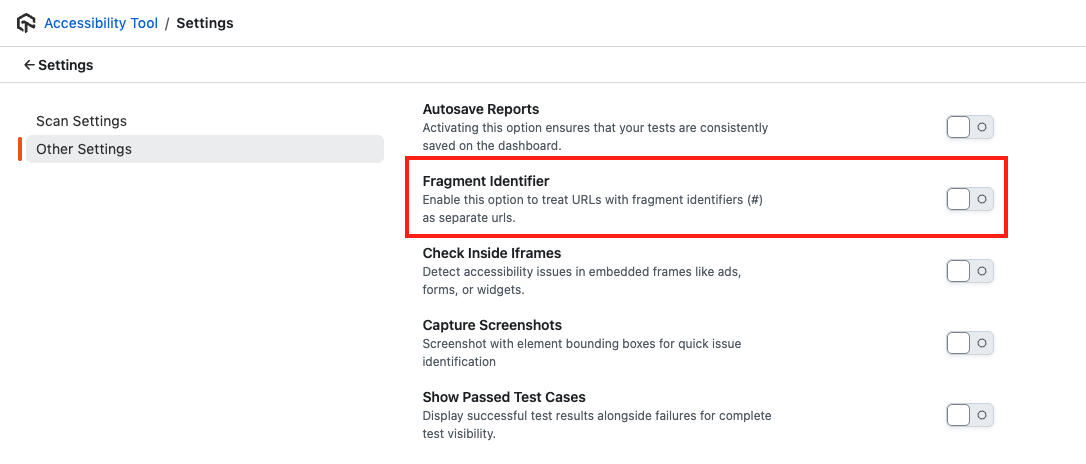
- Open Accessibility DevTools → Settings.
- Open the Other Settings section.
- Find Fragment Identifier.
- Turn the toggle on.
How fragment identifiers work
The fragment is the portion of a URL after the # symbol. It often points to a section, anchor, or client-side route state on the same document.
When the feature is disabled (default)
You scan or track:
https://example.com/page#section1https://example.com/page#section2https://example.com/page#section3
Result: Issues roll up under a single target, for example https://example.com/page.
When the feature is enabled
The same three URLs are tracked as distinct targets:
https://example.com/page#section1https://example.com/page#section2https://example.com/page#section3
Result: Issues are categorized and reported per full URL, including the fragment. That supports clearer ownership and trends when hash fragments reflect real differences in content or flow.
Benefits
- Granular issue tracking: See and triage issues for specific sections or hash states instead of one blended bucket.
- Better SPA support: Hash-based routing and deep links are easier to reason about in the dashboard and reports.
- Clearer workflow: Assign and manage work per fragment when that matches how your app is structured.
- Richer reporting: Reports can reflect section- or state-specific findings where the base URL alone would hide variation.
Related docs
- Accessibility DevTools (Overview)
- Test Scheduling - Sitemap (Overview) (when hash-based URLs affect scheduled or aggregated reports)
- Navigating the Dashboard
- Hide and Restore Issues


 Chat with Us