Rook Profiles, Hooks, and Lifecycle
A profile tells Rook how to reach your live agent and capture its evidence. This guide takes you from a working request, through prompt-based profile generation and verification, to hook contracts, lifecycle phases, delayed evidence, and repair—all on one page.
Rook uses reviewable Node.js hook scripts, not a fixed HTTP or command YAML recipe. Discovery describes what the agent should do; the profile selects the endpoint, command, environment, and session behavior you actually test.
Before You Start
Select a project and agent. Make one harmless request outside Rook first, and gather:
- The working cURL request or local command, with secrets replaced by environment-variable names.
- The request field that receives the goal and the response field containing the answer.
- Session creation/resume details, if the target is genuinely multi-turn.
- Any polling needed for asynchronous results.
- Where real tool calls, usage, files, or traces can be read.
- Test fixtures and restrictions on writes.
Profile authoring and repair use credits and invoke the target. Those calls have real effects. Start with a staging endpoint and a harmless probe goal.
Add a Profile Interactively
Launch rook from your agent workspace. Enter the following slash command inside its interactive TUI, not in your shell:
/profile add staging
Describe the integration in plain language. For example:
Call POST https://agent.staging.example.com/v1/chat.
Read AGENT_TOKEN from the environment and use it as a Bearer token.
Send the goal in the message field.
The answer is response.reply.text; return that as agent_reply.
This endpoint has no conversational state.
Use "show the status of test order ORD-1042" to verify it.
Do not issue refunds or change the test order during verification.
This is a template; replace the endpoint, fields, and fixture with a request you have verified.
The screenshot below shows that interaction in the public triage sample: Rook receives a plain-language endpoint and response mapping, starts author_profile, and pauses before writing its hook script. The profile is called local-triage in this example, rather than staging.
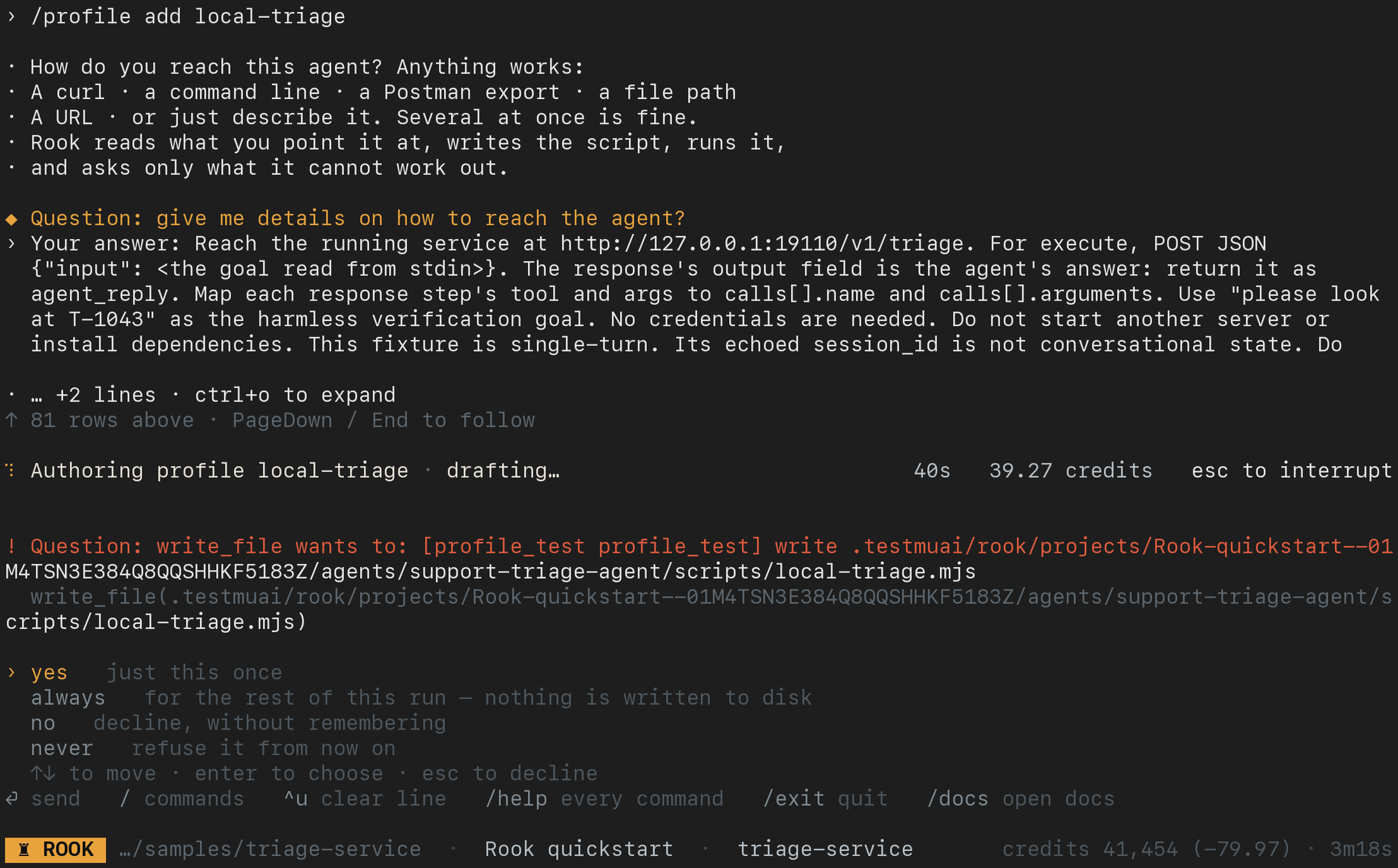
Read each requested action and approve only work needed for the integration. Use yes for that action once; no declines it. Wait for verification to finish before treating the profile as ready. The screenshot is a permission checkpoint, not a successful probe.
Generate From a File or Command
Put the integration material in call.txt, then run from a shell:
rook profile add staging --from call.txt
rook profile add local --command 'my-agent --test-mode'
The file can contain a cURL command, API notes, representative response, Postman export, or pointers to relevant files and URLs. The command example assumes my-agent is already installed.
Rook writes scripts, invokes the target, and corrects mistakes found during verification. Review the changes and permissions; do not approve unrelated installation, credential access, or server startup. In unattended authoring, supply enough material and narrowly reviewed --allow rules. See the command options.
Inspect and Test the Result
In the TUI, enter /profile to open the picker. Type to filter, use the arrow keys, and press Enter to select a profile; Esc returns without changing the selection. The footer shows the active profile.
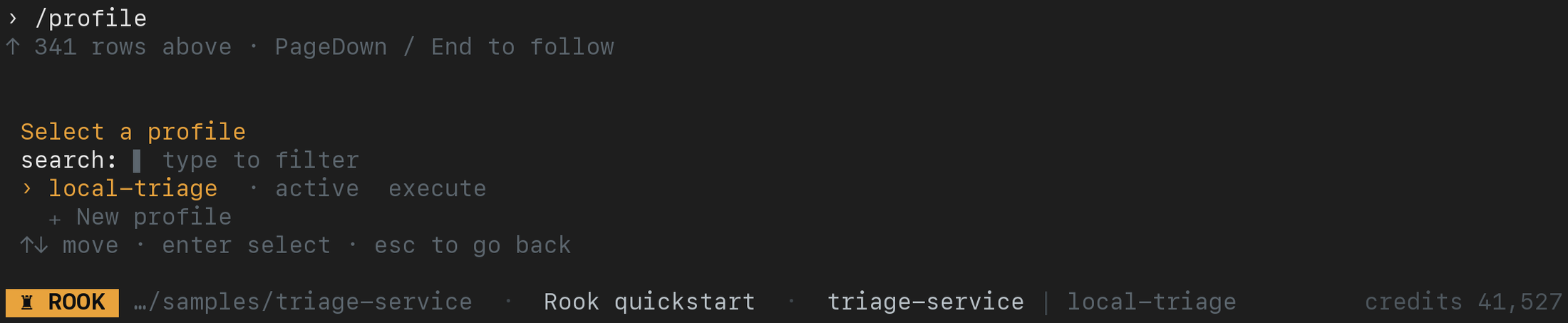
This quickstart profile has only execute, as a newly generated profile often does. Other profiles can add prepare, open, close, and collect; Rook owns judge, so it is not listed as a profile hook.
Inspect your generated profile before testing it:
/profile show staging
/profile test staging --goal "show the status of test order ORD-1042"
/profile use staging
The equivalent commands from a regular shell are:
rook profile
rook profile show staging
rook profile test staging --goal "show the status of test order ORD-1042"
rook profile use staging
The bare command lists profiles in a shell or opens a picker in the TUI. profile test invokes the target through the existing hooks without asking a model to rewrite them. Check that the returned value is an agent answer, not a job ID or success status.
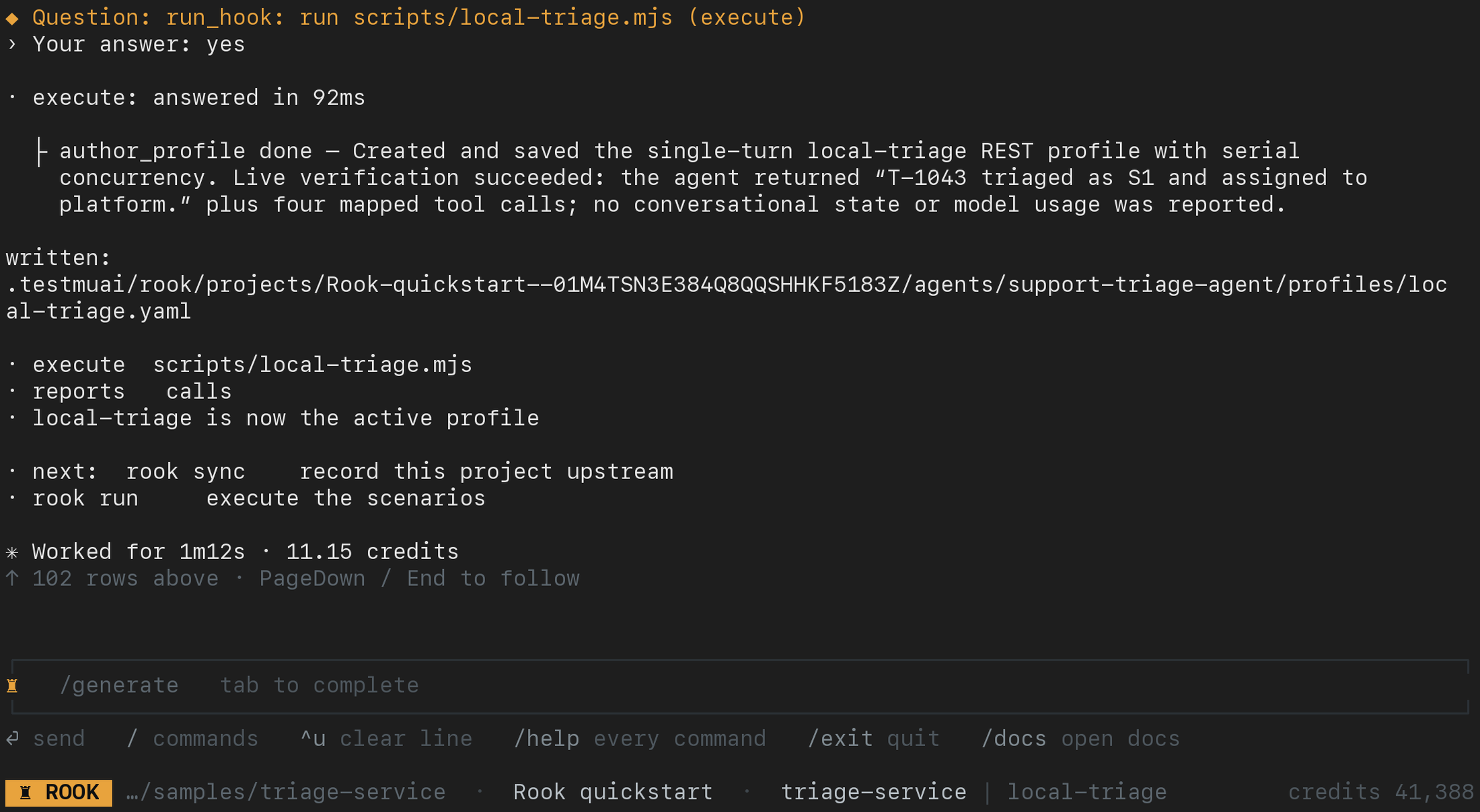
The sample's verified profile reports calls but not session state or measured usage. Check the capabilities your own target actually returned; do not infer them from a successful HTTP response alone.
Generated files live below:
.testmuai/rook/projects/<project-id>/agents/<agent-id>/
  profiles/staging.yaml
  scripts/staging.mjs
For a single-turn HTTP target, a minimal generated profile looks like:
id: staging
name: staging
hooks:
  execute: scripts/staging.mjs
env:
  - variable: AGENT_TOKEN
    purpose: Access to the staging agent
capabilities:
  calls: false
  usage: false
  multi_turn: false
concurrency: 1
Hook paths resolve from the active agent directory, not the workspace root.
Lifecycle
Only execute is required. Add authentication, session setup, teardown, and collection only when the target needs them. Rook owns judge; it is not a user-written hook.
prepare                         once per run
  open                          once per scenario
    execute × N                 once per turn
  close                         once per scenario
  collect                       once per scenario
  judge                         Rook evaluates the recorded evidence
| Phase | Scope | Typical work | If it fails |
|---|---|---|---|
prepare | Once per run | Log in, mint a token, seed fixtures, or warm a cache. | The problem is reported and the run preserves its records. |
open | Before each scenario | Create a target session or reset scenario-specific state. | The problem is reported with the scenario. |
execute | Once per turn | Send the goal and return the agent's answer. This is the only required hook. | The scenario fails. |
close | After each scenario's turns | End a session or release a lock, seat, or other resource. | Rook records and reports the problem without discarding the answer. |
collect | After close | Fetch traces, tool calls, usage, logs, and other delayed evidence. | The scenario fails; the phase can be retried later when evidence is available. |
judge | After evidence is available | Rook evaluates each acceptance criterion. | The result records why a verdict could not be completed. |
judge is a Rook-owned run phase, not a user hook. The other five phases can map to one script or to separate scripts.
A CLI can require authentication and a session; an HTTP endpoint can require neither. For a polling API, describe the job handle, polling request, terminal states, and timeout. Streaming and file-based integrations need real transport or upload code in the hook; a capability declaration alone does not implement it.
Profile File
Verifiedname: staging
id: staging
hooks:
prepare:
script: scripts/login.mjs
timeout_seconds: 45
execute: scripts/order-desk.mjs
collect:
script: scripts/trace.mjs
delay_seconds: 60
timeout_seconds: 120
env:
- variable: REFUND_API_TOKEN
purpose: bearer token for the staging refund API, read-only
- variable: BASE_URL
purpose: target environment base URL
capabilities:
multi_turn: true
calls: true
usage: false
hook_env:
REGION: eu-west-1
concurrency: 1
| Key | Meaning |
|---|---|
id | Stable slug created with the profile. Runs pin the ID, so renaming does not orphan history. |
name | Human-readable and editable profile name. |
hooks | Phase-to-script mapping. Each entry can also define a timeout and delay. Relative paths resolve from the active agent directory. |
env | Required local environment references and their operational purpose. The structure has no secret-value field. |
capabilities | Observed evidence capabilities that determine scenario runnability. |
hook_env | Fixed, non-secret values supplied to every hook, such as a region. They are stored and synced as written, so put credentials under env instead. Rook-owned ROOK_* values take precedence. |
concurrency | Default number of scenarios in flight. Use 1 when hooks touch shared state. |
Hook Inputs
Rook invokes:
Verifiedyour-script.mjs <phase>
The following environment variables provide context:
| Variable | Available | Meaning |
|---|---|---|
ROOK_HOOK | Every phase | Current phase name |
ROOK_WORKSPACE | Every phase | Absolute workspace path |
ROOK_PROJECT | Every phase | Active project ID |
ROOK_AGENT | Every phase | Active agent local ID |
ROOK_STATE_DIR | Scenario phases | Per-scenario state directory that survives its phases |
ROOK_RUN_STATE_DIR | Every phase | Shared state for the run, including prepare output |
ROOK_RUN_ID | From prepare | Current run ID |
ROOK_SCENARIO_ID | From open | Current scenario ID |
ROOK_SESSION | From open | Stable Rook session ID for the scenario |
ROOK_TURN | execute | One-based turn number |
ROOK_CONVERSATION | execute, close, collect | Handle returned by open or the previous execute |
On execute, the arbitrary scenario goal arrives on standard input. No other phase receives standard input. Keeping model-written text out of command-line arguments avoids breakage from quotes, newlines, dollar signs, and backticks.
Hook Output
Write one JSON object to standard output for execute and collect. Write diagnostics to standard error.
{
  "agent_reply": "Your order ships Tuesday.",
  "conversation": "thread_abc123",
  "usage": { "input": 1200, "output": 340 },
  "calls": [
    { "name": "cancel_order", "arguments": { "id": "ORD-1" } }
  ],
  "trace_url": "https://observability.example.com/trace/abc"
}
| Field | Purpose |
|---|---|
agent_reply | Required from execute; this is the agent answer that Rook judges. |
conversation | A target conversation handle returned from open or execute and passed back on later turns. |
usage | Observed input and output token counts; enables token-economy scenarios. |
calls | Observed tool calls; enables assertions about what the agent did or did not call. |
| Additional fields | Preserved as run evidence, such as a trace URL or artifact reference. |
If the first turn of a multi-turn scenario returns no conversation handle, Rook stops the scenario. Treating independent calls as one conversation would produce misleading results.
A non-zero exit is a failed hook and standard error is its diagnosis. An execute or collect failure fails the affected scenario. Failures in the other optional phases are reported while the run preserves completed work.
Map the target's actual answer field (output, message, reply, or another name) to agent_reply. Do not invent calls or token counts. Return calls: [] only when you observed that no calls occurred; omitting calls means they were not observable. A CLI hook must forward the goal to its child process and close the child's input stream.
Hooks for Red-Team Scenarios
Some attack patterns cannot be judged from the reply alone. Rook skips them, with a reason that names the missing hook, until the profile provides it:
| Skip reason | What to add |
|---|---|
| Requires fixture seeding | An open hook that reads $ROOK_STATE_DIR/attack-fixture.json, seeds the content into the target, and returns fixture_seeded: true, a fixture_id equal to the file's id, the same attempt, and the exact established_preconditions set. |
| Requires independent collected evidence | A collect hook that reports the observed control and outcome. |
| Requires a fresh session | open and close hooks, so the probe runs in a second conversation with a distinct handle. |
Rook does not call the target when the fixture acknowledgement does not match. For patterns judged from collected evidence, a compromise counts only when collect returns a compromise_observation with action_observed: true, the matched success signal, a source_kind of tool_trace, protected_state, or callback_receipt, and the evidence it quotes. A defended side effect needs the target's refusal plus a defence_observation with action_observed: false and the matched failure signal.
Capabilities Are Observed
| Capability | Becomes true when | Enables |
|---|---|---|
multi_turn | A hook returns a conversation handle | Multi-turn and state-context scenarios |
calls | Hook output includes actual target tool calls | not_called assertions and action-versus-claim checks |
usage | Hook output contains token counts | Token-economy scenarios |
Rook compares declared capabilities with a real profile test. Optimistic claims are unsafe: declaring calls without returning call evidence could make a must-not-call criterion appear to pass without having been observed.
State Between Phases
Use ROOK_STATE_DIR for state that belongs to one scenario, such as a target session ID or fixture. Use ROOK_RUN_STATE_DIR for state established once in prepare, such as a run-wide access token.
Rook also writes each completed hook result to the run directory as it happens. This makes a later collect invocation able to recover the conversation and prior phase record after a delay, restart, or different process.
Run Only Part of the Lifecycle
Use phase selection when evidence becomes available after the agent responds:
Verifiedrook run --phases prepare,open,execute,close
# Wait for the trace or log pipeline.
rook run --run <run-id> --phases collect,judge
--run continues the same run in place. --resume creates a new run and carries compatible completed work forward.
You can also omit a suffix:
Verifiedrook run --skip collect,judge
Selections follow the fixed lifecycle order. Rook refuses a hole such as prepare,close when it would skip a defined prerequisite between the selected phases.
Timeouts and Delayed Evidence
Default phase timeouts are:
| Phase | Default |
|---|---|
prepare | 60 seconds |
open | 30 seconds |
execute | 300 seconds |
close | 30 seconds, with a 5-second floor |
collect | 120 seconds |
delay_seconds is a minimum elapsed time since the preceding phase, not an unconditional sleep. If collection starts after that interval has already passed, Rook waits nothing. Prefer polling within the collect script when a real readiness signal exists.
Rook runs one scenario at a time by default unless a profile or run configuration selects otherwise. Increase concurrency only when hooks and fixtures isolate concurrent scenarios. If open resets shared state, keep concurrency at 1.
Repair a Profile
rook profile fix staging --what "the response answer moved from reply.text to result.answer"
rook profile test staging --goal "show the status of test order ORD-1042"
rook sync
Repair can change scripts and spend credits. Inspect the diff and test it before syncing. Rook has no profile edit, profile curl, or profile rm subcommands; edit the plain files deliberately when needed.
Keep Credentials Out of the Profile
Use your shell or CI secret manager to provide target credentials. Generated hooks should read process.env.AGENT_TOKEN; the profile records the variable's name and purpose, not its value.
For local stored values, see Environment and Secrets. rook env list masks values; rook env show exposes them. Do not place real tokens in command examples, prompt files, logs, or screenshots.
Script Location
Verified.testmuai/rook/projects/<project>/agents/order-desk/
├── profiles/
│ ├── active
│ ├── staging.yaml
│ └── production.yaml
└── scripts/
├── order-desk.mjs
└── salesforce-login.mjs
Scripts belong to the agent. One script can switch on the phase argument, or separate scripts can implement independently owned phases.
Review Profiles Locally or Online
Use either interface to check the profile context without invoking it:
- Local: run
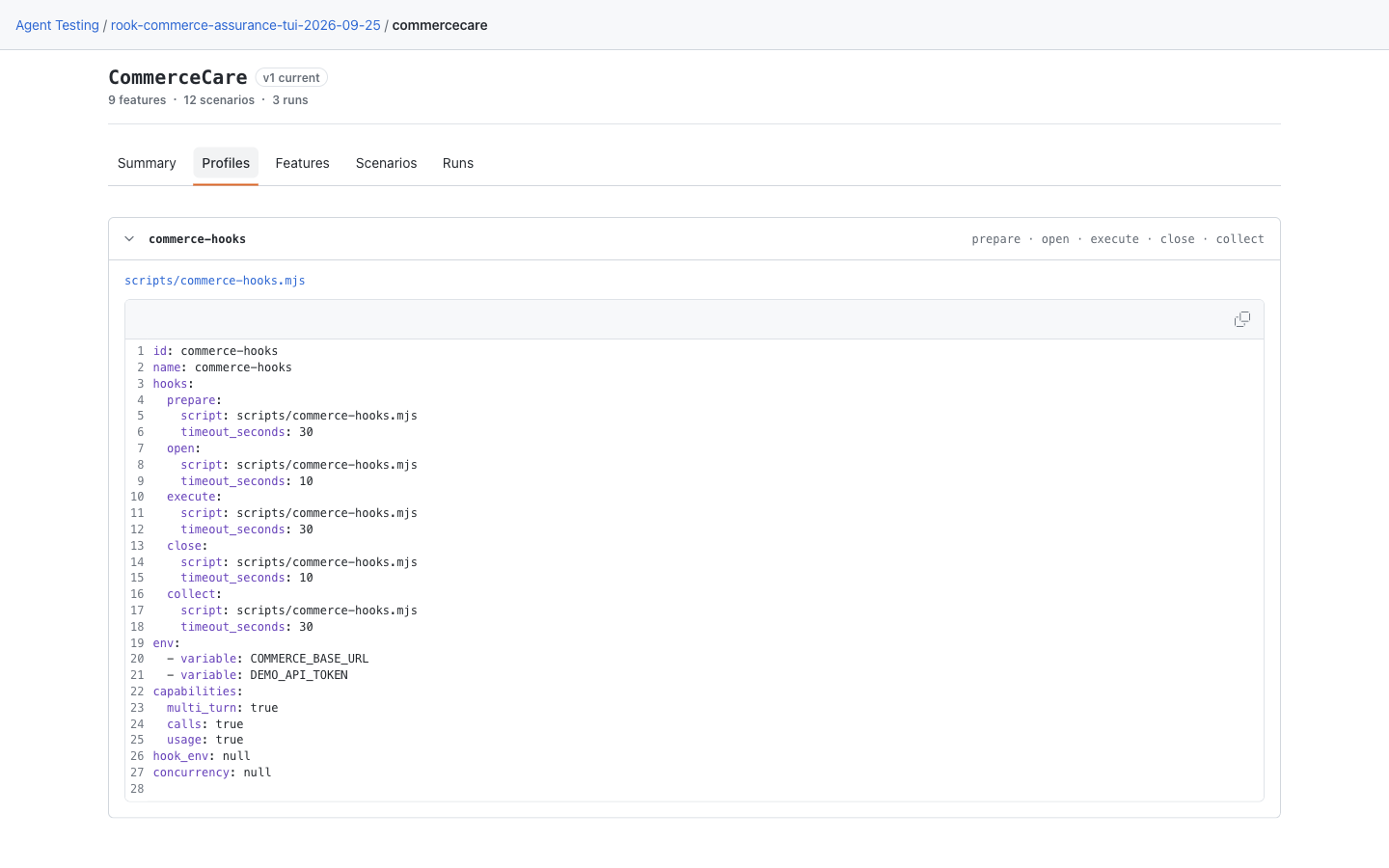
rook ui --local, open the agent's Profiles tab, and expand a profile to read its YAML inline. The execute-script link opens its source in a dialog. You can also userook profile show <name>in the CLI. See the earlier layout if your CLI predates this viewer. - Hosted: after
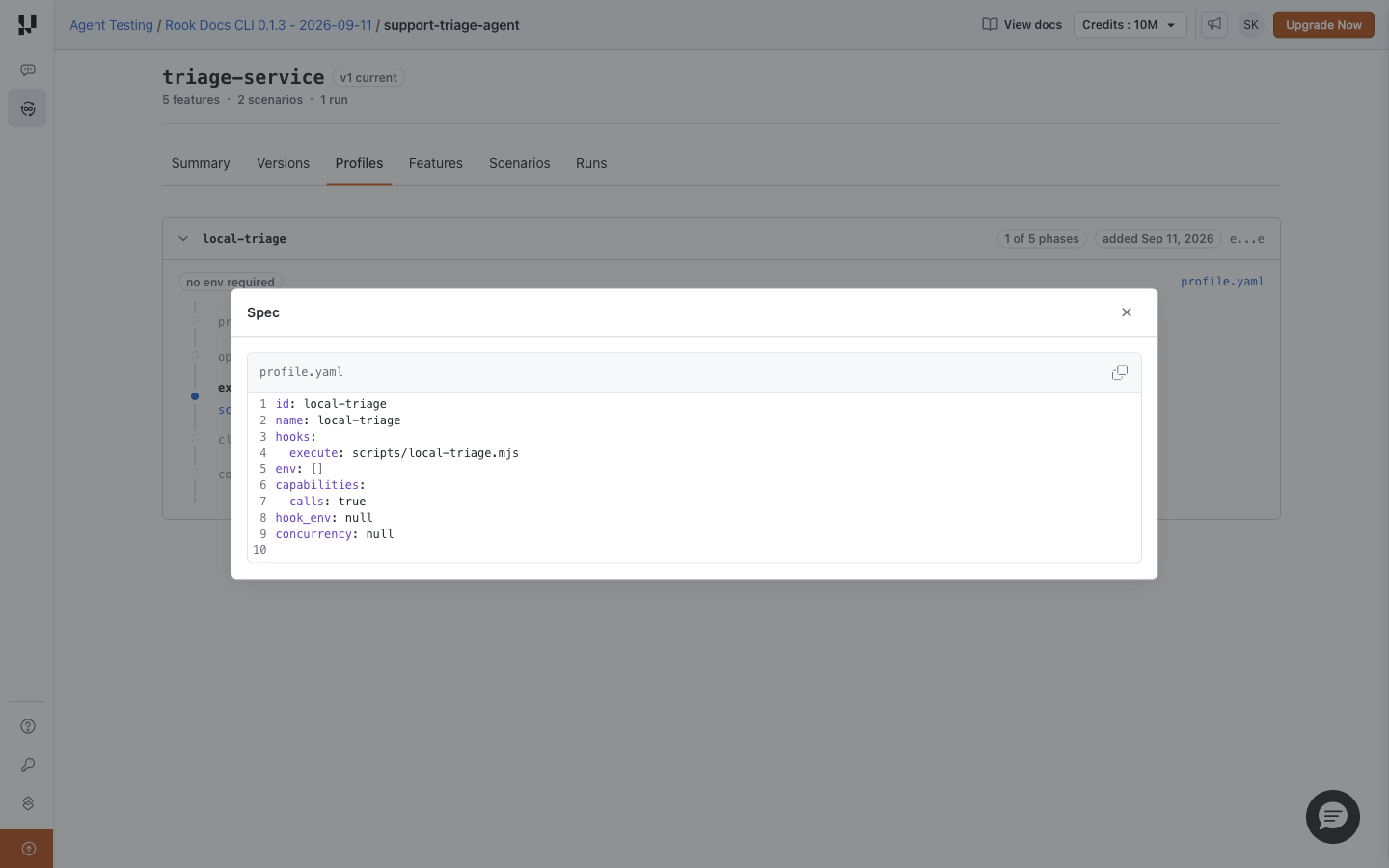
rook sync, runrook uiand open the agent's Profiles tab. Expand the intended profile to see its hook phases, then click profile.yaml for the saved specification. On a run, the profile name opens the revision used for that run; the adjacent link opens the current profile instead.
Neither UI creates, repairs, or tests hooks. Continue authoring and phase execution in the CLI. The combined walkthrough shows both layouts.
Local UI: Check the Profile and Script
Open CommerceCare → Profiles in the saved local demo. The commerce-hooks profile maps prepare, open, execute, close, and collect to scripts/commerce-hooks.mjs. Read each phase's timeout, required environment-variable names, and capabilities in the YAML. Configured phases are not proof that those hooks executed. The local YAML view differs from the hosted phase timeline below.
Hosted Web UI: Inspect the Recorded Profile
Open Profiles and expand the intended profile. The phase timeline shows prepare, open, execute, close, and collect. The example needs only execute; 1 of 5 phases counts configured hooks, not completed work. Optional phases marked not defined are not failures. Timeout and delay badges describe configured limits, not observed timings. Rook owns the judge phase; it is not a profile hook.
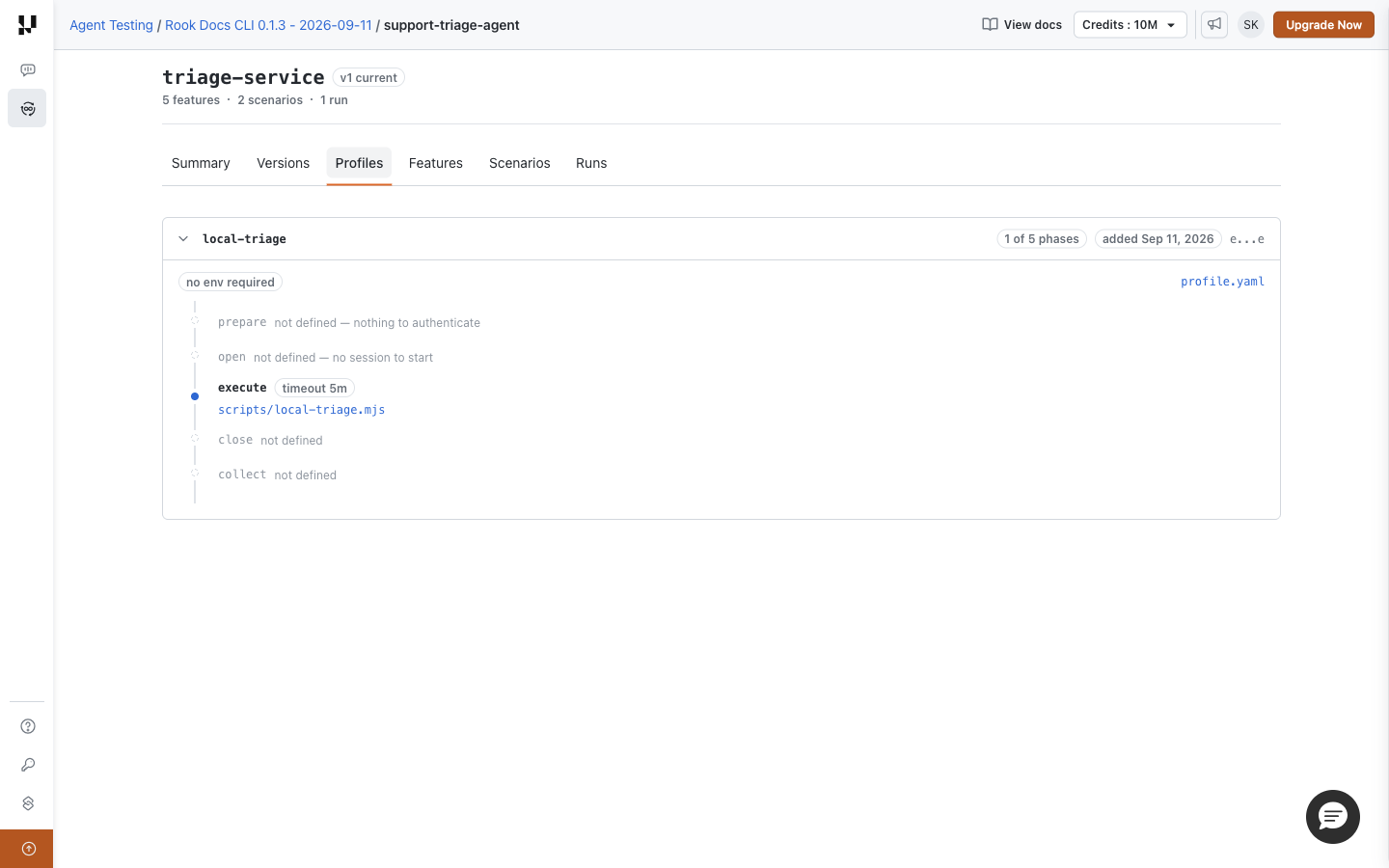
Click profile.yaml to inspect the recorded hook mappings, environment requirements, and capabilities. A README.md link appears when authoring instructions were saved. Linked hook-script paths open their recorded files; a plain-text path means no artifact is available. Older synchronized profiles may lack some supporting files.
Next Steps
Run a reviewed suite · Review results in the Web UI · CLI syntax and options


 Chat with Us