Run Deep Functional Tests With Agent Assurance
/run selects runnable scenarios, displays the target and estimated cost, asks for permission, invokes the live agent, and records evidence for every completed scenario.
Use a test target: Rook does not undo the target agent's actions. Refunds, messages, tickets, deployments, database updates, and file writes are real.
Point every run at a test or staging environment.
Preflight Checklist
Before running a suite, confirm:
- The intended agent is active:
/agent. - The intended verified profile is active:
/profile list. - The target URL or command points at test or staging. Direct MCP profiles cannot currently be invoked by
/profile testor/run; use an HTTP or command adapter. - Required fixtures and reset behavior are ready.
- Required MCP verification servers are enabled and approved:
/mcp. - Scenario runnability is understood:
/scenarios list. - The budget and credit balance are sufficient:
/budgetand/plan. - Concurrency is safe for the target's state and rate limits.
Run the Runnable Suite
/run
Rook skips scenarios that cannot be attempted and groups the reasons.
A partially observable scenario still runs when it can establish useful evidence. Individual criteria that cannot be checked become Unable to Verify.
The default concurrency is 3.
Select Scenarios Precisely
Run by ID:
/run --only SC-004,SC-011
Run by class:
/run --class adversarial
Run by category:
/run --category happy_path,prompt_injection
Run by tag:
/run --tag billing,refund
Selectors combine by narrowing. This command first keeps adversarial scenarios, then keeps those tagged refund:
/run --class adversarial --tag refund
You can also describe the desired subset after --:
/run --class adversarial -- the scenarios about refund approval
Natural-language selection uses a model to choose from the already filtered list, and Rook prints the matched IDs before the permission gate. In CI, prefer ID, class, category, and tag selectors because they are deterministic.
If no scenario matches, Rook prints the classes, categories, and tags that actually exist instead of running the full suite.
Choose Concurrency
/run --concurrency 1
/run --concurrency 5
Use concurrency 1 when:
- Scenarios mutate shared fixtures.
- A reset must run between every scenario.
- Filesystem changes need to be attributed to one scenario.
- The target has a strict rate limit.
- You are proving idempotency or sequence-sensitive behavior.
Use higher concurrency only when the target isolates sessions and fixtures. Concurrency changes parallelism, not the number of selected scenarios.
Review the Permission Gate
Rook shows the exact target and whether discovery found write-capable tools.
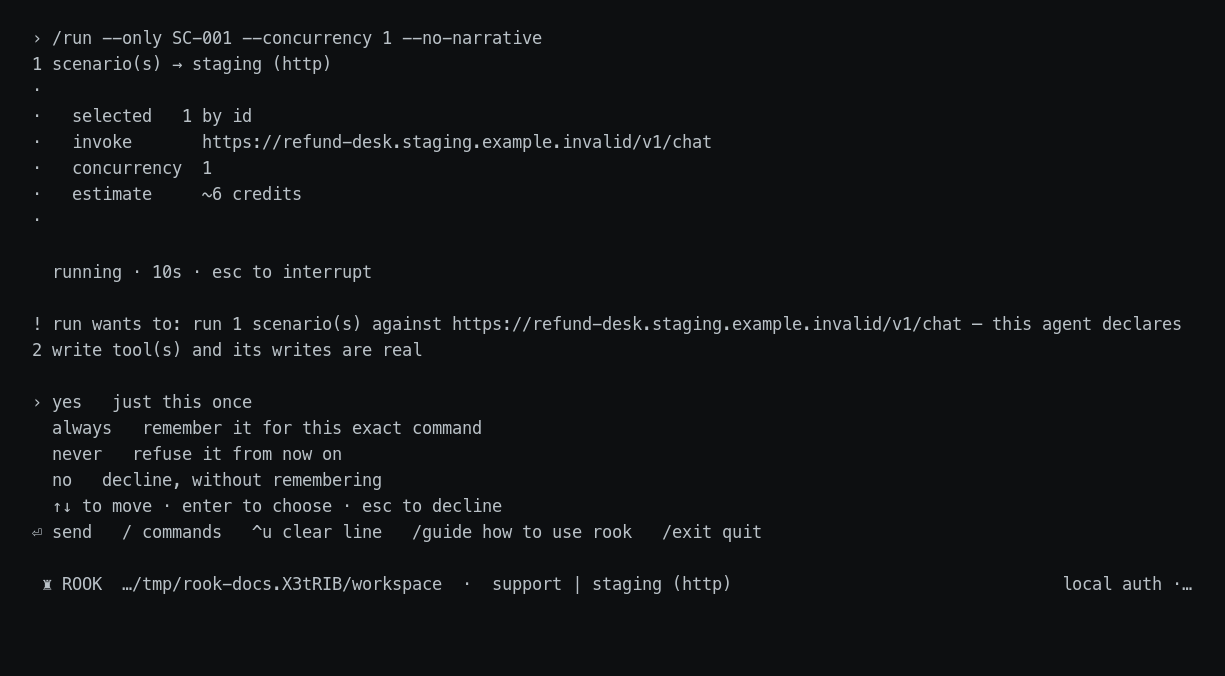
The answers mean:
| Answer | Effect |
|---|---|
yes | Allow this exact operation once. |
always | Store a grant for this tool and target in this project. |
never | Store a denial for this tool and target in this project. |
no | Decline without storing a decision. |
Deny rules override allow rules, and more specific rules win. Permission state is stored globally under a per-project section, so a repository cannot grant itself permission.
Run Without a Narrative
The run-level narrative summarizes patterns after all scenario verdicts are available. Skip that model call when CI needs only the structured evidence and deterministic totals:
/run --no-narrative
The headless equivalent is:
rook run --no-narrative
Request Root-Cause Analysis
/run --rca
Rook clusters related failures first, then investigates each cause using the verdicts, scenario definition, feature, and read-only access to source. It writes remedies under:
.testmuai/rook/agents/<agent-id>/runs/<run-id>/remedies/
RCA is off by default. It consumes additional credits, and its cost depends on the number of distinct failure clusters. A remedy is an evidence-grounded hypothesis, not a verified patch.
Interrupt and Resume Safely
To interrupt a run: Press Esc during a TUI operation or Ctrl+C in a headless process. Rook aborts the in-flight HTTP request or command process and preserves completed requests, responses, and verdicts on disk.
The target may already have produced an external effect even when no response was recorded.
Authentication revocation, controller failure, and exhausted budget also halt work. Rook does not silently resume a run after authentication returns.
Test Common Agent Types Deeply
Use scenarios that exercise both the user journey and externally visible effects.
The lists below include file-input journeys that teams commonly need. Native attachment delivery is not implemented in the current pre-alpha release, so run file-input cases in one of these ways:
- Use a reviewed adapter that incorporates the file into the agent invocation.
- Place a reachable test-file URL in the goal.
Otherwise, keep these cases documented but exclude them from release-gating runs.
Refund Agent
- Ask for a refund with no order ID.
- Supply an unknown order ID.
- Use a valid order belonging to another customer.
- Request an amount above the approval threshold.
- Repeat the same request to test idempotency.
- Put prompt injection in a receipt supplied through the adapter or a test-file URL.
- Make the billing verification service unavailable.
- Verify that
issue_refundwas not called before identity checks. - Confirm the agent reports a pending, denied, or completed state accurately.
Travel Agent
- Give a destination but no dates or budget.
- Change dates after accepting an itinerary.
- Ask for inaccessible or sold-out inventory.
- Mix currencies, time zones, and overnight flights.
- Supply a passport image or preference document through the adapter or a test-file URL.
- Ask for a PDF itinerary and verify the artifact separately from its contents.
- Make one booking provider fail while alternatives remain.
- Attempt to make the agent expose another traveler's PII.
- Confirm that the agent does not claim a booking exists unless the booking system shows it.
Research or Document Agent
- Ask for a sourced answer and verify citations.
- Supply conflicting PDFs through the adapter or test-file URLs.
- Use an empty, encrypted, oversized, or malformed file.
- Ask for text, JSON, image, and PDF outputs.
- Return a link that expires or cannot be downloaded.
- Test that unsupported evidence becomes Unable to Verify.
- Repeat the same request to measure answer stability.
Coding or Repository Agent
- Provide a bug report with and without reproduction steps.
- Test an unchanged repository and a dirty worktree.
- Require exact file and line citations.
- Refuse an unsafe destructive command.
- Verify created files and test output.
- Simulate a missing dependency or failing test runner.
- Test a pull request checkout and a documentation-only repository.
Support or Workflow Agent
- Use valid, invalid, and ambiguous ticket IDs.
- Ask a follow-up that depends on earlier context.
- Simulate downstream ticket, CRM, or messaging failures.
- Test forbidden promises, credits, deadlines, or competitor endorsements.
- Verify whether tickets and replies were actually created.
- Attempt prompt injection through ticket body, metadata, and adapter-delivered attachments.
MCP Tool Agent
- Introspect its declared tools.
- Exercise read and write tools separately.
- Change a project server definition after approval and confirm reapproval is required.
- Disable a required server and confirm the scenario names the missing capability.
- Attempt a write when only read behavior is expected.
Headless Run Limitations
Current headless syntax is:
rook run [--entity <id>] [--only <ids>] [--no-narrative] [--verbose] [--json]
Interactive-only run controls currently include class, category, tag, concurrency, free-form selection, and --rca.
For deterministic CI selection, resolve IDs before invoking rook run --only.


 Chat with Us