Getting Started With Uploading Screenshots through API for Visual Regression Testing
This is the guide to setup the version 2 of the SmartUI upload API.
Prerequisites for running SmartUI
- Basic understanding of HTTP APIs is required.
- Go to
LambdaTest SmartUIand login along with your credentials. - Copy
LT_USERNAMEandLT_ACCESS_KEYcredentials fromAccess Keybutton on the top right of the dashboard.
The following steps will guide you in running your first Visual Regression test on TestMu AI SmartUI platform -
Create a SmartUI Project
To create a SmartUI Project, follow these steps:
- Go to Projects page
- Click on the
new projectbutton - Add name of the project, approvers for the changes found, tags for any filter or easy navigation.
- Click on Submit.
Once, the project is created then you copy the Project Token from the application, here is a sample project token:
projectToken = "123456#1234abcd-****-****-****-************"
Upload screenshots via API
Once you have created a SmartUI Project, you can upload your local screenshots to the projects which will create a build.
Follow the below steps to upload screenshots -
Step 1: Copy the below API endpoint to your project.
API_URL="https://api.lambdatest.com/automation/smart-ui/v2/upload"
For more information, please visit our API documentation.
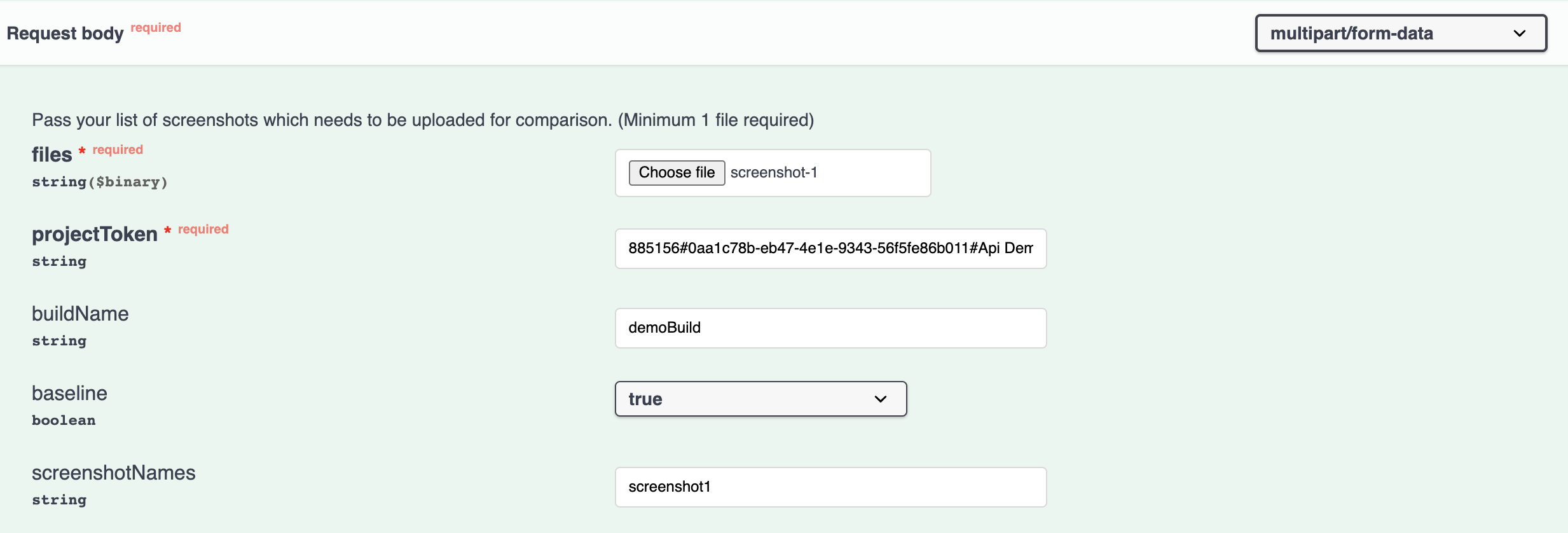
Step 2: Add the following information to your API payload form-body:
| Variable | Type | Description | Is Mandatory? |
|---|---|---|---|
| files | array | You can add the path to the files which will be uploaded. files : [ "path/to/file-1", ""path/to/file-2"] | True |
| projectToken | string | Project token needs to be specified to upload the files and validate the project . projectToken:123456#1234abcd-****-****-****-************ | True |
| buildName | string | Name anything of your choice specified for the uploaded screenshots to a build. buildName : #<Build_Name> | Optional |
| baseline | boolean | An option to make your build as a baseline build for comparison . baseline : true/false | Optional |
| screenshotName new | string | Pass the unique screenshot name in order to compare it. | Optional |
We only support the following formats: .png .jpeg .jpg
Please see the below screenshot for adding your screenshots which needs to be uploaded for your project to generate a build.


 Chat with Us
 Ask the Community