KaneAI Errors
When a KaneAI step fails, the answer is on screen. You do not have to look anything up.
What KaneAI shows you when a step fails
Every failed step reports the same three things, in the step itself.
| What it tells you | |
|---|---|
| Category | The kind of problem, one of the five below. It tells you where to look first: at your step, at the element, at your application, at your data, or at us. |
| Message | What went wrong, written in your terms and quoting the value that caused it. Never a stack trace. |
| Suggestion | What to do next, phrased as an action you can take on this step. |
Two further fields sit behind those. The reason is the specific fault inside the category, and the diagnostic keeps the raw underlying text, such as an exception string, for debugging. The diagnostic is never used as the headline, so the first thing you read is always an explanation rather than machine output.
Error categories
Every error belongs to one of five categories. The category tells you where to look first.
| Category | Meaning | Where to look |
|---|---|---|
| Instruction error | The step itself is wrong | Rewrite the instruction |
| Element error | The target element could not be found or used | Check the element and how the step describes it |
| Application error | The application or page under test misbehaved | Check the application, not the test |
| Data error | A variable, type, secret, or query is wrong | Check the values the step depends on |
| System error | A problem on our side, not yours | Retry, then contact support |
An assertion that comes back false is not an error. It is recorded as a failed assertion and the test carries on. An error means the step could not be checked at all.
How an error is categorised
The category is decided by where the problem is, not by which part of the system reported it.
- A media, deeplink, GPS, or accessibility action that fails on a mobile app is an application error, because the action reached the app and the app is what failed.
- An action that fails on an element that had already been found is an application error, not an element error. The failure is in performing the action, not in locating the target.
- The agent being unable to continue is a system error, not a defect in your instruction.
Instruction errors
The step itself is wrong. KaneAI could not work out one action and one target from what you wrote, or the action you asked for is not supported.
It covers a step that states a goal instead of an action, a condition that cannot be evaluated, a value that is out of range, and an unsupported operation. The fix is always in the instruction.
Element errors
The target element could not be found or could not be used. The instruction was understood. KaneAI could not act on the thing you named.
The element may not be on the page at that point, the description may match more than one control, the element may be present but hidden or disabled, or something may be covering it. Look at the element and at how the step describes it.
Mobile app tests report the same element errors, with the same guidance, as web tests.
Application errors
The application under test misbehaved. The step was right and the element was found. What failed is your application.
It covers a page that will not load, a popup blocking an action, an HTTP error, a CAPTCHA or paywall, and mobile actions the app refused. An error in this category usually points at your application rather than your test.
Data errors
A value the step depends on is wrong. A variable, a secret, a type, a schema, or a query. The step and the element are both fine.
Common causes are a variable no earlier step creates, a comparison between a number and text, and a value of the wrong kind. The message names the variable, and where a type is wrong it names both what the variable holds and what the step needed.
System errors
A problem on our side, not yours. Nothing in your test needs changing.
The agent could not continue, the browser session ended, or an internal operation timed out. Run the step again, and contact support if it repeats.
When the browser or device session has ended, that is reported in place of any more specific cause.
Session states
Sometimes the whole session stops rather than a single step failing. These are not errors and belong to no category.
| State | What it means | What to do |
|---|---|---|
| Stopped by you | You stopped the session while a step was running. | Nothing to fix. Run the test again when you are ready. |
| Out of credits | Your organization has run out of KaneAI credits and the session is paused. | Add credits, then run the test again. |
| Session expired | Your KaneAI session or access key expired mid test. | Sign in again and start a new session. |
How errors behave
Assertions that fail
An assertion that comes back false is a result, not an error. KaneAI records it as a failed assertion and the test carries on, because a false assertion tells you something about your application.
A step errors only when the assertion could not be checked at all, for example when a variable it uses does not exist, when it compares a number against text, or when the operator is not supported. A step like that is never reported as passed.
If a step did not stop your test after an assertion, check whether the assertion came back false, in which case the step still succeeded, or whether the step itself carries an error.
Errors inside conditionals
When a step inside an if block fails, KaneAI tells you which branch failed and whether the problem was in the branch condition or in one of the steps inside it. The block is marked as errored and the message stays on the step that actually failed.
A failing elif is reported rather than skipped, so a broken middle branch does not fall through to else. Editing and resetting a branch keeps its error with it, and saving a draft keeps the status of the block.
While loops
Each while loop error, with its code and fix, is listed on the While Loops page.
A while loop is rejected when both sides of its condition are parameters. Parameter values do not change during a run, so the loop could never end. You are told this when you create the loop, not after it runs.
A loop whose condition is vague or errored fails rather than running with an empty condition. A loop that can never end, and a loop that runs past its iteration limit, each say so.
If a step that feeds the loop condition fails, such as a query whose result the condition compares against, KaneAI retries it on the next pass rather than skipping it.
Variables and comparisons
A missing variable or TOTP is reported as a data error naming the variable, on web and mobile app tests alike.
A missing variable inside a condition or an assertion is an error, not a blank. An if block does not fall through to else, and an assertion does not return a result it never checked.
Greater than and less than comparisons do not convert text to numbers, so 5 > "sam" is an error. Equality comparisons are unaffected.
When a variable holds the wrong kind of value, the message names both what it holds and what the step needed, such as a list where text was expected.
Exported code does not apply the comparison rule above. A comparison such as 5 > "sam" errors while you author and can still pass in exported code.
Failure conditions
While you author or replay a test, a soft failure condition, meaning Warn or Fail but continue, applies to Close Tab steps only. Every other step fails the test whatever its failure condition is.
A step with no failure condition set, or with an invalid one, is treated as Fail test immediately. Your organization default applies to assertions only.
A failure condition never hides a step that could not be evaluated. A missing variable, a comparison against text, the wrong kind of value, or an unsupported operator stays an error. A soft failure condition softens only an assertion that came back false.
Test runs and exported code are not affected. Assertions there still honor a soft failure condition, and UI actions still honor it in run reports.
Objectives
An objective that fails to generate stays in your test, marked as errored, so you can see what happened. Retrying replaces the failed attempt.
An errored objective you have not changed is carried forward with its status, its error and its steps. Saving a test that contains one saves the test as errored, even when the objective produced no steps.
When you reopen the test, an errored objective still shows its error and the next run regenerates it. Objectives that ran cleanly restore their steps and replay as before.
Where an error appears
An error stays with its step while you author, when you save a draft, when you quit and save, on the test summary, and when you reopen the test.
When you reopen a test to edit it, the step is reset and any message or suggestion from the previous attempt is cleared, so you never read guidance belonging to an older version of the step.
On the summary page, a test that ended with an error is reported as Error. Steps that never ran are marked as skipped, and steps that passed, errored or were stopped keep their status.
Examples of errors in KaneAI
Three real errors, as KaneAI reports them while you author. Each shows the same three things: the category, a message that says what went wrong in your terms, and a suggestion for what to do next.
An address KaneAI cannot navigate to
The step asked for http://example.com:99999. Port 99999 is outside the valid range, so there is nothing to open.
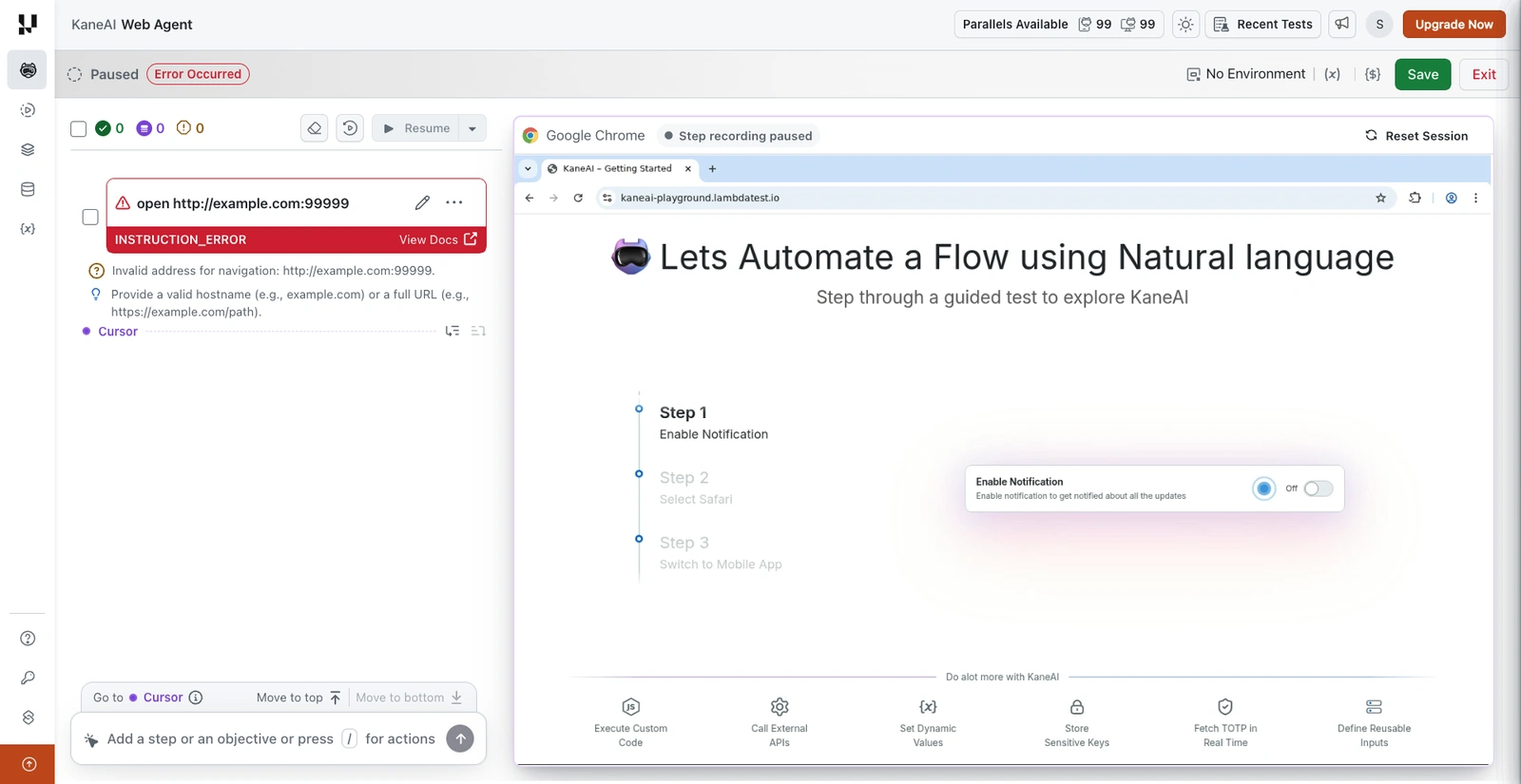
KaneAI names the category as an instruction error, states the problem as Invalid address for navigation, and suggests a valid hostname or a full URL. The address you gave is quoted back, so you can see exactly what was read.
A step too vague to act on
The step said Author the step sdfgh and run. There is no action and no target in it.
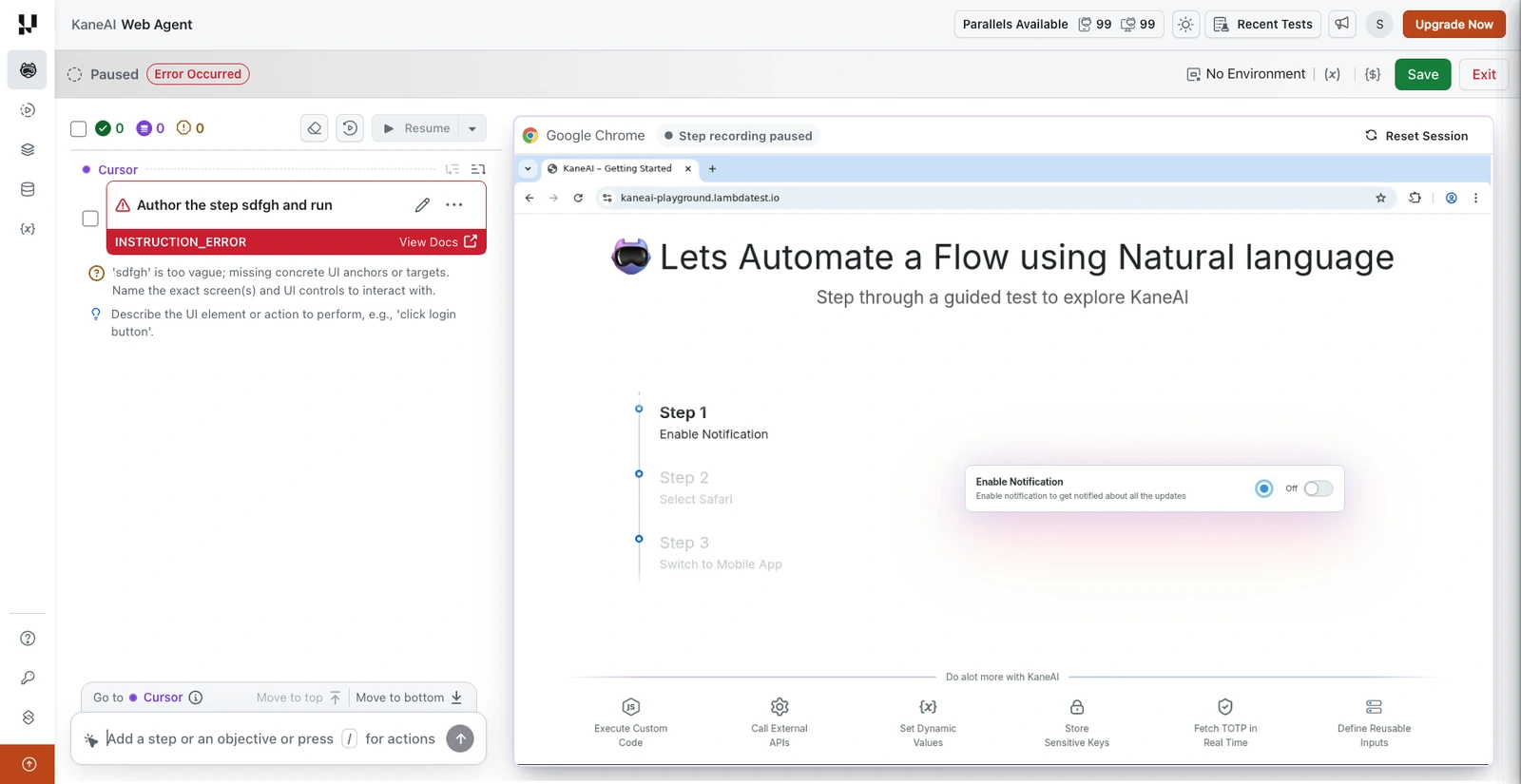
Again an instruction error. The message explains that the text is too vague and names what is missing, concrete UI anchors or targets, and the suggestion shows the shape of a step that would work, such as click login button.
An assertion on a variable that does not exist
The step asserted {{ghost}} == 1, and no step in the test ever creates ghost.
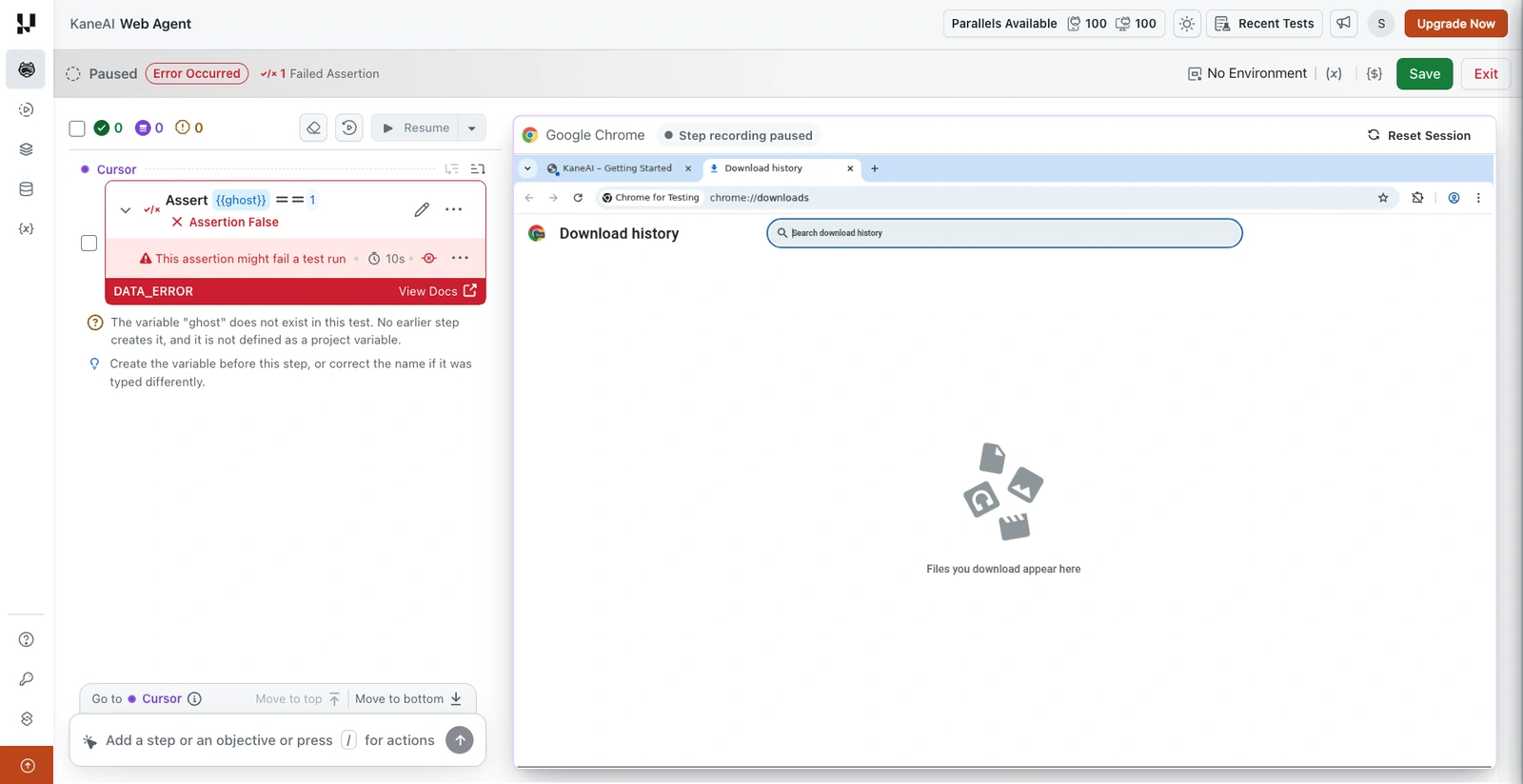
This is a data error, not an element or instruction problem, because the step and its target were both fine and the value behind them was not. The message names the variable and says where KaneAI looked for it, in earlier steps and in project variables. The assertion is separately marked as false and flagged as one that might fail a test run, so you can see that the check never actually ran rather than assuming it ran and returned false.
Next Steps
Continue with these guides:
- Review the full KaneAI command reference.
- Understand assertion failure behavior in KaneAI failure conditions.
Have any feedback or request? Reach out to us via support@testmuai.com and we would be happy to hear from you.


 Chat with Us