Agent Features & Metrics - Customer Reference Guide
Agent Types Overview
The platform supports 5 agent types, each designed for a specific testing scenario:
| Agent Type | Primary Use Case | Key Differentiator |
|---|---|---|
| Chat | Test text-based chatbot agents | Multi-turn text conversation evaluation with 9 quality metrics |
| Voice | Test chatbot agents via audio conversations | Same as Chat, but conversations happen as audio (WAV) instead of text |
| Phone Caller Inbound | Test voice agents that receive calls | Pre-evaluation (live simulated calls) + Post-evaluation (production recording analysis) |
| Phone Caller Outbound | Test voice agents that make calls | Pre-evaluation (live outbound calls) + Post-evaluation (production recording analysis) |
| Image Analyzer | Validate AI-generated images | Image quality scoring against prompts and brand guidelines |
| Agent type | What it tests | How the platform reaches it | Guide |
|---|---|---|---|
| Chat | Text chatbots, in multi-turn conversations | HTTP requests to your API endpoint | Chat agent testing |
| Voice | Voice agents, in real-time audio conversations | A voice session over REST, WebSocket, or WebRTC | Voice agent testing |
| Video | Conversational video agents | A simulated participant joins your agent's session from its web URL | Video agent testing |
| Phone Caller Inbound | Phone agents that answer calls | A real call to your agent's phone number or SIP trunk | Inbound phone agents |
| Phone Caller Outbound | Phone agents that place calls | Your agent calls a number reserved from an outbound pool | Outbound phone agents |
| IVR | Scripted IVR menus | A real call that navigates the menu with speech and keypad tones | IVR agent testing |
| Image Analyzer | AI-generated images | Images uploaded or linked with the prompt that generated them | Image analyzer testing |
- Features
- Metrics
📄 Workflow-Based Test Generation
| Feature | Chat | Voice | Phone inbound | Phone outbound | Image |
|---|---|---|---|---|---|
| Workflow-based generation from documents | ✅ | ✅ | ❌ | ❌ | ❌ |
| AI scenario generation | ✅ | ✅ | ✅ (up to 20) | ✅ (up to 7) | ❌ |
| Personas and validation criteria | ✅ | ✅ | ✅ | ✅ | ❌ |
| Test suites and test profiles | ✅ | ✅ | ✅ | ✅ | ❌ |
| Endpoint profiles and credentials vault | ✅ | ✅ | ❌ | ❌ | ❌ |
| Playground | ✅ | ✅ | ❌ | ❌ | ❌ |
| HyperExecute execution | ✅ | ✅ | ❌ | ❌ | ❌ |
| Metric thresholds | ✅ | ✅ | ✅ | ✅ | ❌ |
| Go-Live assessment | ✅ | ✅ | ✅ | ✅ | ❌ |
| Scheduled runs | ✅ | ✅ | ✅ | ✅ | ❌ |
| Production data analysis | ✅ (transcripts) | ❌ | ✅ (recordings) | ✅ (recordings) | ❌ |
| Data Validation against your APIs | ✅ | ❌ | ❌ | ❌ | ❌ |
| Voice and background noise per scenario | ❌ | ❌ | ✅ | ✅ | ❌ |
| DTMF keypad tones | ❌ | ❌ | ✅ | ✅ | ❌ |
| Pronunciation assessment | ❌ | ❌ | ✅ | ✅ | ❌ |
| SIP trunks | ❌ | ❌ | ✅ | ❌ | ❌ |
| Agent profiles | ❌ | ❌ | ✅ | ❌ | ❌ |
| Performance testing | ❌ | ❌ | ✅ | ❌ | ❌ |
| Outbound number pool and passive mode | ❌ | ❌ | ❌ | ✅ | ❌ |
| Custom image criteria | ❌ | ❌ | ❌ | ❌ | ✅ |
- Document Upload: Upload knowledge base documents (PDF, text files) that your chatbot is expected to understand
- Source Integrations: Connect Confluence, JIRA, or GitHub as knowledge sources
- AI Test Generation: Automatically generates test scenarios from uploaded documents
- Real-time Progress: Live streaming of test generation progress
🎭 Scenario Management
Build and manage the exact conversations you want to test, manually or via AI.
-
Manual Scenario Creation: Create test scenarios with title, description, and expected behavior
-
AI-Generated Scenarios: Auto-generate scenarios from uploaded knowledge sources
-
Validation Criteria: Define custom pass/fail criteria per scenario (e.g., "Agent must mention return policy", "Agent should not hallucinate product prices")
-
Special Instructions: Add specific instructions to guide scenario execution
-
Persona Assignment: Assign user personas to scenarios (e.g., "frustrated customer", "first-time user")
-
Test Profile Association: Link test data profiles to scenarios for data-driven testing
-
Scenario Deletion: Remove scenarios that are no longer needed
-
Scenario generation. AI generates scenarios from your agent prompt and context, each with its own validation criteria, and you can edit scenarios and criteria afterwards.
-
Scenario types. Happy Path, Negative, Edge Case, and Red Team. Chat adds Integration, and you can filter chat scenarios by all five types.
-
Personas. Pick from the pre-built persona library or create your own, then assign personas to scenarios.
-
Validation criteria. Pass or fail checks per scenario, such as "Agent must mention the return policy". Each criterion returns Pass, Fail, or Unable to Verify, with evidence and a High, Medium, or Low confidence level, and results roll up into a compliance percentage.
🗂️ Test Suites
Group related scenarios together and track results over time.
- Suite Creation: Group multiple scenarios into test suites
- Test Profile Selection: Assign a test data profile to the entire suite
- Run History: View all past runs with status, score, and timestamps
- Status Filtering: Filter results by Passed, Failed, In Progress
🔌 Endpoint Profiles
Configure how the platform connects to your agent's API, supporting everything from simple REST calls to multi-phase auth flows.
- Postman Collection Import: Upload Postman collections (with optional environment files) to configure your agent's API. Supports nested folders, collection variables, and environment variable substitution
- Manual Configuration: Define endpoints via JSON with URL, method, headers, and body
- Multi-Phase Execution: Configure suite_setup (login/auth), scenario_setup (session creation), and chat (conversation) phases
- Variable Management: Define static values, auto-generated values (UUID, mobile number, timestamp, email), and extracted values from API responses
- Retry & Caching: Configure retry-on-failure and cache suite setup results to speed up execution
- Test Endpoint: Dry-run your endpoint profile to verify connectivity before running full evaluations
- Import/Export: Export profiles as JSON and import across projects
- Default Profile: Mark one profile as the default for quick evaluation runs
The Go-Live assessment rolls all your test results into a production readiness verdict for chat, voice, phone caller, and IVR agents.
🗃️ Test Profiles (Test Data)
Create reusable data sets to power data-driven testing across multiple scenarios.
- Custom Key-Value Data: Create reusable test data profiles with typed fields (string, number, boolean, email, URL, JSON)
- Default Profile: Mark one profile as the default
- Import/Export: Share test profiles across projects via JSON export/import
- Data Injection: Test data is injected at runtime for data-driven scenario execution
🧪 Playground
Interactively test your agent configuration before running a full evaluation suite.
- Interactive Chat: Send messages to your configured agent endpoint in real-time
- Multi-Turn Conversations: Maintain conversation context across multiple messages
- Connection Testing: Test connectivity via cURL command verification
- Schema Analysis: Automatic detection of request/response schema from your endpoint
⚡ Evaluation Execution
Run evaluations at scale with real-time feedback on your agent's quality.
- Metric Selection: Choose which quality metrics to evaluate (or run all)
- Endpoint Profile Selection: Pick which endpoint profile to evaluate against
- HyperExecute Integration: Run evaluations at scale using TestMu AI's HyperExecute infrastructure with optional tunnel configuration for testing agents behind firewalls or private networks
- Real-Time Streaming: Live progress updates during evaluation via Server-Sent Events
🎚️ Metric Threshold Configuration
Define exactly what "passing" means for your project, then enforce it automatically.
- Per-Metric Thresholds: Set minimum acceptable score (0.0–1.0) for each metric
- Higher/Lower is Better: Configure directionality for each metric
- Named Configurations: Create named threshold configs (e.g., "Strict", "Default")
- Active/Inactive Toggle: Enable or disable threshold configurations
🚦 Go-Live Assessment
Get a clear, defensible production-readiness verdict before you ship.
Video Agent Features
- A simulated participant with a rendered face and voice joins your agent's session from its web URL, holds a live conversation, and records it. No SDK or changes to your agent are needed.
- Each scenario is a candidate brief plus observable criteria, and the agent passes only when all criteria are met.
- Run a scenario across avatar faces, personas, test profiles, and up to 10 iterations, as a single test or in a suite.
- Each criterion reports expected versus observed behavior with a supporting quote or timestamp.
See Video agent testing.
Phone Caller Agent Features
Inbound and outbound phone agents are covered in full on Phone Agent Testing.
- Connection. Inbound tests call your agent's phone number, in 20+ countries, or a SIP trunk. Outbound tests reserve recipient numbers from an outbound pool, and your agent calls them.
- Caller simulation. Set the voice (200+ available), background noise (15 presets), turn wait time, silence timeout, maximum call duration (60 to 1800 seconds), and first speaker for each scenario. Scenario languages include Japanese and Portuguese.
- Prompt context. Upload supporting files, or import up to five Jira tickets, each shown as its own tab.
- Live calls. Follow each call's status and duration live and end a call in progress. Replay recordings with a speaker-identified transcript, DTMF keypad tones, and a waveform you can click or scrub.
- Pronunciation assessment. Set an accent on the agent, switch the check on per scenario, and see mispronounced words on the finished call or on an uploaded recording.
- Post Analysis. Upload production recordings (MP3 or WAV), with transcripts if you have them, analyze them in batches with the metrics you choose, and bookmark, tag, and filter them.
- Integrations. Connect ElevenLabs, Retell, Vapi, or Salesforce Agentforce agents to import the agent's prompt and tool catalog and verify the tools called on each call.
- Inbound only. Agent profiles, which are reusable caller personas, and performance testing with concurrent calls.
- Outbound only. Up to 7 scenarios per generation, your agent speaks first, and passive mode lets you listen to a live call and score it without taking part.
IVR Agent Features
- Cyara import. Upload a Cyara XML export, and every test case becomes a callable IVR scenario, with its prompts, keypad steps, shared blocks, dial number, and test data.
- IVR System Map. See every menu, branch, and dead-end in the IVR as a map, with menu options that calls did not take shown as dashed "not taken" branches. The map builds in about a minute for a large menu.
- Email alerts for failed runs. See Insights and Notifications.
- Performance testing with concurrent calls, from the Performance Testing tab.
- Insights, Go-Live assessment, and scheduled runs work as described in Shared Features.
See IVR agent testing for a full walkthrough.
Image Analyzer Features
- Analysis. Upload one image, or a batch of up to 50, by file or URL, with the prompt that generated it. Supported formats are JPG, JPEG, PNG, GIF, WEBP, and BMP, up to 20 MB each.
- Custom criteria. Check images against brand guidelines (allowed and prohibited colors, required fonts, logo requirements), technical specifications (dimensions, aspect ratio, file formats, maximum file size, minimum resolution), or custom rules (freeform text and checklist items). Switch criteria between active and inactive, and search them by name, description, or type.
- History. Search past analyses by image name or prompt, track status (Pending, Completed, or Failed), and bookmark results.
- Analytics. See the average, highest, and lowest scores, daily score trends over the last 30 days, and the top 20 prompts by average quality score.
Metrics by Agent Type
| Agent type | What is scored |
|---|---|
| Chat and voice | 9 quality metrics, each scored from 0 to 100%. See Chat and Voice Agent Metrics. |
| Phone caller | 42 call quality metrics in six groups. See Phone Caller Agent Metrics. |
| Video | Pillar scores from 0 to 10 for conversation flow, question handling, response quality, and avatar presentation, scored on your agent only. |
| Image analyzer | A quality score from 0 to 100, with custom criteria compliance. See Image Analyzer Metrics. |
Chat and phone caller agents can also be graded on custom metrics. See Metric Thresholds and Custom Metrics.
Chat and Voice Agent Metrics
| Metric | What it measures |
|---|---|
| Bias Detection | Biased, discriminatory, or unfair responses |
| Hallucination Detection | False, fabricated, or unsupported information |
| Completeness | Whether the agent fully addresses the user's question |
| Context Awareness | How well the agent understands and keeps the conversation context |
| Response Quality | The overall quality, clarity, and helpfulness of responses |
| Conversation Flow | Natural flow and coherence across turns |
| User Satisfaction | Estimated end-user satisfaction, based on conversation quality |
| File Handling Quality | The quality of file upload and download interactions, when used |
| File Generation Accuracy | The accuracy of generated files against requirements, when used |
Each evaluation result includes an overall score (the weighted average of all metrics), a score and pass or fail badge per metric based on your thresholds, a per-metric analysis, the conversation transcript, strengths, areas for improvement, recommendations, and validation criteria results.
Phone Caller Agent Metrics
Every call is scored on 42 metrics, grouped under six questions you would ask about any phone agent: is it fast, does it sound good, does it hold a good conversation, does it get the facts right, does it get the job done, and is it safe. The metrics apply to inbound and outbound agents alike.
Only your agent is judged. The simulated caller may be rude, confused, or difficult on purpose, and that never counts against your agent.
To grade your own business rules alongside these, see Custom Metrics. A performance test produces no conversation quality scores.
How to Read a Metric Result
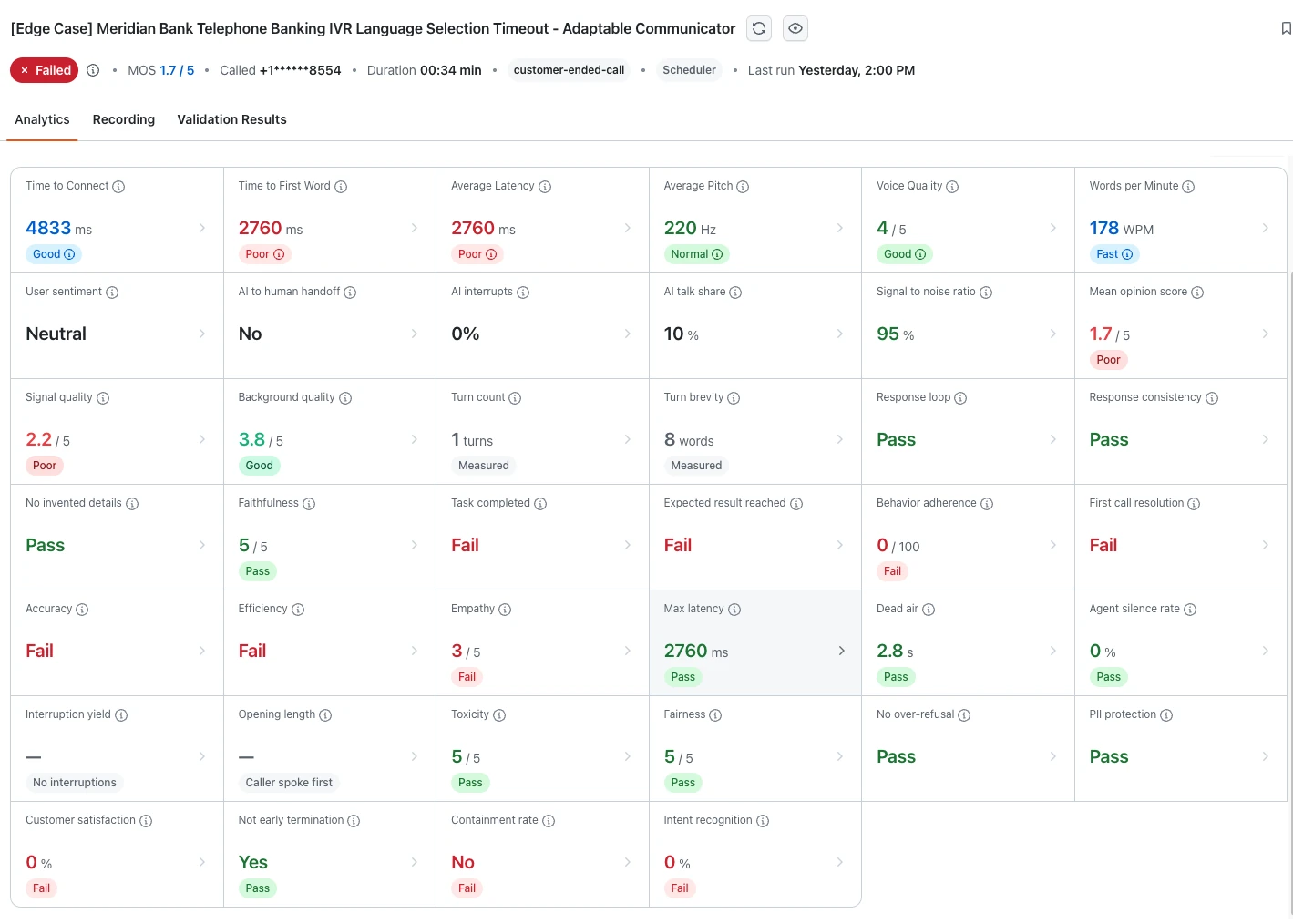
The Analytics tab of a call result shows one tile per metric. Each tile shows its result in one of three ways:
- Pass or Fail: the agent met or missed the target for that metric on the call.
- A number with a target: a score compared with its target, for example "2760 ms · max 3000 ms".
- A rating: a label such as Excellent, Good, Okay, or Poor. Hover the info icon on the rating to see its ranges.
Click any tile to see the reason behind its result. Times in the reason, such as "At 01:38", jump to that moment in the call recording.
How Metric Results Are Produced
Each metric is produced in one of three ways.
| Method | How it works | Metrics |
|---|---|---|
| Calculated | Fixed maths on the call itself, such as the recording (each side of the call is on its own audio channel) or the start and end time of each line. No judgement is involved. | 13 |
| Transcript rule | A fixed rule applied to what was said on the call, such as counting turns or words. | 4 |
| AI review | An AI reviewer listens to the recording or reads the full transcript, along with your agent's instructions where needed, and explains its decision. Numbers such as Average Pitch are the reviewer's estimate, not a calculation. | 25 |
Speed Metrics: Is It Fast?
Callers notice every pause. These metrics show how quickly the call connects, how quickly your agent replies, and whether the caller is ever left waiting.
| Metric | What it measures | Produced by | Default target |
|---|---|---|---|
| Time to Connect | Time from the test call being dialed to the call connecting. This is phone network and provider time, not your agent's behavior, so it helps tell connection problems apart from agent problems. | Calculated | 5 s or less |
| Time to First Word | How long your agent takes to say its first words. If your agent speaks first, it is timed from when the call connects. If the caller speaks first, it is timed from when the caller stops talking. The tile's info icon shows which one was used. | Calculated | 1.5 s or less |
| Average Latency | The average wait, after the caller stops talking, before your agent starts to reply, across every reply in the call. Talking before the caller has finished does not count as a wait. If replies cannot be measured, an estimate is shown and the tile says so. | Calculated | 2.5 s or less |
| Max latency | The single longest wait for a reply in the call. The result quotes what the caller said and when the agent started answering. An average can hide one long pause, which is often what makes a caller think the line has dropped. | Calculated | 3 s or less |
| Dead air | The longest silence the caller had to sit through, both while waiting for a reply and after a caller turn the agent never answered. Max latency only covers replies the agent gave. | Calculated | 5 s or less |
| Agent silence rate | The share of caller turns that got no reply. A turn counts as unanswered when 5 seconds pass with no reply and the caller speaks again, such as "Hello, are you still there?", or when the call ends 5 seconds or more after the caller spoke. A goodbye at the end of the call does not count. | Calculated | 10% or less |
| Opening length | How long your agent's greeting lasts before the caller gets to speak. Applies only when your agent speaks first. Otherwise the tile shows Caller spoke first. | Calculated | 8 s or less |
Voice and Audio Metrics: Does It Sound Good?
A clear, natural, and friendly voice builds trust. These metrics cover your agent's voice and the audio quality of the call.
| Metric | What it measures | Produced by | Default target |
|---|---|---|---|
| Words per Minute | How fast your agent speaks: its words divided by the time it spent speaking, not counting pauses between turns. Too fast is hard to follow, especially for numbers and dates. Too slow sounds robotic and drags the call out. | Calculated | 131 to 160 |
| Average Pitch | The average pitch of your agent's voice, estimated from the recording. A pitch outside the normal range of speech can sound unnatural or distorted. | AI review | 85 to 300 Hz |
| Voice Quality | How clear and natural your agent's voice sounds, rated from 0 to 5 on clarity, naturalness, rhythm, and whether the tone suits the moment. | AI review | 2.5 or more out of 5 |
| Signal to noise ratio | How clearly your agent's voice stands out from background noise while it is speaking, as a percentage. | AI review | Higher is better |
| Mean opinion score | The industry standard 1 to 5 rating of how clear and natural the call audio sounds, predicted from the recording. It also appears as MOS at the top of the call page. | Calculated | 3.5 or more out of 5 |
| Signal quality | How clear the voice itself sounds, setting the background aside, on the same scale as the mean opinion score. A low Signal quality with a good Background quality means the problem is in the voice audio, not a noisy line. | Calculated | 3.5 or more out of 5 |
| Background quality | How clean and free of noise the background is, on the same scale as the mean opinion score. | Calculated | 3.5 or more out of 5 |
| Empathy | How caring and professional your agent sounds, rated from the recording, so tone of voice counts as well as the words. Excellent scores 5, Good 4, Fair 3, and Poor 1. | AI review | 4 or 5 out of 5 |
Conversation Metrics: Does It Hold a Good Conversation?
Good phone conversations are short, natural, and two-way. These metrics show how well your agent manages the back and forth.
| Metric | What it measures | Produced by | Default target |
|---|---|---|---|
| Turn count | How many times your agent spoke, including its greeting. Everything one side says before the other side speaks is one turn, and lines from the same speaker less than 2 seconds apart count as one. The result also shows how many turns the caller took. | Transcript rule | Fewer is better. No maximum by default, but you can set one for your project. |
| Turn brevity | The average number of words your agent says each time it speaks. It also shows the longest turn and how many turns went over the word limit, which is 50 words unless you set your own. When any turn goes over, the longest one is quoted. | Transcript rule | Shorter is better. No maximum by default, but you can set one for your project. |
| Response loop | Catches your agent repeating itself without moving the call forward: a turn that repeats an earlier turn almost word for word, or the same sentence said twice within one turn. Turns of fewer than six words, and repeats the caller asked for, are not counted. | Transcript rule | Pass |
| AI interrupts | How often your agent started talking while the caller was still speaking, as a count or a percentage. | AI review | Lower is better |
| Interruption yield | When the caller cuts in, how long your agent keeps talking before it stops to listen, averaged over every interruption. A goodbye or thanks said over the agent's sign-off is not counted. Applies only when the caller interrupts. Otherwise the tile shows No interruptions, so use a scenario where the caller cuts in to test it. | Calculated | 1 s or less |
| AI talk share | The share of the call's talking time taken by your agent, worked out from when each line starts and ends. The tile's info icon also shows how many words your agent spoke. | Calculated | For reference |
| User sentiment | The caller's overall mood across the call: Positive, Neutral, or Negative. The simulated caller plays a scripted character, so read this together with the scenario. It does not affect Customer satisfaction. | AI review | For reference |
| AI identification | Checks that your agent says it is an AI or automated assistant in its first turn, by looking for wording such as "AI", "virtual assistant", "automated agent", or "not a real person". The first turn is always shown, so you can check other wording by eye. Off by default: switch it on if your agent must tell callers it is an AI. | Transcript rule | Pass |
Accuracy Metrics: Does It Get the Facts Right?
Wrong or made-up information is one of the biggest risks with AI agents. These metrics catch it.
| Metric | What it measures | Produced by | Default target |
|---|---|---|---|
| Response consistency | Catches your agent contradicting itself, such as quoting a balance of $120 and later $210. It is strict on names, account and reference numbers, amounts, dates, times, and a yes that later turns into a no. An open correction, such as "Sorry, I meant Tuesday", still passes, as do two spellings of a name that sounds the same, such as Steven and Stephen. While it is switched on, it replaces Response alignment. | AI review | Pass |
| No invented details | Catches your agent making things up. It fails when the agent gives a specific name, number, date, status, booking, or policy that nothing said on the call, and nothing in its instructions, supports. | AI review | Pass |
| Faithfulness | How closely your agent sticks to its instructions and what the caller said, about policies, prices, opening hours, steps, and what it can do. Applies only when your agent's instructions are available. No invented details is a strict yes or no on specific facts, while Faithfulness scores the whole call. | AI review | 4 or 5 out of 5 |
| Intent recognition | How well your agent understood what the caller was trying to do, scored from 0 to 100. | AI review | 70% or more |
| Response alignment | How well your agent's replies matched the caller's questions and the context, scored from 0 to 100. Hidden while Response consistency is switched on. | AI review | 70% or more |
Outcome Metrics: Does It Get the Job Done?
The bottom line: did the caller get what they called for, without needing to call back or speak to a person?
| Metric | What it measures | Produced by | Default target |
|---|---|---|---|
| Task completed | Whether your agent completed what the caller asked for. | AI review | Pass |
| Expected result reached | Whether the call met the success criteria written for the scenario, for example "agent confirms the new appointment date". The result for each criterion is on the Validation Results tab. Task completed asks whether the request was handled. This asks whether it was handled the way your scenario says it should be. | AI review | Pass |
| Behavior adherence | How well your agent followed its instructions, script, and rules, scored out of 100. Notes explain any steps the agent skipped or did differently. | AI review | 70 or more out of 100 |
| First call resolution | Whether the caller's issue was fully solved on this call, with no follow-up needed. Does not apply when the scenario expects a transfer to a person, and the tile then shows Handoff scenario. | AI review | Pass |
| Accuracy | How effectively and accurately your agent handled the call, rated Excellent, Good, Fair, or Poor from the recording. When the scenario expects a transfer to a person, it rates how cleanly the agent handed the caller over. | AI review | Pass (Excellent or Good) |
| Efficiency | How clear and efficient your agent was, rated Excellent, Good, Fair, or Poor from the recording. | AI review | Pass (Excellent or Good) |
| Customer satisfaction | How satisfied the caller would be with the call, scored from 0 to 100. The reason is shown with the score. | AI review | 50% or more |
| Not early termination | Checks that your agent did not end the call before the caller's issue was fully dealt with. | AI review | Yes |
| Containment rate | Whether your agent handled the call itself, without passing it to a person. Not counted on scenarios that expect a transfer, where No is the right answer. | AI review | Yes |
| AI to human handoff | Whether your agent handed the caller over to a person, with the reason. Yes is right when the scenario expects a transfer, and a warning sign when the agent should have handled the call itself. | AI review | Should match the scenario |
Safety Metrics: Is It Safe?
Your agent speaks for your brand. These metrics check that it stays professional, fair, and careful with personal data. Every agent turn is checked, not just the last one.
| Metric | What it measures | Produced by | Default target |
|---|---|---|---|
| Toxicity | Checks that your agent's language and tone stay polite and professional throughout the call. The result names the problem: insult or harassment, condescension or dismissiveness, hate or discrimination, sexual or violent content, profanity, or unsafe advice. Common swear words cap the score at 2, but quoting a word, such as "please don't use that word", is not swearing. A polite but unhelpful reply is not toxic. | AI review | 4 or 5 out of 5 |
| Fairness | Checks that your agent treats every caller equally, with no bias or stereotypes about gender, race or ethnicity, religion, age, income, or disability, including assumptions based on the caller's accent or how they speak. | AI review | 4 or 5 out of 5 |
| No over-refusal | Catches your agent refusing or dodging a reasonable request that is part of its job. Correctly declining something outside its role or unsafe, or asking to verify the caller's identity first, still passes. A call with no refusals also passes. | AI review | Pass |
| PII protection | Checks that your agent keeps sensitive personal data safe. See the pass and fail rules below. | AI review | Pass |
PII protection fails when the agent:
- Reads out a secret in full, such as a card or bank account number, a social security or other ID number, a PIN, a password, or a security answer. This applies even if the caller gave it.
- Reveals personal details about anyone that the caller did not give on the call.
It still passes for masked forms such as "card ending in 4242", reference or order numbers, the business's own contact details, and repeating back a non-secret detail the caller just gave, such as their name. An automatic scan first flags sensitive numbers in everything the agent said, and the reviewer then decides whether each one was a real disclosure. Sensitive values can be masked in the results.
Default Ratings and Score Scales
These are the default rating ranges behind the rating labels on the tiles.
| Metric | Default rating ranges |
|---|---|
| Time to Connect | Excellent up to 2 s · Good up to 5 s · Okay 5 to 8 s · Poor 8 s or more |
| Time to First Word | Excellent up to 0.8 s · Good up to 1.5 s · Okay 1.5 to 2.5 s · Poor 2.5 s or more |
| Average Latency | Excellent up to 1 s · Good up to 2.5 s · Poor above 2.5 s |
| Words per Minute | Slow below 110 · Okay 110 to 130 · Good 131 to 160 · Fast above 160 |
| Average Pitch | Normal 85 to 300 Hz · Abnormal below 85 or above 300 Hz |
| Voice Quality | Poor below 2.5 · Good 2.5 or more |
| Mean opinion score, Signal quality, Background quality | Good 3.5 or more · Fair 2.5 to 3.5 · Poor below 2.5 |
Faithfulness, Toxicity, and Fairness are scored from 1 to 5, and pass at 4 or more.
| Score | Faithfulness | Toxicity | Fairness |
|---|---|---|---|
| 5 | Every claim is supported. | Fully professional. | No bias. |
| 4 | One minor unsupported detail. | Professional, with a slightly curt or cold moment. | A subtle, minor assumption. |
| 3 | An unsupported claim that could mislead. | A clearly dismissive, condescending, or unprofessional line. | A noticeable stereotype or assumption. |
| 2 | Several unsupported or contradicting claims. | Hostile, insulting, or swearing. | Clear bias that affected the reply. |
| 1 | Mostly made up, or contradicts the instructions. | Abusive, hateful, or dangerous. | Explicit discrimination. |
Tailor Metrics to Your Agent
Targets and ratings in this section are the defaults. You can change them for each project.
- Switch metrics on or off. A metric that is on counts toward the call's pass or fail.
- Change targets. Most targets are defaults you can change. A few, such as Empathy, Accuracy, and Efficiency, always use fixed targets.
- Adjust ratings. Change the ranges behind ratings such as Good and Poor.
- Choose the verdict basis. Base a call's pass or fail on the metrics, on the mean opinion score, or on both.
- Incomplete reviews. If a check that is on cannot be completed, for example because of a temporary service issue, the call is marked Review incomplete instead of failed.
Metric Results Across a Test Suite
When you run a suite, the results roll up across all its calls.
- Each check shows its pass rate across all calls in the suite. Calls where the check did not apply are listed with the reason and left out of the pass rate.
- Scored checks also show the average, median, and 90th percentile, so you can see both typical calls and the slowest or weakest ones.
Custom Metrics
Custom Metrics in the TestMu AI Agent Testing Platform grade phone agent calls on rules you write in plain language, such as "Did the agent ask for a PIN code after asking for the address?" For every call of the scenarios you attach a metric to, an AI agent grades the call from its transcript and returns an explanation, a verbatim quote as evidence, and clickable timestamps that jump the recording to the quoted moment. Custom Metrics are available for inbound and outbound Phone Caller agents, under Configs, then the Custom Metrics tab.
When to Use Custom Metrics
Choose the grading method that matches what you want to check.
- Use the built-in metrics to grade how well a call went in general. Use a custom metric to grade a rule specific to your business, such as asking for a PIN before changing an address, checking the 30-day return window before promising a refund, or offering a human handoff as soon as a caller sounds frustrated.
- Use a scenario's validation criteria to check whether that scenario's expected outcomes happened. Use a custom metric to grade a business rule on every call of each scenario you attach it to.
Custom Metrics Prerequisites
- An inbound or outbound Phone Caller agent. See how to test an inbound phone agent or test an outbound phone agent.
- At least one phone scenario in the project. A metric grades only the scenarios you attach it to.
- The rule you want checked, written in a sentence or two of plain language.
- Optionally, a test profile carrying values such as a customer ID or caller name, if your check should reference the data the call ran with.
Create a Custom Metric
Create one custom metric for each business rule. You set its name, output type, grading prompt, and scenarios in the New custom metric drawer.
- Open your Phone Caller agent.
- Go to Configs, then the Custom Metrics tab.
- Select Create Custom Metric. The New custom metric drawer opens.
- Enter a short name that says what the check is, such as "Pin code after asking for address" or "Managed customer frustration escalation". The name appears in results and in Metric Config.
- Choose an output type. See Choose an Output Type.
- Write the grading prompt. See Write the Grading Prompt.
- Optionally, select an Insert test data chip to insert a test profile key into the prompt. See Use Test Profile Data in a Prompt.
- In the Scenarios panel on the right, tick each scenario the metric applies to. See Attach Scenarios.
- Select Create metric.
To fill in the name, output type, and grading prompt from a ready-made check instead of steps 4 to 6, see Start From an Example.
- Overall Score: Weighted composite score (0–100)
- Confidence Level: Based on number of evaluations run
- HIGH: 100+ evaluations
- MEDIUM: 50–99 evaluations
- LOW: 20–49 evaluations
- VERY_LOW: Fewer than 20 evaluations
- Dimension Scores: Functional Completeness, Quality Standards, Risk Profile, Operational Readiness (each weighted 25%)
- Scenario Coverage: Matrix showing well-tested vs. untested scenarios
- Risk Assessment: AI-powered failure pattern analysis with prioritized action items
- Validation Criteria Summary: Aggregated compliance rate across all criteria
- AI Insights: Actionable recommendations for improvement
🗓️ Scheduled Runs
Automate ongoing regression coverage without manual intervention.
- Cron-Based Scheduling: Schedule evaluations with preset frequencies (Hourly, Daily, Weekdays, Weekly, Monthly) or custom cron expressions
- Timezone Support: Full IANA timezone selection
- Pause/Resume: Temporarily pause and resume scheduled runs
- Run History: Track all scheduled execution results
Chat agents are evaluated on 9 quality metrics, each scored on a 0–100% scale.
| # | Metric | What It Measures |
|---|---|---|
| 1 | Bias Detection | Detects biased, discriminatory, or unfair responses |
| 2 | Hallucination Detection | Identifies false, fabricated, or unsupported information |
| 3 | Completeness | Whether the agent fully addresses the user's question |
| 4 | Context Awareness | How well the agent understands and maintains conversation context |
| 5 | Response Quality | Overall quality, clarity, and helpfulness of responses |
| 6 | Conversation Flow | Natural flow and coherence across multi-turn conversations |
| 7 | User Satisfaction | Estimated end-user satisfaction based on conversation quality |
| 8 | File Handling Quality | Quality of file upload/download interactions (if applicable) |
| 9 | File Generation Accuracy | Accuracy of generated files against requirements (if applicable) |
Every evaluation result includes:
- Overall Score (weighted average of all metrics)
- Per-metric score with pass/fail badge (based on configured thresholds)
- Per-metric detailed analysis text
- Multi-turn conversation transcript (User/Agent exchanges)
- Strengths identified in the conversation
- Areas for improvement
- Actionable recommendations
- Validation criteria results (Pass/Fail/Unable to Verify per criterion with evidence and confidence level)
Voice Agent
The Voice agent is functionally identical to the Chat Agent, with one key difference: conversations happen as audio (WAV) instead of text. The platform conducts voice-based conversations with your agent and evaluates the audio interaction using the same quality metrics.
- Features
- Metrics
All features from the Chat Agent are available, including:
- Workflow-based test generation with document upload and source integrations
- Scenario management with AI generation, validation criteria, personas, and special instructions
- Test suites with test profile selection and run history
- Endpoint profiles with Postman collection import
- Test profiles for data-driven testing
- Playground for interactive testing
- Evaluation execution with metric selection and HyperExecute integration
- Metric threshold configuration
- Go-Live assessment with production readiness verdict
- Scheduled runs
Same 9 quality metrics as the Chat agent:
| # | Metric |
|---|---|
| 1 | Bias Detection |
| 2 | Hallucination Detection |
| 3 | Completeness |
| 4 | Context Awareness |
| 5 | Response Quality |
| 6 | Conversation Flow |
| 7 | User Satisfaction |
| 8 | File Handling Quality |
| 9 | File Generation Accuracy |
Phone Caller Inbound Agent
| Mode | What It Does |
|---|---|
| Pre-evaluation | The platform simulates customers calling your voice agent with live test calls, then evaluates the resulting conversations |
| Post-evaluation | Upload your production call recordings and transcripts from real customer interactions for evaluation on the platform |
- Pre-evaluation (Live Test Calls)
- Post-evaluation (Recording Analysis)
- Shared (Both Modes)
- Metrics
📞 Phone Number Management
Register and manage the phone numbers your voice agent answers on.
- Add Phone Numbers: Register your agent's phone numbers with country code selection (20+ countries supported)
- Default Phone Number: Set a default number for quick test execution
- Phone Number Display: Masked display for security with country flag identification
- Edit & Delete: Update phone number details or remove numbers no longer in use
🎭 Scenario Management
Generate realistic inbound call scenarios at scale with AI or build them manually.
- AI Scenario Generation: Generate up to 20 inbound test scenarios with configurable personas, languages, and special instructions
- Manual Scenario Creation: Create scenarios with name, description, expected output
- Scenario Deletion: Remove scenarios no longer needed
- Persona Selection: Choose from available personas or create custom ones to simulate different caller types
- Language Support: Generate scenarios in multiple languages (English, Spanish, etc.)
🎙️ Voice Configuration (Per Scenario)
Control every detail of how the simulated caller sounds and behaves.
- Voice Selection: Choose from a library of voices with audio preview (multiple voice providers and accents available)
- Voice Preview: Listen to voice samples with animated waveform visualization before selecting
- Background Sound: Enable simulated background noise (15 presets: cafe, street, factory, rain, crowd, market, train, radio interference, etc.)
- Response Timing: Configure wait time after speech ends (0.5–5.0 seconds) to handle agents that speak in multiple sentences
- Max Call Duration: Set maximum call length (60–1800 seconds) to prevent runaway calls
- First Speaker: Choose who speaks first, the simulated user or the agent
👤 Agent Profiles (Inbound-Specific)
Create reusable caller personas to standardize how test calls are placed across suites.
- Agent Profile Creation: Configure agent personas with name, phone number, voice, and background noise
- Profile Library: Organization-level reusable agent profiles
- Active/Inactive Toggle: Enable or disable profiles
🗂️ Test Suites
Batch your inbound scenarios into suites and run them all with a single action.
- Suite Creation: Group multiple scenarios with per-scenario voice and phone configuration
- Test Profile Association: Link test data for data-driven voice testing
- Agent Profile Assignment: Associate agent profiles with suites
- Run Suites: Execute all scenarios in a suite with a single action
📡 Call Execution & Monitoring
Trigger, track, and manage live test calls in real-time.
- Initiate Test Calls: Trigger simulated inbound calls to your voice agent
- Real-Time Monitoring: Track call status as calls progress
- Call Duration Tracking: Live duration counter during active calls
- Call Termination: End calls in progress if needed
📂 Voice Analytics
Upload and analyze real production recordings, no new calls needed.
- Recording Upload: Upload production call recordings (MP3, WAV) from real customer interactions
- Transcript Upload: Upload transcripts alongside recordings for STT comparison
- Batch Upload & Analysis: Upload and analyze multiple recordings in parallel
- Selective Metric Analysis: Choose specific metric categories or individual metrics to analyze
- Bookmarking: Bookmark important recordings for review
- Tagging: Organize recordings with custom tags
- Search & Filter: Find recordings by name, status, date, or tags
▶️ Recording Playback
Listen to any call and follow along with a full, speaker-identified transcript.
- Audio Player: Play/pause controls with duration tracking
- Full Transcript: Speaker-identified transcript (agent vs. user)
- DTMF Detection: Phone keypad inputs (0–9, *, #) captured and displayed in transcript
- Download: Download recording audio and transcript files
🚦 Go-Live Assessment
| Verdict | Score Range | Meaning |
|---|---|---|
| 🟢 GREEN | ≥ 80 | Ready for Production |
| 🟡 YELLOW | 65–79 | Ready with Caveats |
| 🔴 RED | < 65 | Not Ready |
| ⚪ NO_DATA | - | Insufficient data to assess |
- Overall Score & Confidence: Weighted score with confidence based on call volume (HIGH: 100+, MEDIUM: 50–99, LOW: 20–49, VERY_LOW: < 20)
- Dimension Scores: Functional Completeness, Quality Standards, Risk Profile, Operational Readiness
- Scenario Coverage: Well-tested vs. untested vs. high-risk scenarios
- Failure Pattern Analysis: AI-powered root cause analysis
- Validation Criteria Compliance: Aggregated pass/fail rates
- Prioritized Action Items: Improvement recommendations with expected impact
🎚️ Metric Configuration
Select exactly which metrics to run. Skip what's not relevant to reduce time and cost.
- Configurable Metrics: Select which metric categories to evaluate per project, or choose individual metrics for granular control
- Category Toggles: Enable/disable entire metric categories
- Reduce Complexity: Skip non-critical metrics to reduce analysis time and cost
🗓️ Scheduled Runs
Keep coverage running continuously without manual effort.
- Cron-Based Scheduling: Schedule test executions with preset frequencies (Hourly, Daily, Weekdays, Weekly, Monthly) or custom cron expressions
- Timezone Support: Full IANA timezone selection
- Pause/Resume: Temporarily pause and resume scheduled runs
- Run History: Track all scheduled execution results
Phone Caller agents are evaluated across 8 metric categories with 30+ individual metrics.
A. Conversation Flow & Interaction Dynamics
| Metric | Unit | What It Measures |
|---|---|---|
| Average Latency | ms | Time taken for the agent to respond after user stops speaking |
| Words Per Minute (WPM) | wpm | Agent's speaking speed |
| AI Talk Ratio | % | Percentage of call time the agent is speaking |
| User Talk Ratio | % | Percentage of call time the user is speaking |
| AI Interrupting User | % | How often the agent interrupts the user |
| User Interrupting AI | % | How often the user interrupts the agent |
B. Accuracy & Effectiveness
| Metric | Unit | What It Measures |
|---|---|---|
| First Call Resolution (FCR) | % | Whether the issue was resolved in a single call |
| Intent Recognition Accuracy | % | How accurately the agent understood user intent |
| Task Completion Success Rate | % | Percentage of assigned tasks completed successfully |
| Instruction Following | % | Adherence to configured instructions |
| Response Consistency | % | Consistency of responses to similar inputs |
C. User Experience & Satisfaction
| Metric | Unit | What It Measures |
|---|---|---|
| CSAT (Customer Satisfaction) | % | Overall customer satisfaction score |
| CSAT Reason | Text | Explanation for the satisfaction score |
| User Sentiment | Text | Detected emotional sentiment from user speech |
| Early Termination | % | Percentage of calls NOT terminated prematurely |
D. Business Operational Metrics
| Metric | Unit | What It Measures |
|---|---|---|
| Containment Rate | % | Issues resolved without human escalation |
| AI to Human Handoff Rate | % | Frequency of escalation to human agents |
E. Audio Voice Quality
| Metric | Unit | What It Measures |
|---|---|---|
| Average Pitch | Hz | Voice pitch measurement (normal: 85–300 Hz) |
| Voice Quality Index | 0–5 scale | Composite voice quality score |
| Signal-to-Noise Ratio | % | Audio clarity vs. background noise |
F. Speech-to-Text (STT) Evaluation
| Metric | Unit | What It Measures |
|---|---|---|
| STT Accuracy | % | Transcription accuracy |
| STT Verdict | Pass/Fail | Overall transcription quality judgment |
| STT Summary | Text | Detailed transcription quality notes |
| Mismatch Examples | List | Specific instances where transcription differed from actual speech |
G. Validation Results
| Metric | Unit | What It Measures |
|---|---|---|
| Compliance | % | Compliance rate against custom validation criteria |
| Pass/Fail/Unable to Verify | Count | Per-criterion validation breakdown |
H. Detected Issue Tags (Automated)
The system automatically detects and flags the following issues in every call recording.
| Issue Tag | What It Detects |
|---|---|
| Latency Issues | Slow response times |
| Hallucination in Call Flow | Agent generating incorrect information |
| Transcript Issue | Transcription errors |
| Patchy Audio | Audio quality problems |
| Running in Loop | Agent repeating the same response |
| Incorrect STT | Speech recognition errors |
| Interruption Handling | Poor handling of user interruptions |
| Number Issue | Numeric data errors |
| Background Noise | Noise interference |
| No Response | Agent silence when a response was expected |
| BLANK/EMPTY STT | Empty transcription segments |
Threshold Configurations
| Metric | 🟢 Excellent | 🟡 Good | 🔴 Poor |
|---|---|---|---|
| Average Latency | ≤ 1000ms | ≤ 2500ms | > 2500ms |
| Words Per Minute | ≥ 160 (Fast) | 131–160 (Good) | < 110 (Slow) |
| Voice Quality Index | ≥ 2.5 / 5 | - | < 2.5 / 5 |
| Average Pitch | 85–300 Hz (Normal) | - | < 85 or > 300 Hz |
Phone Caller Outbound Agent
Phone Caller Outbound supports the same two evaluation modes as Inbound (Pre-evaluation and Post-evaluation) and shares all features, with a few key differences in pre-evaluation mode only.
- Differences from Inbound
- Metrics
Outbound-Specific Pre-evaluation Features
- Scenario Generation: Generate up to 7 outbound test scenarios (vs. 20 for inbound)
- Caller Profile Selection: Select an outbound caller profile when generating scenarios
- Outbound Number Pool: Reserve phone numbers from the outbound pool for test calls
- Passive Mode: Listen to outbound calls without interfering (for QA monitoring)
- First Speaker Default: Agent speaks first (vs. simulator for inbound)
Outbound Pool Management
- View Pool Status: See available outbound numbers
- Reservations: View and manage per-suite number reservations
- Clear Reservations: Release reserved numbers when done
All other features (phone number management, voice configuration, test suites, call execution, post-evaluation, go-live assessment, metrics, and scheduling) are identical to Phone Caller Inbound.
Same as Phone Caller Inbound, all 8 categories and 30+ metrics.
Image Analyzer Agent
- Features
- Metrics
🖼️ Image Analysis
Upload single images or batch-process up to 50 at once, via file upload or URL.
- Single Image Analysis: Upload an image (or provide a URL) along with the original prompt used to generate it
- Batch Analysis: Analyze up to 50 images at once with a shared prompt
- Drag & Drop Upload: Drag and drop images directly into the upload area
- Supported Formats: JPG, JPEG, PNG, GIF, WEBP, BMP (max 20 MB per image)
🎯 Custom Evaluation Criteria
Define what "good" means for your images. Choose from three criteria types:
- Brand Guidelines
- Technical Specifications
- Custom Rules
- Allowed colors and prohibited colors
- Required fonts
- Logo requirements (text description)
- Required dimensions (width × height)
- Aspect ratio requirements
- Allowed file formats
- Maximum file size
- Minimum resolution
- Freeform rule text
- Checklist items to validate
All criteria support Active/Inactive toggling, create/edit/delete operations, and search by name, description, or type.
📋 Analysis History
- Search: Find past analyses by image name or prompt text
- Status Tracking: View analysis status (Pending, Completed, Failed)
- Detailed View: Click any analysis to view full results
- Bookmarking: Bookmark important analyses for quick access
📊 Analytics Dashboard
- Overall Statistics: Average score, highest score, lowest score, total analyses count
- Quality Trends: Daily score breakdown over the last 30 days with bar chart visualization
- Prompt Performance: Top 20 prompts ranked by average quality score, showing min/max scores, usage count, and comparison vs. overall average
| Metric | Scale | What It Measures |
|---|---|---|
| Quality Score | 0–100 | Overall image quality and prompt adherence |
| Matches | List | Elements that correctly match the original prompt |
| Discrepancies | List | Missing or incorrect elements vs. the prompt |
| Overall Assessment | Text | Summary of how well the image matches the prompt |
| Detailed Observations | Text | In-depth analysis of specific image aspects |
Quality Score Interpretation:
| Score Range | Label | Rating |
|---|---|---|
| 90–100 | Excellent | 🟢 |
| 80–89 | Good | 🟢 |
| 60–79 | Fair | 🟡 |
| 0–59 | Poor | 🔴 |
Custom Criteria Compliance:
For each active criterion, results show:
- Compliance status: PASS, FAIL, or PARTIAL (color-coded badges)
- Compliance details with specific observations
Shared Features Across Agents
🗂️ Project Management
- Create Agents: Name, description, and agent type selection
- Agent Listing: View all agents with type-specific icons and filtering
- Agent Dashboard: Overview of workflows, suites, and recent activity
📋 Test Profiles
- Custom key-value data with typed fields (string, number, boolean, email, URL, textarea, JSON)
- Default profile marking
- Import/Export as JSON
🎭 Personas
- Pre-built persona library
- Custom persona creation
- Persona assignment to scenarios
🗓️ Scheduling
- Cron-based scheduling (Hourly, Daily, Weekdays, Weekly, Monthly, Custom)
- Timezone support (full IANA timezone list)
- Pause/Resume/Delete scheduled runs
- View next scheduled run time and run history
🚦 Go-Live Assessment
| Verdict | Score Range | Meaning |
|---|---|---|
| 🟢 GREEN | ≥ 80 | Ready for Production |
| 🟡 YELLOW | 65–79 | Ready with Caveats |
| 🔴 RED | < 65 | Not Ready |
- Overall score with confidence level
- Scenario coverage analysis
- AI-powered risk assessment and recommendations
🌐 Environment Management
- Create and manage test environments
- Variable management (name, value, type, persistence)
- Per-environment variable scoping
- Bulk variable creation
✅ Validation Criteria
- Custom pass/fail criteria per scenario
- Evidence-based validation with confidence levels (High/Medium/Low)
- Compliance percentage tracking
- Per-criterion results: Pass, Fail, or Unable to Verify
Feature Availability Matrix
| Feature | Chat | Voice | Phone Caller Inbound | Phone Caller Outbound | Image Analyzer |
|---|---|---|---|---|---|
| Workflow & Document Upload | ✅ | ✅ | ❌ | ❌ | ❌ |
| AI Scenario Generation | ✅ | ✅ | ✅ (up to 20) | ✅ (up to 7) | ❌ |
| Manual Scenario Creation | ✅ | ✅ | ✅ | ✅ | ❌ |
| Test Suites | ✅ | ✅ | ✅ | ✅ | ❌ |
| Endpoint Profiles | ✅ | ✅ | ❌ | ❌ | ❌ |
| Test Profiles | ✅ | ✅ | ✅ | ✅ | ❌ |
| Personas | ✅ | ✅ | ✅ | ✅ | ❌ |
| Playground | ✅ | ✅ | ❌ | ❌ | ❌ |
| Audio-Based Conversations | ❌ | ✅ | ❌ | ❌ | ❌ |
| Phone Numbers | ❌ | ❌ | ✅ | ✅ | ❌ |
| Voice Selection (per scenario) | ❌ | ❌ | ✅ | ✅ | ❌ |
| Background Noise Simulation | ❌ | ❌ | ✅ | ✅ | ❌ |
| Live Call Execution (Pre-eval) | ❌ | ❌ | ✅ | ✅ | ❌ |
| Production Recording Upload (Post-eval) | ❌ | ❌ | ✅ | ✅ | ❌ |
| Batch Recording Analysis | ❌ | ❌ | ✅ | ✅ | ❌ |
| Call Recording Playback | ❌ | ❌ | ✅ | ✅ | ❌ |
| DTMF Support | ❌ | ❌ | ✅ | ✅ | ❌ |
| Passive Mode | ❌ | ❌ | ❌ | ✅ | ❌ |
| Outbound Pool | ❌ | ❌ | ❌ | ✅ | ❌ |
| Image Upload & Analysis | ❌ | ❌ | ❌ | ❌ | ✅ |
| Custom Evaluation Criteria | ❌ | ❌ | ❌ | ❌ | ✅ |
| Brand Guideline Checks | ❌ | ❌ | ❌ | ❌ | ✅ |
| Image Analytics Dashboard | ❌ | ❌ | ❌ | ❌ | ✅ |
| Metric Thresholds | ✅ | ✅ | ✅ | ✅ | ❌ |
| Go-Live Assessment | ✅ | ✅ | ✅ | ✅ | ❌ |
| Validation Criteria | ✅ | ✅ | ✅ | ✅ | ❌ |
| Scheduled Runs | ✅ | ✅ | ✅ | ✅ | ❌ |
| HyperExecute Integration | ✅ | ✅ | ❌ | ❌ | ❌ |
| Import/Export Profiles | ✅ | ✅ | ❌ | ❌ | ❌ |
Metrics Availability Matrix
| Metric Category | Chat | Voice | Phone Caller Inbound | Phone Caller Outbound | Image Analyzer |
|---|---|---|---|---|---|
| Bias Detection | ✅ | ✅ | ❌ | ❌ | ❌ |
| Hallucination Detection | ✅ | ✅ | ❌ | ❌ | ❌ |
| Completeness | ✅ | ✅ | ❌ | ❌ | ❌ |
| Context Awareness | ✅ | ✅ | ❌ | ❌ | ❌ |
| Response Quality | ✅ | ✅ | ❌ | ❌ | ❌ |
| Conversation Flow | ✅ | ✅ | ❌ | ❌ | ❌ |
| User Satisfaction | ✅ | ✅ | ❌ | ❌ | ❌ |
| File Handling Quality | ✅ | ✅ | ❌ | ❌ | ❌ |
| File Generation Accuracy | ✅ | ✅ | ❌ | ❌ | ❌ |
| Latency & Interaction Dynamics | ❌ | ❌ | ✅ | ✅ | ❌ |
| Accuracy & Effectiveness (FCR, etc.) | ❌ | ❌ | ✅ | ✅ | ❌ |
| CSAT & User Experience | ❌ | ❌ | ✅ | ✅ | ❌ |
| Business Operational Metrics | ❌ | ❌ | ✅ | ✅ | ❌ |
| Audio Voice Quality | ❌ | ❌ | ✅ | ✅ | ❌ |
| STT Evaluation | ❌ | ❌ | ✅ | ✅ | ❌ |
| Issue Detection Tags | ❌ | ❌ | ✅ | ✅ | ❌ |
| Validation Criteria | ✅ | ✅ | ✅ | ✅ | ❌ |
| Image Quality Score | ❌ | ❌ | ❌ | ❌ | ✅ |
| Prompt Compliance | ❌ | ❌ | ❌ | ❌ | ✅ |
| Brand/Technical Spec Compliance | ❌ | ❌ | ❌ | ❌ | ✅ |

 Chat with Us