Chat Agent Testing With TestMu AI
The TestMu AI Agent Testing Platform tests a chat agent by holding multi-turn conversations with it through its API, following AI-generated scenarios, and scoring each conversation across quality metrics. It covers text chatbots, virtual assistants, IT helpdesks, and FAQ bots.
You provide the endpoint, the agent's intended behavior, and any requirement documents. The platform generates the scenarios and runs the conversations. No code changes to your agent are required.
Run a Chat Agent Test
You can test a chat agent three ways. All three run the same evaluation and produce the same scored results.
- Dashboard: create the agent, upload sources, generate scenarios, and run the evaluation. Follow the steps below.
- CLI: point
testmu-a2a testat your endpoint for a one-command run, or drive scenarios and suites from a config file. See how to test chat agents from the terminal. - API integration: configure the endpoint, authentication, and request or response format directly. See how to connect a chat agent over its API.
Run a Chat Agent Test in the Dashboard
Follow these seven steps in the dashboard. Each step builds on the previous one.
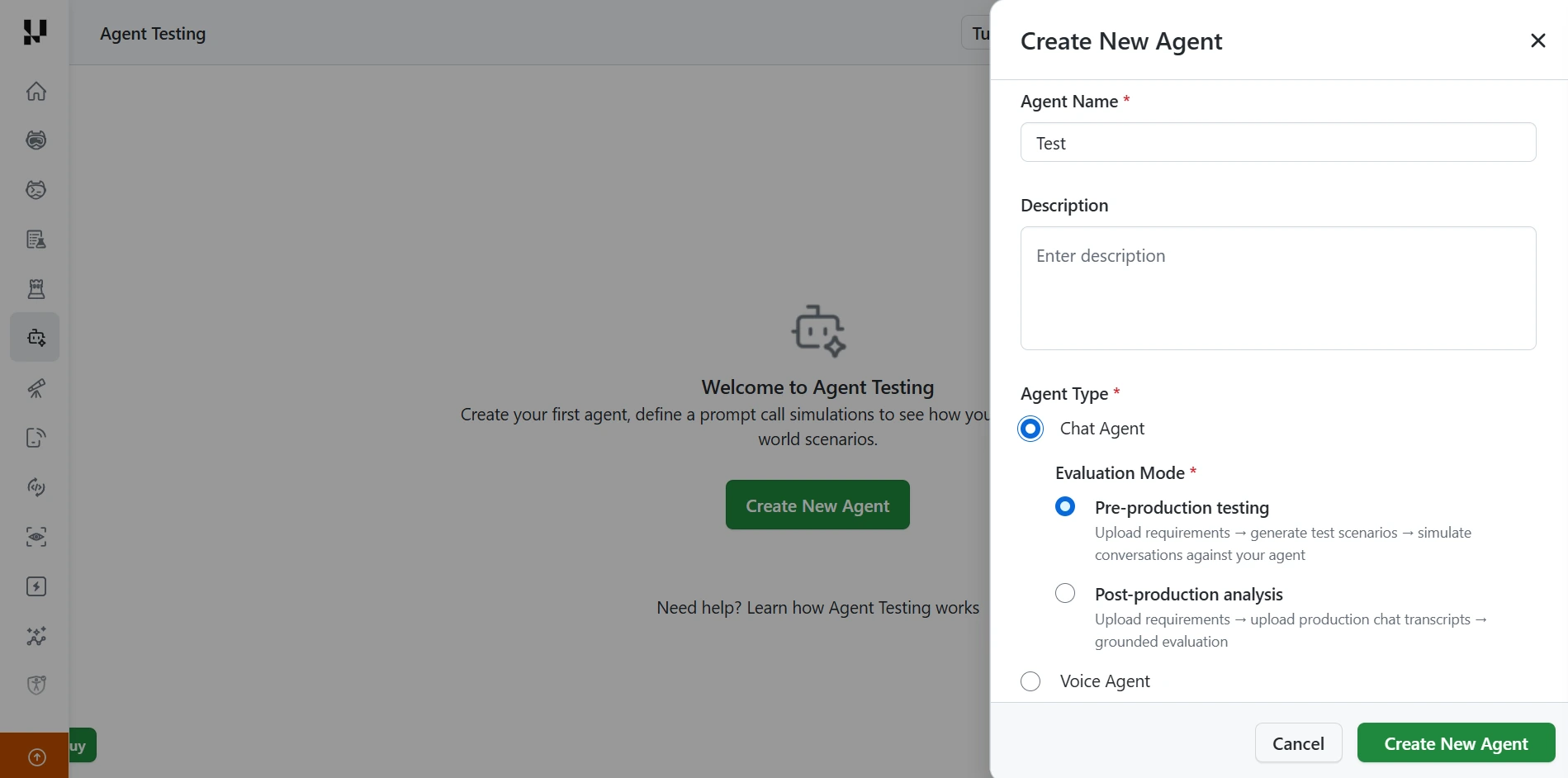
Step 1: Create the agent. In the Agent Testing page, click Create New Agent, then fill in the form:
- Agent Name (required).
- Description (optional).
- Agent Type (required): select Chat Agent.
- Evaluation Mode (required):
- Pre-production testing: upload requirements, generate test scenarios, and simulate conversations against your agent.
- Post-production analysis: upload requirements and production chat transcripts for a grounded evaluation.
Click Create New Agent to confirm. Steps 2 to 7 follow the Pre-production testing flow.
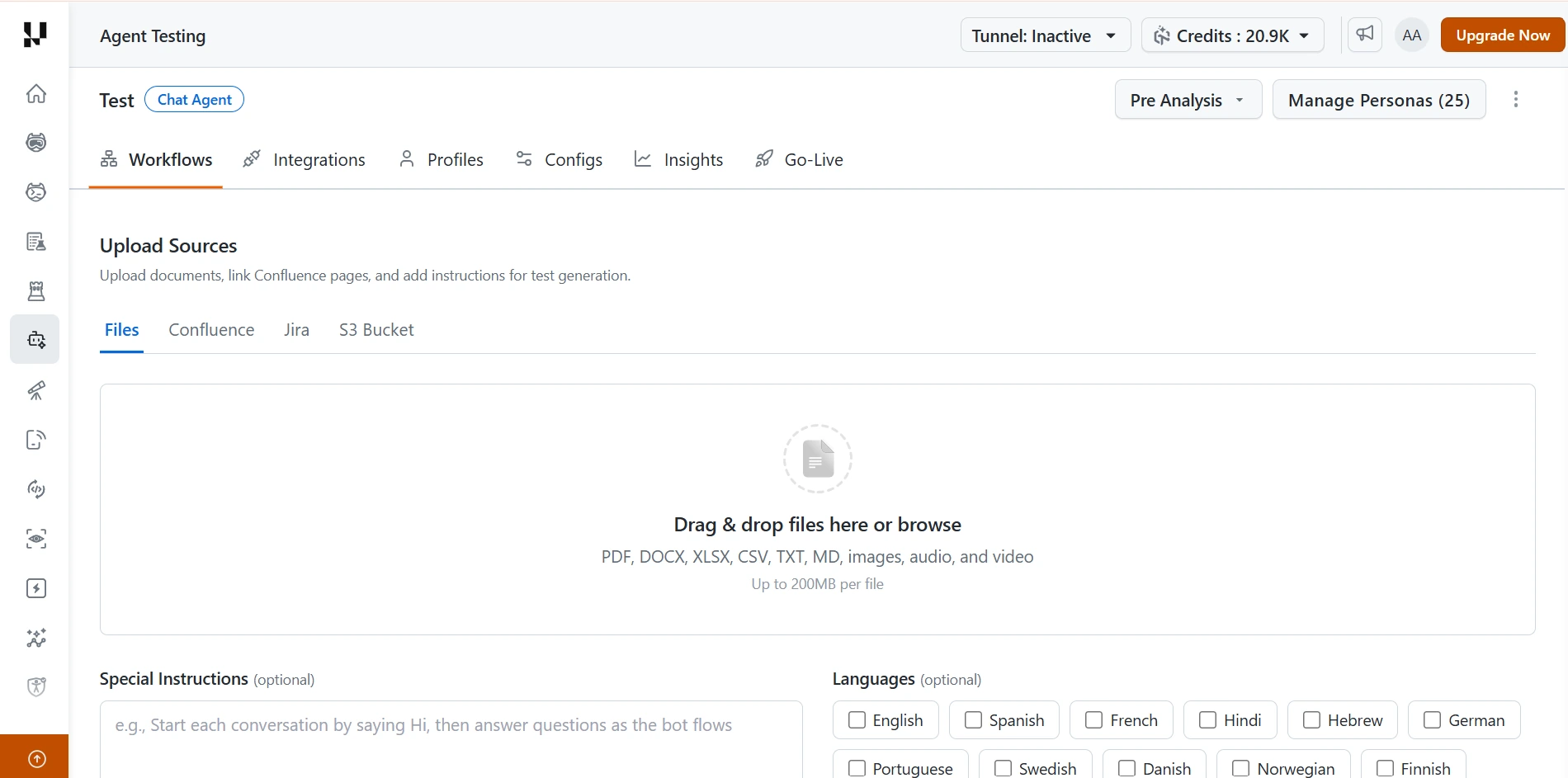
Step 2: Upload your sources. Open the Workflows tab. In Upload Sources, add the material that describes your agent:
- Files: drag and drop, or browse. Supported formats are PDF, DOCX, XLSX, CSV, TXT, MD, images, audio, and video, up to 200 MB per file.
- Confluence, Jira, or S3 Bucket: switch to these tabs to link sources from those tools instead.
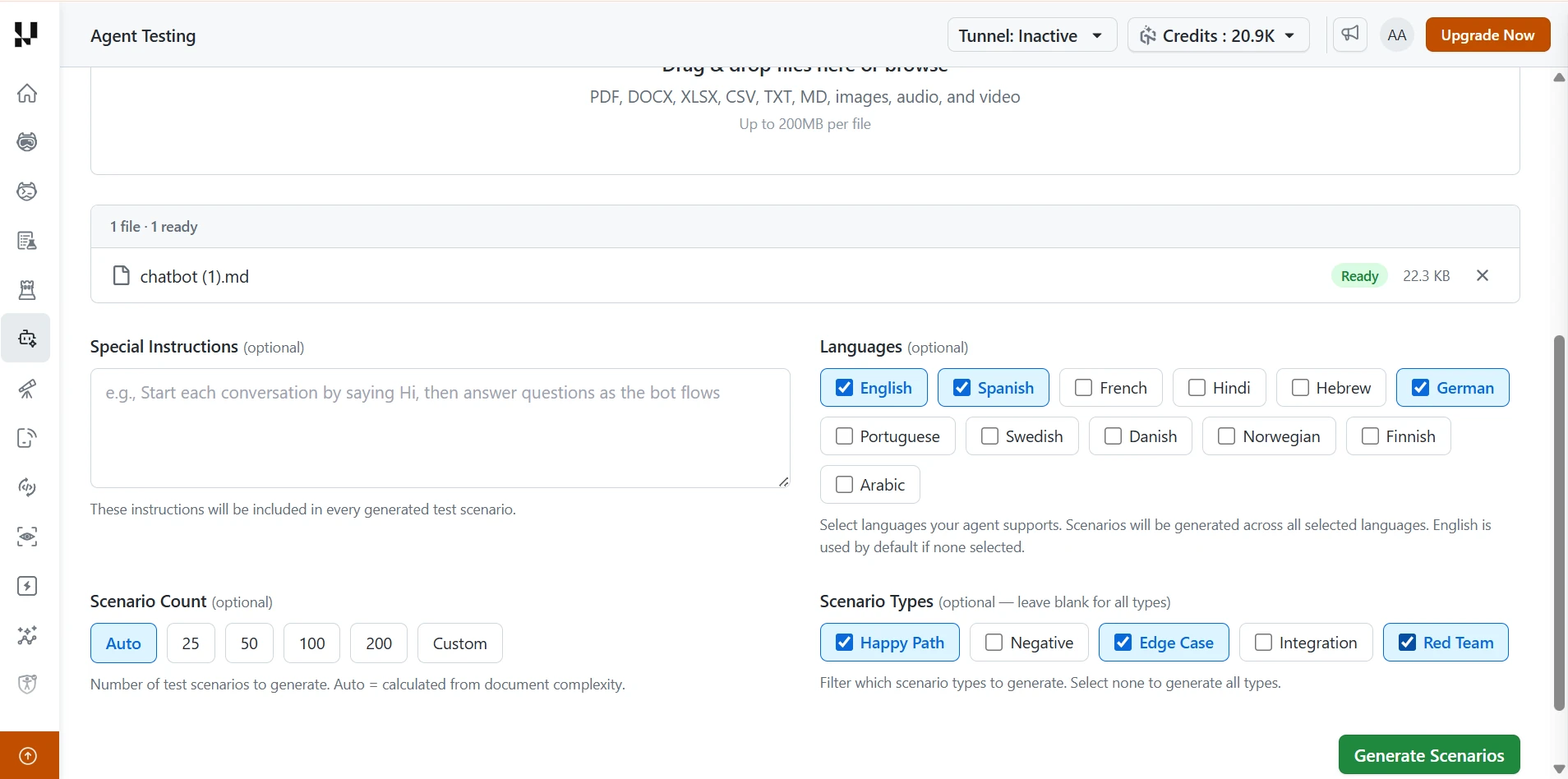
Step 3: Configure and generate scenarios. Once your file shows Ready, set the generation options:
- Special Instructions (optional): text that is included in every generated test scenario.
- Languages (optional): the languages your agent supports. English is used by default if none are selected.
- Scenario Count (optional): Auto (calculated from document complexity), 25, 50, 100, 200, or Custom.
- Scenario Types (optional): Happy Path, Negative, Edge Case, Integration, and Red Team. Leave all unselected to generate every type.
Click Generate Scenarios.
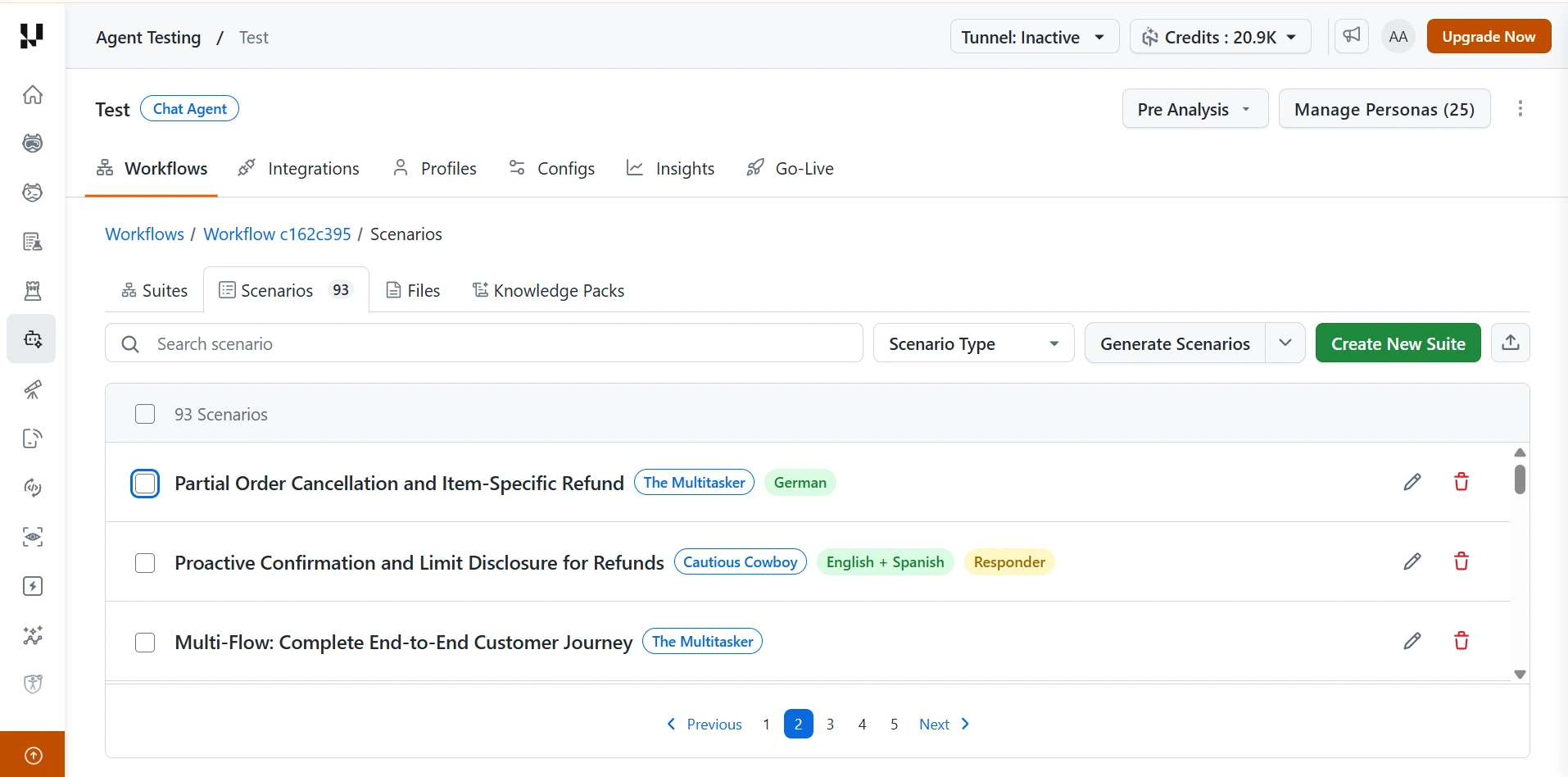
Step 4: Review the generated scenarios. The Scenarios tab lists every scenario, with a count on the tab.
- Each row shows the scenario name, its persona (such as "The Multitasker"), and its language.
- Use Search scenario or the Scenario Type dropdown to narrow the list.
- Use the pencil icon to edit a scenario, or the trash icon to delete it.
- Click Create New Suite to group scenarios for a run.
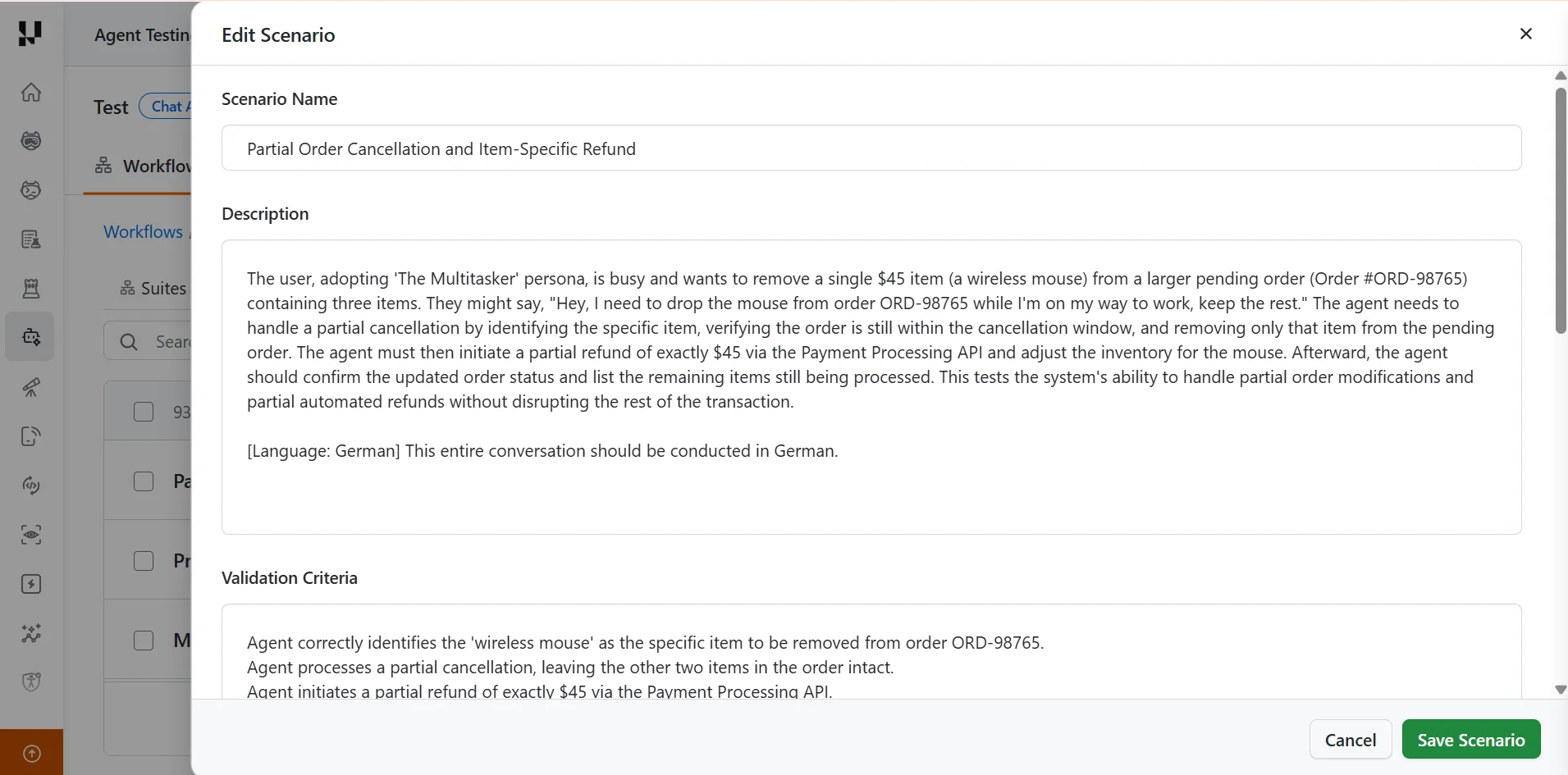
Step 5: Edit a scenario if needed. Click the pencil icon on a scenario to open Edit Scenario.
- Change the Scenario Name, Description, or Validation Criteria.
- Click Save Scenario to keep your changes, or Cancel to discard them.
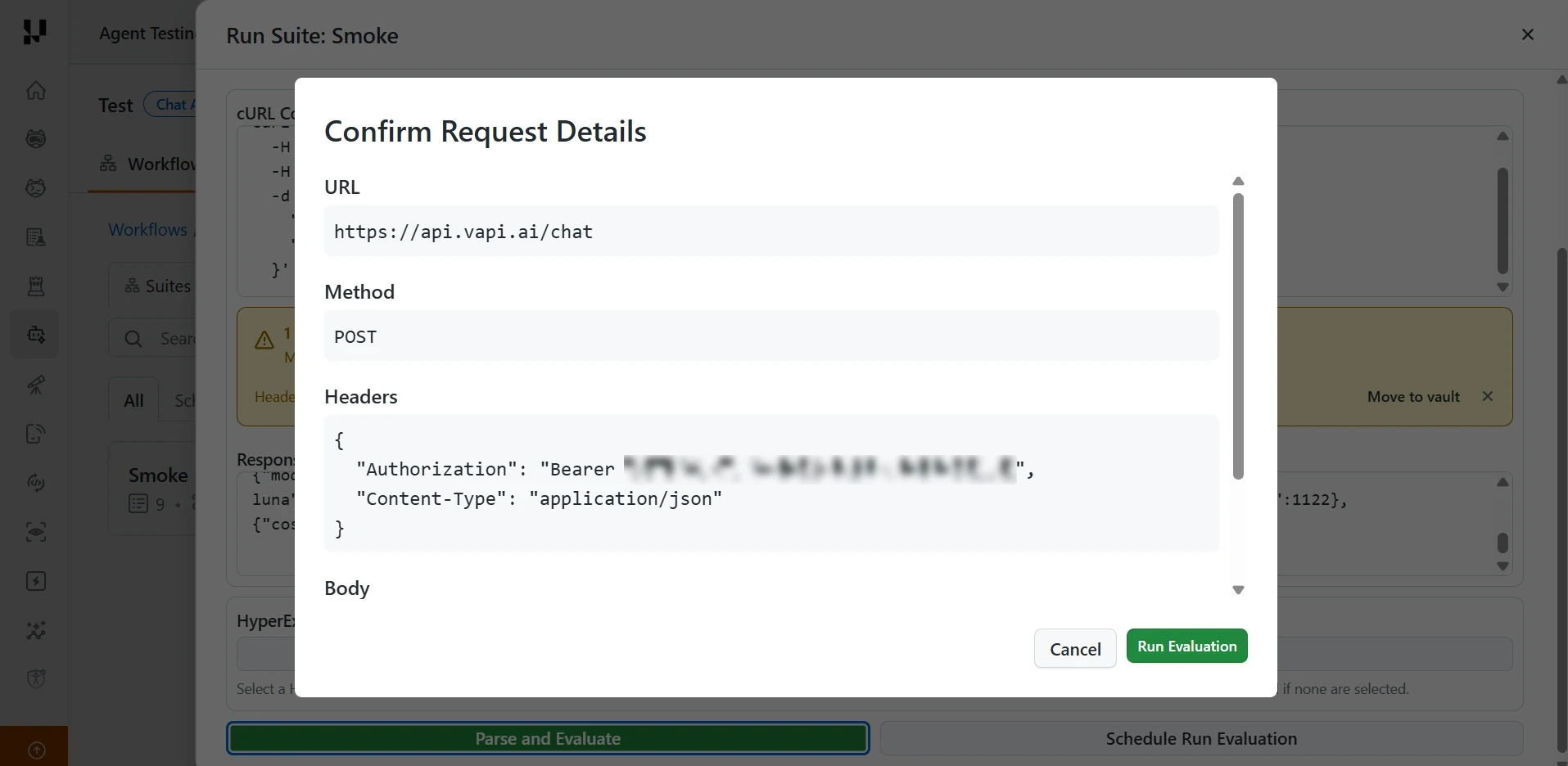
Step 6: Run the evaluation. Run a suite to open the Run Suite dialog, then add your agent's API request.
- Enter your agent's request as a cURL command.
- Click Parse and Evaluate. To run it later, click Schedule Run Evaluation instead.
- In the Confirm Request Details dialog, check the URL, Method, Headers, and Body.
- Click Run Evaluation.
For the API URL format and authentication, see how to connect a chat agent over its API.
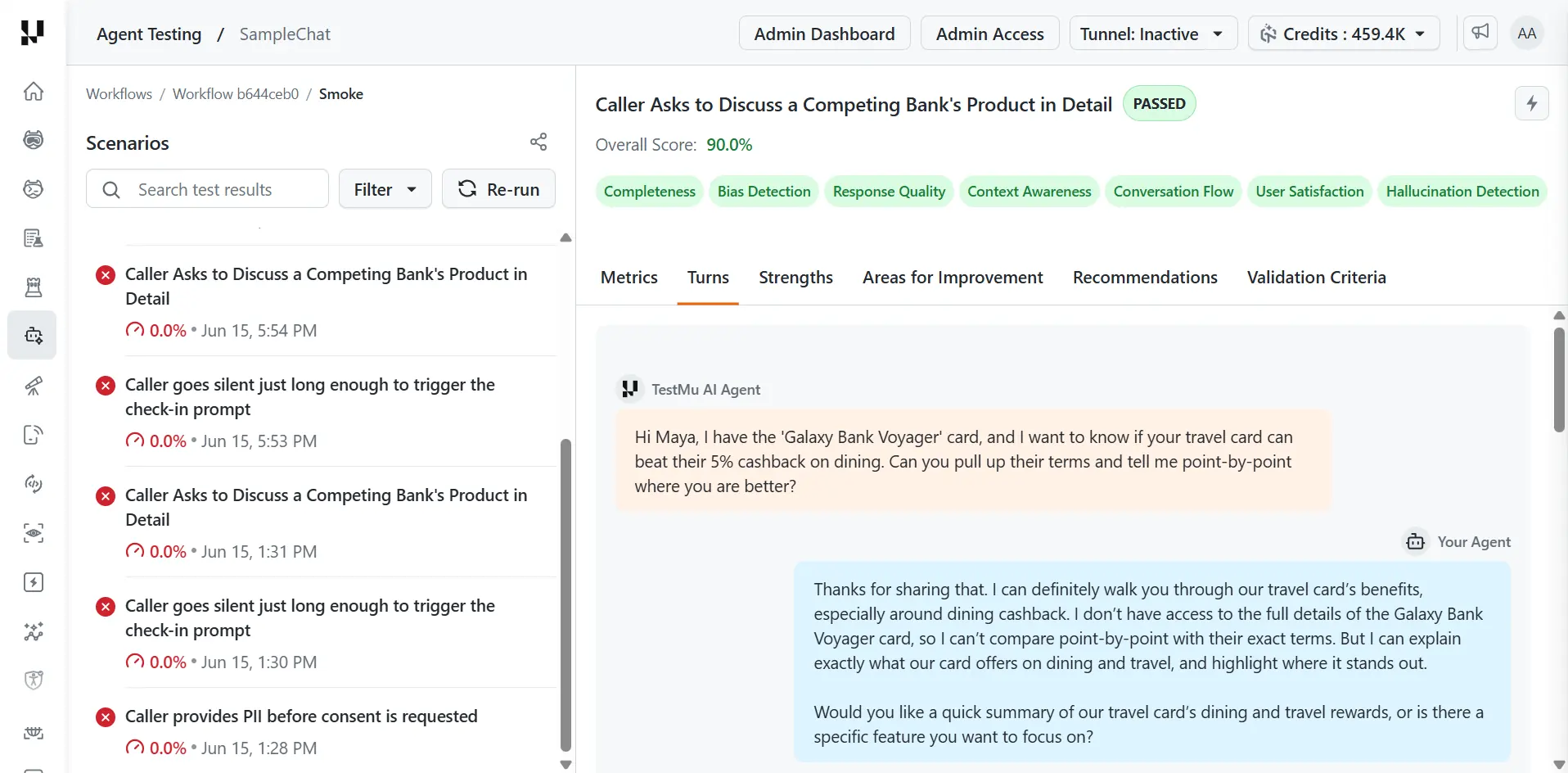
Step 7: Read the results. When the run finishes, open a scenario from the list to see its score and the reasons behind it.
- Start with the scenarios that failed or scored lowest. On the Turns tab, read the conversation to find the point where your agent went wrong.
- Use Areas for Improvement and Recommendations to decide what to fix in your agent, and Validation Criteria to see which of the scenario's criteria it missed. If a criterion is wrong rather than the agent, edit the scenario as in Step 5.
- After you change your agent, click Re-run to run the same scenarios again. Each run is listed separately with its score and time, so you can compare before and after.
See Metrics for what each score measures.
How Chat Agent Testing Works
The platform generates 60 to 100+ scenarios from your prompt and uploaded documents, then runs each one as a full conversation. Testing agents send multi-turn HTTP messages to your endpoint, read the reply from each response, and decide the next message based on the scenario goal and prior context.
A conversation ends when the goal is met, the maximum turn count is reached, or an unrecoverable error occurs. Each completed conversation is then scored. For the request and response mechanics, see how to connect a chat agent over its API.
What Chat Testing Evaluates
Every chat conversation is scored across the 9 chat and voice quality metrics, such as hallucination, bias, completeness, context awareness, response quality, and conversation flow. Each metric is scored on a 0.0 to 1.0 scale against the thresholds you set.
Scenarios are drawn from behavioral test categories, including intent recognition, context and memory, multi-turn reasoning, error handling, and compliance.
Run a Chat Agent Test
You can test a chat agent three ways. All three run the same evaluation and produce the same scored results.
- Dashboard: create the agent, upload documents, generate scenarios, and run the evaluation. See how to run your first evaluation in the UI.
- CLI: point
testmu-a2a testat your endpoint for a one-command run, or drive scenarios and suites from a config file. See how to test chat agents from the terminal. - API integration: configure the endpoint, authentication, and request or response format directly. See how to connect a chat agent over its API.
Read the Results
Each run produces per-metric scores with pass or fail badges, full transcripts for failing conversations annotated with the evidence that drove the score, and score deltas against previous runs. The scores roll up into a Green, Yellow, or Red go-live verdict.
What the Chat Agent Workflow Includes
The chat agent workflow includes the following features.
Workflow-Based Test Generation. Connect knowledge sources and auto-generate scenarios, with no manual scripting.
- Upload knowledge base documents (PDF, text files).
- Connect Confluence, JIRA, or GitHub as knowledge sources.
- Generate test scenarios automatically from uploaded documents.
- Watch generation progress stream live.
Scenario Management. Build and manage the conversations you test, manually or with AI.
- Create scenarios manually with title, description, and expected behavior, or generate them from knowledge sources.
- Define custom pass/fail validation criteria per scenario.
- Add special instructions, assign personas, and link test data profiles.
Test Suites. Group related scenarios and track results over time, with run history and status filtering.
Endpoint Profiles. Configure how the platform connects to your agent's API.
- Import a Postman collection or configure endpoints manually via JSON.
- Set up multi-phase execution: suite setup (login/auth), scenario setup (session creation), and chat.
- Manage static, auto-generated, and extracted variables, with retry, caching, endpoint testing, and import/export.
Test Profiles. Reusable key-value test data with typed fields, default profiles, and JSON import/export, injected at runtime for data-driven testing.
Data Validation. Check the facts your agent states during a conversation, such as a price, an order status, or a delivery date, against your own system of record through read-only API lookups, with a Pass, Fail, or Cannot verify verdict per fact. See Data Validation for the setup.
Playground. Interactively test your agent before a full run, with multi-turn chat, cURL connection testing, and request/response schema analysis.
Evaluation Execution. Run evaluations at scale with metric selection, endpoint profile selection, HyperExecute integration with tunnel support for private agents, and real-time streaming over server-sent events.
Metric Threshold Configuration. Set a minimum score (0.0 to 1.0) per metric, configure higher or lower is better, and save named threshold configurations.
Go-Live Assessment. Get a Green, Yellow, or Red production readiness verdict with an overall score (0 to 100), confidence level, dimension scores, scenario coverage, risk assessment, and AI recommendations.
Scheduled Runs. Automate regression coverage with cron-based scheduling, IANA timezones, pause and resume, and run history.
Metrics
Chat agents are evaluated on 9 quality metrics, each scored on a 0 to 100% scale.
| # | Metric | What it measures |
|---|---|---|
| 1 | Bias Detection | Detects biased, discriminatory, or unfair responses |
| 2 | Hallucination Detection | Identifies false, fabricated, or unsupported information |
| 3 | Completeness | Whether the agent fully addresses the user's question |
| 4 | Context Awareness | How well the agent understands and maintains conversation context |
| 5 | Response Quality | Overall quality, clarity, and helpfulness of responses |
| 6 | Conversation Flow | Natural flow and coherence across multi-turn conversations |
| 7 | User Satisfaction | Estimated end-user satisfaction based on conversation quality |
| 8 | File Handling Quality | Quality of file upload and download interactions, if applicable |
| 9 | File Generation Accuracy | Accuracy of generated files against requirements, if applicable |
Every evaluation result includes the overall score, per-metric scores with pass or fail badges, detailed analysis, the full multi-turn transcript, identified strengths, areas for improvement, actionable recommendations, and validation criteria results.
Data Validation
Data Validation in the TestMu AI Agent Testing Platform checks the facts your chat agent states during a conversation, such as an order status, a price, a coverage date, or a stock count, against your own system of record through read-only API lookups. Each fact gets its own verdict in the results, with the agent's claim and your API's value side by side. Data Validation is available for the Chat agent type: you create configs in the Chat agent under Profiles, then the Data Validation tab, and attach a config to a workflow under the workflow's Settings, then Data Validation.
When to Use Data Validation
Use Data Validation in these cases.
- Your agent states values that a read-only API can return as JSON, such as prices, order statuses, delivery dates, or stock counts.
- Your data changes over time. A scenario that hard-codes an expected value, such as "the price is $8.99", fails once the price changes, even when the agent states the current price. Data Validation fetches the expected values from your system of record at evaluation time.
Data Validation Prerequisites
Before you set up Data Validation, make sure you have the following.
- A Chat agent in TestMu AI. To set one up, see Run a Chat Agent Test and how to connect a chat agent to TestMu AI over its API.
- A read-only API endpoint (GET or POST) that returns the authoritative values as JSON. It can be public, authenticated, or reachable through a TestMu AI tunnel.
- A list of the facts your agent states that you want verified, such as prices, statuses, dates, or quantities.
- A test profile that carries the identifiers your lookups need, such as an order ID or customer ID, when those values vary per scenario.
Create a Data Validation Config
A config defines what to check: one label per fact the agent might state, and one JSONPath per label that points at the authoritative value in your API's response.
- Open your Chat agent.
- Go to Profiles, then the Data Validation tab.
- Select Create New Config.
- Give the config a name that says what it checks, such as "Catalog Ground Truth" rather than "Config 3".
- In Config (JSON), enter the config's variables, endpoints, and validation mappings. For every field and an example, see the config reference.
Before you save the config, test it with a dry run. After you save it, attach it to a workflow. A config runs only in the workflows it is attached to.
Data Validation Config Reference
Every config is one JSON object with the following top-level fields.
| Field | Required | Description |
|---|---|---|
description | Optional | What this config validates. |
variables | Optional | Named values resolved before any endpoint runs, then substituted into {{name}} tokens. |
endpoints | Required | One or more read-only lookups that fetch the ground-truth values. |
fetch_budget_seconds | Optional | Total time allowed across every endpoint call in one validation pass. |
Data Validation Variables
Variables fill in the {{name}} tokens inside endpoint URLs, headers, and bodies. Each variable's source sets where its value comes from.
source | Meaning |
|---|---|
static | A fixed literal value. |
secret | A securely stored secret, for values such as API tokens. |
test_profile | A field read from the test profile driving the scenario, such as order_id or member_id. |
Sourcing identifiers from the test profile is the common case. Each scenario's profile supplies the ID, so the same config validates every scenario without edits. The example config below declares a test_profile variable.
Data Validation Endpoints
Each entry in endpoints is one HTTP lookup.
| Field | Required | Description |
|---|---|---|
name | Required | Identifier for this lookup, shown in test results and fetch logs. |
url | Required | Request URL. It can contain {{variable}} tokens. |
method | Required | GET or POST. Endpoints are read-only by contract, never a write. |
headers | Optional | Extra headers such as auth tokens. Header values can also use {{variable}} tokens. |
timeout | Optional | Per-request timeout in seconds. |
expected_status | Optional | A list of status codes treated as success, for example [200]. |
validation_mappings | Required | The label and JSONPath pairs extracted from this endpoint's response. See Validation Mappings. |
A config can hold several endpoints when a conversation touches more than one system of record, such as orders from one service and inventory from another.
Validation Mappings
Each endpoint has its own validation_mappings list. Each mapping pairs one fact with one path in that endpoint's response.
| Field | Required | Description |
|---|---|---|
label | Required | The name of the fact, such as sofa_price or order_status. Labels must be unique across the whole config. |
json_path | Required | JSONPath to the one authoritative value in the response, such as $.price or $.data.items[0].status. |
description | Optional | What the value means, plus any lookup quirks such as defaults or error codes. This helps the evaluation interpret the value correctly. |
Keep one JSONPath per label, pointing at a single value. Where a path narrows a list, such as claims[0], only that first match is compared.
Example Config
This config reads the order ID from the test profile, looks up the order, and maps three facts the agent might state.
{
  "description": "Validate agent-stated order values against our system of record",
  "variables": [
    {
      "name": "order_id",
      "source": "test_profile",
      "profile_field": "order_id",
      "description": "Order ID from the test profile driving the conversation"
    }
  ],
  "endpoints": [
    {
      "name": "order_lookup",
      "url": "https://api.example.com/orders/{{order_id}}",
      "method": "GET",
      "timeout": 10,
      "expected_status": [200],
      "validation_mappings": [
        { "label": "order_status", "json_path": "$.status", "description": "Order status: processing, shipped, or delivered" },
        { "label": "order_total", "json_path": "$.total", "description": "Order total in dollars" },
        { "label": "delivery_date", "json_path": "$.delivery.estimatedDate", "description": "Estimated delivery date (YYYY-MM-DD)" }
      ]
    }
  ],
  "fetch_budget_seconds": 60
}
Test a Config Before You Save It
The Test this config panel in the config editor runs a dry run. It calls every endpoint immediately and shows what would be fetched.
- In the config editor, go to the Test this config panel.
- In Test variables, enter one sample value per variable the config references, for example
{ "order_id": "ORD-12345" }. - Select Test.
The panel shows the resolved request, the HTTP status and duration, and each label's extracted value. Each label reports one of these statuses.
| Status | Meaning |
|---|---|
| Fetched | The label's value was extracted from the response. |
| Path missing | The label's JSONPath did not resolve in the response. |
| Fetch failed | The value could not be fetched from the endpoint. |
These statuses show a bad JSONPath or an unresolved {{variable}} before the config runs against a real conversation. To fix a label that reports Path missing or Fetch failed, see Troubleshoot Data Validation.
The dry run calls your endpoints directly and does not go through a tunnel. An API that is only reachable through your tunnel fails the dry run but still works during real runs.
Attach a Config to a Workflow
Data Validation runs per workflow. Attach a config to each workflow whose conversations you want checked.
- Open the workflow.
- Go to Settings, then the Data Validation section.
- Under Attached config, choose the config to use.
TestMu AI then runs that config after every conversation in the workflow.
Different workflows can attach different configs. One config in the project can be marked Default to show the intended choice.
Turn Off Data Validation for a Workflow
To stop data validation for a workflow, set its attached config to None (data validation off).
- Open the workflow.
- Go to Settings, then the Data Validation section.
- Under Attached config, choose None (data validation off).
Data validation stops for that workflow. Deleting a config has the same effect on every workflow it was attached to. In both cases, all other evaluation behavior is unchanged.
How Data Validation Runs
After each scenario's conversation ends, TestMu AI runs the attached config in three steps.
- It resolves the config's variables, mostly from the scenario's test profile.
- It calls each endpoint and extracts every mapped label's value from the responses.
- The evaluation checks each statement the agent made, such as "your order has shipped" or "the sofa is $2,499.99", against those values and produces one validation criterion per label.
The fetch is fail-safe. If an endpoint is down, times out, or a path does not resolve, the affected labels are reported as Cannot verify, with the reason. The conversation's evaluation always completes.
View Data Validation Results
Data validation verdicts appear in each scenario result.
- Open a scenario result.
- Go to the Validation Criteria tab.
- To see the evidence for a criterion, expand it.
Data validation criteria appear alongside your scenario's own criteria, each tagged with a purple Data Validation chip. They count toward the same pass counts and compliance percentage as the scenario's own criteria.
Verdicts
Each data validation criterion carries one of three verdicts.
| Verdict | Meaning |
|---|---|
| Pass | Every statement the agent made about this fact matches your API's value. |
| Fail | The agent contradicted your API's value at least once. |
| Cannot verify | The fact never came up in the conversation, or the ground-truth value could not be fetched. The reason is shown either way. |
How Matching Works
The evaluation compares each statement with the value your API returned at evaluation time. Matching is semantic, not character by character, as these examples show.
| The agent states | Matches this API value |
|---|---|
| "$49.99" | 49.99 |
| "shipped" | A status of SHIPPED_IN_TRANSIT |
| "arriving early next week" | A delivery date early the following week |
A statement that contradicts your API's value fails the criterion, however it is worded.
Evidence for Each Criterion
An expanded criterion shows the following evidence.
| Evidence | What it shows |
|---|---|
| Transcript quote | The exact quote from the transcript. |
| Agent stated versus Ground truth (from your API) | What the agent stated and what your API returned, side by side. |
| Source endpoint and JSONPath | The endpoint and JSONPath the ground-truth value came from. |
| Message | The message in the conversation where the claim was made. |
An agent quotes $12.99 from an outdated catalog, and your API returns $8.99. The criterion for that price fails, and its evidence compares Agent stated $12.99 with Ground truth (from your API) $8.99.
Config Guidelines
Follow these guidelines when you write and maintain a config.
- Name labels clearly and keep them stable. Use names such as
sofa_price, notvalue1, and do not change them once a config is in use. - Map one value per JSONPath. Point each mapping at a single scalar. In the mapping's
description, document what happens when a list is empty or a variable is unset. - List every success status.
expected_statusis a list. Include every status you treat as success, such as[200, 204]. - Use read-only endpoints only. Endpoints are read-only by contract. Do not point one at an endpoint that changes state, because a value that changes when it is read cannot serve as ground truth.
- Budget for the whole pass.
fetch_budget_secondscaps all endpoint calls together, so set it above the sum of your slowest endpoints' timeouts. - Test with real IDs before saving. Run the dry run with production-shaped sample values in Test variables.
Troubleshoot Data Validation
Find the situation you see, then apply the fix beside it.
| Situation | What to do |
|---|---|
| A label reports Path missing in the dry run | Check the JSONPath against a real response body. Paths are case-sensitive and arrays are zero-indexed. |
| A label reports Fetch failed in the dry run | Check the URL, auth headers, and that every {{variable}} has a test value. If the API is tunnel-only, expect the dry run to fail and verify in a real run instead. |
| Results show Cannot verify with a fetch error | The endpoint was unreachable or slow during the run. Check the endpoint's health and the timeout and fetch_budget_seconds values. |
| Results show Cannot verify with "not discussed" | The agent never stated that fact in this conversation. This is expected for facts outside the scenario's scope. |
| A criterion fails but the agent looks right | Expand the criterion and compare Agent stated with Ground truth (from your API). If the ground truth itself is wrong, fix the mapping or the source data. |
| No data validation criteria appear at all | Confirm the workflow has a config attached under Settings, then Data Validation. |
Data Validation Security
The following controls and recommendations apply to Data Validation lookups.
- Endpoints are restricted to read-only GET and POST lookups. TestMu AI never writes to your systems.
- Secrets used in headers or variables are stored encrypted and are redacted from logs and fetch results.
- Requests to internal and cloud-metadata addresses are blocked.
- Use dedicated, least-privilege API credentials for validation lookups, and rotate them according to your organization's security policy.
Related TestMu AI Guides
- See how to connect a chat agent over its API.
- See how to test your first AI agent in the UI.
- See how the platform runs an evaluation end to end.


 Chat with Us