Automating Test Runs Execution with CI/CD on KaneAI
This guide provides a detailed walkthrough for automating the execution of test runs using CI/CD tools such as GitHub Actions or Jenkins on the KaneAI platform. By following these steps, you can effortlessly integrate test run executions with your pipelines.
Prerequisites
- Access to Test Manager.
- A project with KaneAI-generated test cases.
- Credentials for TestMu AI platform.
Step-by-Step Guide
Step 1: Navigate to the Test Manager
- Log in to the KaneAI platform and go to the Test Manager page.
- Access the project where the test run is located.
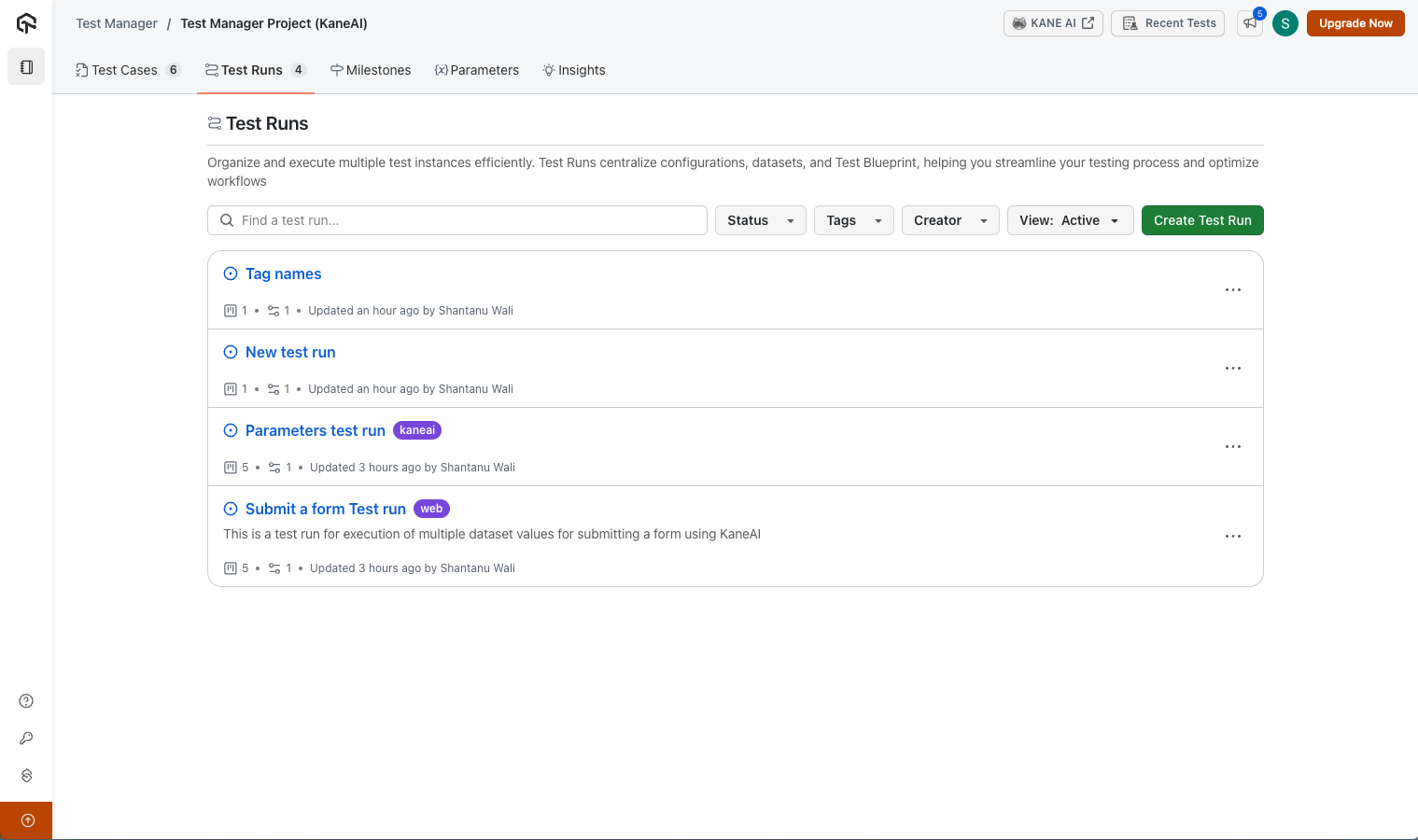
Step 2: Locate the 'Test Runs' Section & Copy Test run ID
Inside your selected project, navigate to the Test Runs section. Select the desired test run for integration or direct triggering from your CI/CD pipeline.
Open the test run to view its URL. Copy the Test Run ID from the URL. This ID will be used in the API call for integration.
A list of test instances with various configurations will be displayed for each test run.
Step 3: Configure the API Call
Replace <TestRunID> with the actual ID from the URL and set additional optional parameters:
- concurrency: Select the concurrency you want to set for this test run. Defaults to 1 if not specified.
- title: Assign a unique job title; a random one will be generated if omitted.
- region: Choose a region for web tests such as eastus or centralindia to select the region from where the VM is allocated.
- mobile_region: Choose a region for mobile app tests such as us,ap or eu to select the region from where the device is allocated.
- tunnel: Add the parameter and tunnel name if you want to run using TestMu AI Tunnel for private applications. See more details for tunnel here.
- dedicated_proxy: Add the region of the dedicated proxy such as us or eu, #Optional, either tunnel or dedicated proxy or geolocation can be used in a single API call.
- geolocation: Add the resgion of the geolocation that you want to run your tests from. You can find the list of support geolocations here.
- environment_id: Define the environment on which you want to run the test run if required.
- retry_on_failure: Define whether to retry on failure. When enabled, retries are triggered both when the testRunnerCommand execution fails and when individual test cases fail. You can set the maximum number of retries using
max_retries. You can find more details here. - max_retries: Define the number of maximum retries you want (Max value 5). Default retries 1. You can find more details here.
- timezone: Define the timezone you want to choose for test run in UTC+01:00 format.
- app_profiling: Add true if you want to track app profiling metrics in your test. You can find more details here.
- performance: Add true if you want generate Lighthouse report for your web tests. Supported on limited OS browser combinations. Additionally, Setting this as true could potentially slow down the execution time. You can find more details here.
- android_app_id: Specify an Android app ID to override the existing app in the configuration of the Test instances.
- ios_app_id: Specify an iOS app ID to override the existing app in the configuration of the Test instances.
- accessibility: Set as true if you want to run accessibility test on all your tests in the test run. Setting this as true could potentially slow down the execution time.
- replaced_url : To be used to dynamically replace any pattern URL in test cases with the replacement URL for entire test run.
- report_enabled: Set to
trueto generate an HTML report for the test run. The report can be accessed from the HyperExecute Job page after execution. See Reports for details. - extent_report_enabled: Set to
trueto generate an Extent report for the test run. The report can be accessed from the HyperExecute Job page after execution. Only one report type can be enabled at a time. Use eitherreport_enabledorextent_report_enabled, not both. - report_email_to: An array of email addresses to receive the test run report via email after execution. Maximum 10 email addresses. Only works when
report_enabledis set totrue. - callback_url: An HTTPS URL that receives one
POSTwith the job status and test counts when each job of the test run finishes. Not supported for sequential test runs. See Receive the Job Status via a Callback URL.
Test case failure retries are supported only for code exported from May 10, 2026 onwards. For previously exported code, retries are triggered only on test runner command failure. To use this capability, regenerate the code export for your test cases in Test Manager.
Example API Call:
curl --location 'https://test-manager-api.lambdatest.com/api/atm/v1/hyperexecute' \
--header 'Content-Type: application/json' \
--header 'Authorization: Basic <Base64Auth>' \
--data '{
    "test_run_id": "YOUR_TEST_RUN_ID", #enter test run id
    "concurrency": 1, # Optional, default 1
    "title": "UNIQUE_BUILD_NAME", #Optional
    "console_log": false, #Optional for web tests, options - false, error, warn, info, true
    "network_logs": false, #Optional to capture network calls during the test
    "network_full_har": false, #Optional, Only for web, to capture complete network requests & response during the test
    "region": "YOUR_DESIRED_REGION", #Optional for web tests, options - eastus, centralindia
    "mobile_region": "YOUR_DESIRED_REGION", #Optional for mobile tests, options - us,eu,ap
    "tunnel": "tunnel-name", #Optional, either tunnel or dedicated proxy or geolocation can be used
    "dedicated_proxy": "region", #Optional, either tunnel or dedicated proxy or geolocation can be used
    "geolocation": "region", #Optional, either tunnel or dedicated proxy or geolocation can be used
    "environment_id": 0, #Optional, default null, to define the environment for test run
    "retry_on_failure": true, #Optional, default true, to define if retry is needed in case of failure
    "max_retries": 1, #Optional, default 1, to define the number of retries needed if retry_on_failure is enabled
    "timezone": {"region":"Indianapolis"}, #Optional, Only for web, to define the timezone using which the test runs should run
    "app_profiling": false, #Optional for performance metrics for native mobile apps
    "performance": false, #Optional for lighthouse report for web tests
    "android_app_id": "lt://<YOUR_ANDROID_APP_ID>", #optional
    "ios_app_id": "lt://<YOUR_iOS_APP_ID>", #optional
    "accessibility": false, #Optional only for web tests
    "network_throttle": {
        "label": "No Throttling",
        "value": "default",
        "download_speed": 0,
        "upload_speed": 0,
        "latency": 0,
        "honor_network": true
    }, #Optional, only for mobile tests, to define if sessions needs to be enabled with network throttling enabled
    "replaced_url": [
      {
          "pattern_url": "TEST_URL_1",
          "replacement_url": "REPLACED_TEST_URL_1"
      },
      {
          "pattern_url": "TEST_URL_2",
          "replacement_url": "REPLACED_TEST_URL_2"
      }
    ], #Optional to be used to dynamically replace any pattern URL in test cases with the replacement URL
    "report_enabled": false, #Optional, set true to generate HTML report
    "extent_report_enabled": false, #Optional, set true to generate Extent report
    "report_email_to": ["email1@example.com"], #Optional, array of email addresses to receive report (max 10)
    "callback_url": "https://your-server.example.com/hyperexecute/callback" #Optional, HTTPS URL called when each job finishes
}'
Sample API Response:
The API response contains the job ID for both jobs created for desktop web tests as well as mobile tests on real devices. Here is a sample response for a test run which contains both app and web test cases:
{
    "job_id": "abcd1234-abcd-1234-abcd-1234abcd1234",
    "app_job_id": "abcd1234-abcd-1234-abcd-1234abcd1234",
    "test_run_id": "01LAMBDATEST2024KANEAIJ8NPGDP",
    "job_link": "https://hyperexecute.lambdatest.com/hyperexecute/task?jobId=<job_id>",
    "mobile_job_link": "https://hyperexecute.lambdatest.com/hyperexecute/task?jobId=<app_job_id>"
}
Step 4: Authenticate and Trigger the Job
- Provide your TestMu AI username and access key for Basic Authentication.
- Submit the API call to trigger the job. The process will start within seconds.
Important : Keep your credentials secure to maintain platform integrity.
Step 5: Monitor Test Executions
- Follow the link provided in the API response to view the HyperExecute Job.
- Monitor running executions in real time through the dashboard.

Github Actions sample
Here is a sample that you can use on how to integrate the API with Github Actions in your Github repository:
Step 1: Create a GitHub Actions Workflow YAML File In your Git repository, navigate to .github/workflows/ and create a file named sanity-test.yml.
Step 2: Sample for yml file In below sample, we are executing a test run using test_run_id and then verifying the result for it using HyperExecute job status API. You can find more details on HyperExecute APIs here and update the API in the .yml file based on your needs.
name: Run Sanity Tests on LambdaTest

on:
  push:
    branches:
      - main
  pull_request:
    branches:
      - main

jobs:
  sanity-test:
    runs-on: ubuntu-latest

    steps:
      - name: Trigger Sanity Test on LambdaTest
        id: trigger-test
        run: |
          echo "Triggering sanity tests on LambdaTest"
          response=$(curl --location 'https://test-manager-api.lambdatest.com/api/atm/v1/hyperexecute' \
            --header 'accept: application/json' \
            --header 'Content-Type: application/json' \
            --header 'Authorization: Basic <Base64Auth>' \
            --data '{
                "test_run_id" : "<test_run_id>",
                "concurrency" : 1,
            }')
          echo "Response: $response"
          job_id=$(echo $response | jq -r '.job_id')
          echo "Job ID: $job_id"
          echo "::set-output name=job_id::$job_id"

      - name: Check Test Status
        run: |
          echo "Checking test status"
          job_id=${{ steps.trigger-test.outputs.job_id }}
          sleep 240  # Wait before checking the status
          response=$(curl --location "https://api.hyperexecute.cloud/v2.0/job/$job_id" \
            --header "accept: application/json" \
            --header "Authorization: Basic <Base64Auth>")

          echo "Response: $response"
          status=$(echo $response | jq -r '.data.status')
          echo "Test status: $status"
          if [[ "$status" != "completed" ]]; then
            echo "Tests failed. Exiting with error."
            exit 1
          fi
          echo "Sanity tests passed successfully."
Step 3: Define Workflow Triggers Set the workflow to trigger on push and pull_request events (you can modify the trigger based on your needs) under "on" section of the yaml above.
Video Explanation
The video consists of old configuration with Test Plans and Builds instead of Test Runs. Please keep this in mind while going through the video. The video will be updated soon.


 Chat with Us