Auto Healing for Playwright Web Automation
The TestMu AI Auto Healing feature for Playwright testing automatically recovers from certain types of failures during test execution. When enabled, it reduces test flakiness and improves test reliability by detecting broken locators and handling unexpected errors in your test suites.
Enabling Auto Healing
To enable the Auto Healing feature, you need to pass the autoHeal: true as a capability in your Playwright configuration. For example:
const capabilities = {
  browserName: "Chrome",
  browserVersion: "latest",
  "LT:Options": {
    platform: "Windows 10",
    build: "Playwright Auto Heal Build",
    name: "Playwright Auto Heal Test",
    user: process.env.LT_USERNAME,
    accessKey: process.env.LT_ACCESS_KEY,
    network: true,
    video: true,
    console: true,
    autoHeal: true,
  },
};
Note: There are no Prerequisites required for enabling the auto-healing feature. You can enable the auto-healing feature directly via desired capabilities.
Language Preferences:
- JavaScript
- Python
- C#
- Java
For JavaScript/NodeJS, you can use the following code:
// playwright.config.js
module.exports = {
  use: {
    connectOptions: {
      wsEndpoint: `wss://cdp.lambdatest.com/playwright?capabilities=${encodeURIComponent(JSON.stringify({
        'browserName': 'Chrome',
        'browserVersion': 'latest',
        'LT:Options': {
          'platform': 'Windows 10',
          'build': 'Playwright Auto Heal Build',
          'name': 'Playwright Auto Heal Test',
          'autoHeal': true,
          'user': process.env.LT_USERNAME,
          'accessKey': process.env.LT_ACCESS_KEY,
        }
      }))}`
    }
  }
};
For Python, you can use the following code:
import asyncio
import json
import urllib.parse
from playwright.async_api import async_playwright

capabilities = {
    'browserName': 'Chrome',
    'browserVersion': 'latest',
    'LT:Options': {
        'platform': 'Windows 10',
        'build': 'Playwright Auto Heal Build',
        'name': 'Playwright Auto Heal Test',
        'autoHeal': True,
        'user': 'your_username',
        'accessKey': 'your_access_key',
    }
}

async def run():
    async with async_playwright() as playwright:
        browser = await playwright.chromium.connect(
            ws_endpoint=f"wss://cdp.lambdatest.com/playwright?capabilities={urllib.parse.quote(json.dumps(capabilities))}"
        )
For C#, you can use the following code:
using Microsoft.Playwright;

var capabilities = new Dictionary<string, object>()
{
    ["browserName"] = "Chrome",
    ["browserVersion"] = "latest",
    ["LT:Options"] = new Dictionary<string, object>()
    {
        ["platform"] = "Windows 10",
        ["build"] = "Playwright Auto Heal Build",
        ["name"] = "Playwright Auto Heal Test",
        ["autoHeal"] = true,
        ["user"] = Environment.GetEnvironmentVariable("LT_USERNAME"),
        ["accessKey"] = Environment.GetEnvironmentVariable("LT_ACCESS_KEY"),
    }
};

var browser = await Playwright.Chromium.ConnectAsync($"wss://cdp.lambdatest.com/playwright?capabilities={Uri.EscapeDataString(JsonSerializer.Serialize(capabilities))}");
For Java, you can use the following code:
import com.microsoft.playwright.*;
import java.util.HashMap;
import java.util.Map;

Map<String, Object> capabilities = new HashMap<>();
capabilities.put("browserName", "Chrome");
capabilities.put("browserVersion", "latest");

Map<String, Object> ltOptions = new HashMap<>();
ltOptions.put("platform", "Windows 10");
ltOptions.put("build", "Playwright Auto Heal Build");
ltOptions.put("name", "Playwright Auto Heal Test");
ltOptions.put("autoHeal", true);
ltOptions.put("user", System.getenv("LT_USERNAME"));
ltOptions.put("accessKey", System.getenv("LT_ACCESS_KEY"));

capabilities.put("LT:Options", ltOptions);

Browser browser = playwright.chromium().connect("wss://cdp.lambdatest.com/playwright?capabilities=" + URLEncoder.encode(new Gson().toJson(capabilities), "UTF-8"));
How Auto Healing Works
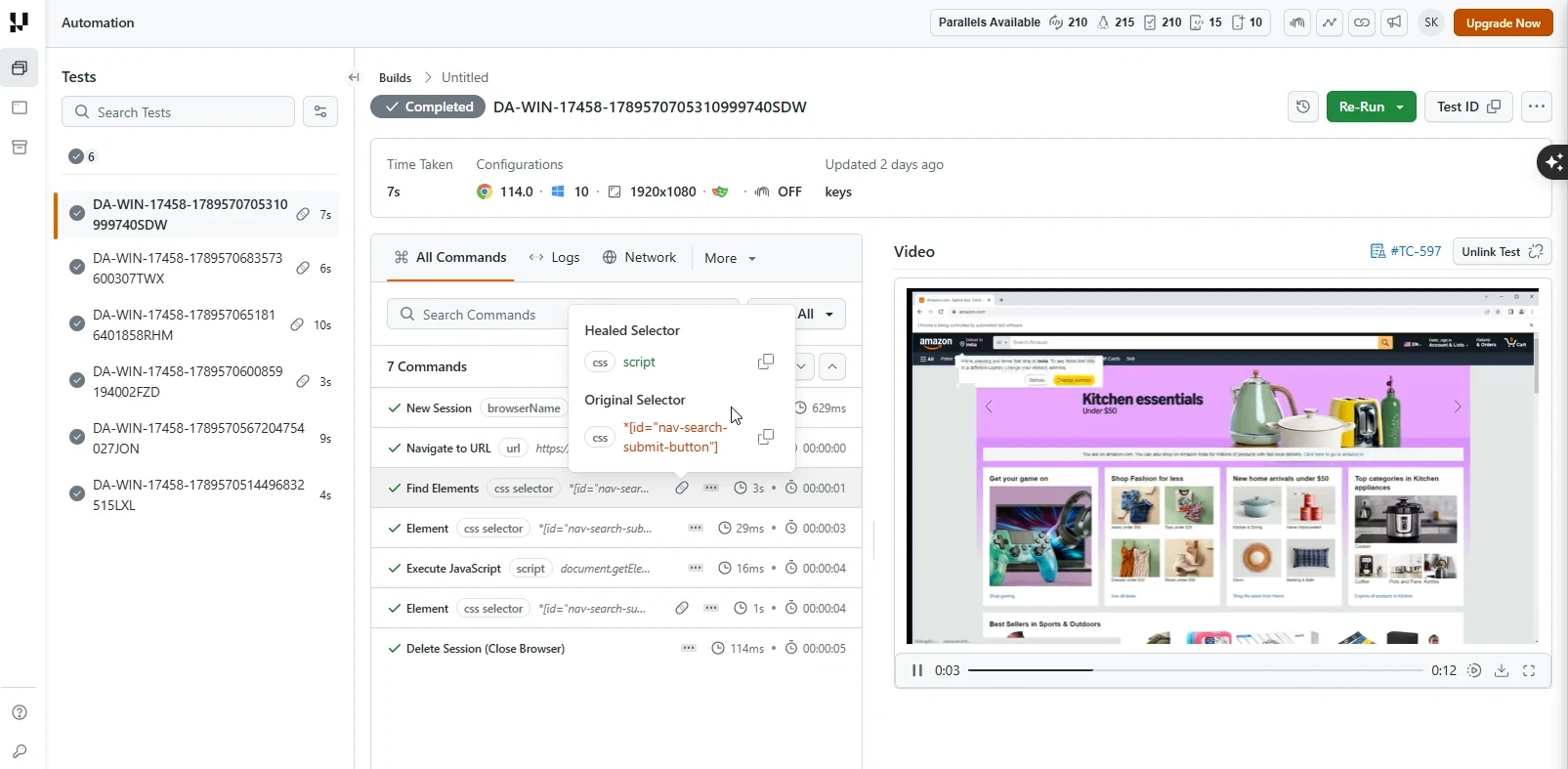
Auto-healing adjusts broken locators by merging attributes and context. During runtime, it monitors the web page to identify DOM (Document Object Model) changes.
When an element is successfully located using Playwright's locator methods (page.locator('#username').click(), etc.), its DOM path is recorded. If that same element is later referenced on the same page and is missing, the system evaluates the current page and generates new locators for altered elements based on previous benchmarks.
Auto Detection of New Locator
In some scenarios, web elements might change their locators due to updates in the web application. However, the Auto Healing feature can automatically detect the new locator and continue the test execution.
Here is an example test case demonstrating this:
const { test } = require('../lambdatest-setup');
const { expect } = require('@playwright/test');

test.describe('Browse LambdaTest in different search engines', () => {
    test('Test Auto Heal', async ({ page }) => {
        await page.goto('https://www.lambdatest.com/selenium-playground/auto-healing');
        await page.waitForTimeout(1000); // sleep 1s

        // Locate element before DOM change
        let buttonBeforeDOMChange = await page.locator('#username'); // equivalent to FindElement ByID
        await buttonBeforeDOMChange.click();

        // Trigger DOM change
        await page.click('p.selenium_btn');
        await page.waitForTimeout(1000); // sleep 1s

        // Try to locate the same element after DOM change
        // Auto healing will automatically detect the new locator
        let buttonAfterDOMChange = await page.locator('#username'); // again check for element
        await buttonAfterDOMChange.click();

        await page.waitForTimeout(1000); // sleep 1s
    });
});
In the above test case, we are interacting with an element before and after a DOM change occurs on TestMu AI's auto-healing playground. The Auto Healing feature will automatically detect if the element's locator has changed and adapt accordingly, ensuring the test continues to execute successfully.
To run the test, execute the below command:
npx playwright test auto-heal.spec.js
Benefits Of Auto Healing
- Increased Test Stability: Playwright tests remain consistent even when the web application's UI undergoes minor changes, reducing flakiness.
- Reduced Test Maintenance: The system automatically adapts to evolving interfaces, reducing the manual effort required to update test scripts.
- Reliable CI/CD Pipeline: Stable tests feeding into CI/CD pipelines reduce unexpected failures and ensure smoother deployments.
Limitations of Auto Healing
While the Auto Healing feature is designed to handle a wide range of issues, there are certain limitations to be aware of:
-
Non-recoverable errors: Auto Healing cannot recover from certain types of errors, such as Playwright browser initialization errors, network connectivity issues, or system-level failures.
-
Test accuracy: While Auto Healing can reduce test flakiness, it may also mask real issues in your web application or test scripts. It's important to review the logs and understand why a test needed healing.
-
Performance impact: While typically minimal, enabling Auto Healing can have a slight impact on test execution time due to the additional checks and recovery mechanisms.
-
Limited scope: Auto Healing works best with simple locator changes (ID, class, attribute modifications) and may not be effective for complete page redesigns or fundamental workflow changes.
Auto Healing enhances test suite robustness but does not replace good test design. Review healed tests regularly for issues that may be masked by the feature.
Related Docs
- Run your first Playwright test on TestMu AI walks through executing a Playwright script on the cloud grid.
- Migrate existing Playwright tests to TestMu AI moves your current suite onto the cloud grid.
- Configure Playwright capabilities covers the
autoHealcapability and every other test option.


 Chat with Us