Auto Healing for Selenium Web Automation
The TestMu AI's Auto Healing feature for Selenium testing allows you to automatically recover from certain types of failures during the execution of your test scripts. When enabled, it can significantly enhance the robustness of your test suite by handling unexpected situations and errors, thereby reducing test flakiness and improving test reliability of your test suites.
Enabling Auto Healing
To enable the Auto Healing feature, you need to pass the autoHeal: true as a capability in your WebDriver configuration. For example:
const capability = {
    "browserName": "Chrome",
    "browserVersion": "114.0",
    "LT:Options": {
        "platformName": "Windows 10",
        "project": "Untitled",
        "w3c": true,
        "plugin": "node_js-node_js",
        "autoHeal": true
    }
}
Warning: The
autoHealcapability will only work whensmartWaitis disabled. Both features cannot be enabled together in the same test session.
There are no prerequisites required for enabling the auto-healing feature. You can enable the auto-healing feature directly via desired capabilities.
Language Preferences:
- Java
- NodeJS
- C#
- PHP
- Python
- Ruby
For Java, you can use the following code:
ChromeOptions browserOptions = new ChromeOptions();
browserOptions.setBrowserVersion("118.0");
HashMap<String, Object> ltOptions = new HashMap<String, Object>();
ltOptions.put("username", "devanshb");
ltOptions.put("accessKey", "Cm0a8lbtMY5VvHWbovA2ocMn8nkT26qtlfv89K8T5IdOAiq0UU");
ltOptions.put("project", "Untitled");
ltOptions.put("selenium_version", "4.0.0");
ltOptions.put("w3c", true);
browserOptions.setCapability("LT:Options", ltOptions);
For NodeJS, you can use the following code:
const capability = {
	"browserName": "Chrome",
	"browserVersion": "118.0",
	"LT:Options": {
		"username": "devanshb",
		"accessKey": "Cm0a8lbtMY5VvHWbovA2ocMn8nkT26qtlfv89K8T5IdOAiq0UU",
		"project": "Untitled",
		"w3c": true,
		"plugin": "node_js-node_js"
	}
}
For C#, you can use the following code:
ChromeOptions capabilities = new ChromeOptions();
capabilities.BrowserVersion = '118.0';
Dictionary<string, object> ltOptions = new Dictionary<string, object>();
ltOptions.Add("username", "devanshb");
ltOptions.Add("accessKey", "Cm0a8lbtMY5VvHWbovA2ocMn8nkT26qtlfv89K8T5IdOAiq0UU");
ltOptions.Add("project", "Untitled");
ltOptions.Add("w3c", true);
ltOptions.Add("plugin", "c#-c#");
capabilities.AddAdditionalOption("LT:Options", ltOptions);
For PHP, you can use the following code:
$capability = array(
	"browserName" => "Chrome",
	"browserVersion" => "118.0",
	"LT:Options" => array(
		"username" => "devanshb",
		"accessKey" => "Cm0a8lbtMY5VvHWbovA2ocMn8nkT26qtlfv89K8T5IdOAiq0UU",
		"project" => "Untitled",
		"w3c" => true,
		"plugin" => "php-php"
	)
);
For Python, you can use the following code:
options = ChromeOptions()
options.browser_version = "118.0"
lt_options = {};
lt_options["username"] = "devanshb";
lt_options["accessKey"] = "Cm0a8lbtMY5VvHWbovA2ocMn8nkT26qtlfv89K8T5IdOAiq0UU";
lt_options["project"] = "Untitled";
lt_options["w3c"] = True;
lt_options["plugin"] = "python-python";
options.set_capability('LT:Options', lt_options);
For Ruby, you can use the following code:
options = Selenium::WebDriver::Options.chrome
options.browser_version = "118.0"
lt_options = {};
lt_options[:username] = "devanshb";
lt_options[:accessKey] = "Cm0a8lbtMY5VvHWbovA2ocMn8nkT26qtlfv89K8T5IdOAiq0UU";
lt_options[:project] = "Untitled";
lt_options[:w3c] = true;
lt_options[:plugin] = "ruby-ruby";
options.set_capability('LT:Options', lt_options);
How Auto Healing Works
Selenium Locator's auto-healing is a sophisticated method in test automation designed to address the instability of inconsistent tests. This system smartly adjusts locators by merging attributes and context, ensuring robustness and adaptability. During runtime, it consistently monitors the web page to identify DOM (Document Object Model) alterations.
When an element is successfully located on the page, its DOM path is recorded for subsequent use. If that same element is later referenced on the same page and is missing, the system evaluates the current page and formulates new locators for altered elements based on previous benchmarks.
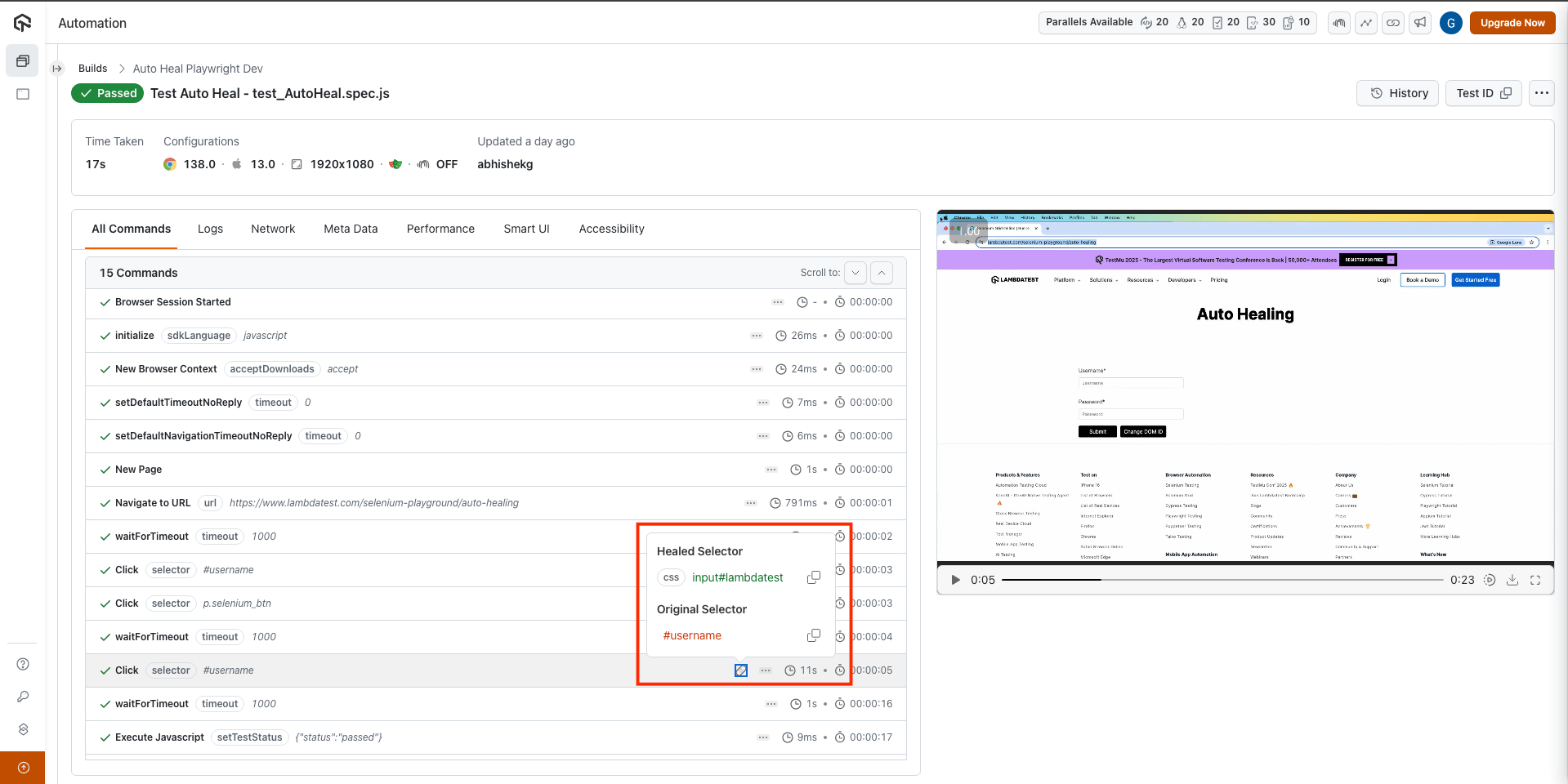
Auto Detection of New Locator
In some scenarios, web elements might change their locators due to updates in the web application. However, the Auto Healing feature can automatically detect the new locator and continue the test execution.
Here is an example test case demonstrating this:
import assert from 'assert';
import { Builder, By, until, Capabilities } from 'selenium-webdriver';

describe('Amazon Search Box Test', function () {
    this.timeout(30000);
    let driver;
    let vars;

    const capability = {
        "browserName": "Chrome",
        "browserVersion": "114.0",
        "LT:Options": {
            "platformName": "Windows 10",
            "project": "Untitled",
            "w3c": true,
            "plugin": "node_js-node_js",
            "autoHeal": true
        }
    }

    beforeEach(async function () {
        driver = await new Builder()
            .usingServer('LambdaTest_Hub_Url')
            .withCapabilities(capability)
            .build();
        vars = {};
    });

    afterEach(async function () {
        await driver.quit();
    });

    it('should change id of search box and find element', async function () {
        await driver.get('https://www.amazon.com');
        const searchBoxActual = await driver.findElement(By.id('nav-search-submit-button'));
        await driver.executeScript("document.getElementById('nav-search-submit-button').id='amazonsearchbox'");
        // const searchBox = await driver.findElement(By.id('amazonsearchbox'));
        const searchBoxHeal = await driver.findElement(By.id('nav-search-submit-button'));
        assert(searchBoxHeal, 'Element not found');
    });
});
In the above test case, we are changing the id of the search box on Amazon's homepage and then trying to find the element using the old id. The Auto Healing feature will automatically detect the new id and find the element.
To run the test, execute the below command:
./node_modules/.bin/mocha autohealingTest.js
Benefits Of Auto Healing
Self-healing plays a vital role in refining the test automation process. Here are its primary advantages:
-
Increased Test Stability: The auto-healing feature of TestMu AI ensures that tests remain consistent and stable, even when faced with minor changes in the web application's UI. By dynamically adjusting to these changes, the AI Native auto-healing feature overcomes test flakiness, providing stability and reliability to your test suite in no time.
-
Reduced Test Maintenance: One of the significant challenges in test automation is the constant need to update and maintain test scripts due to evolving application interfaces. With TestMu AI's auto-healing capability, the system automatically adapts to these changes, reducing the manual effort required to update test scripts, and saving time and resources.
-
Intelligent Test Automation: TestMu AI's auto-healing feature is not just about adapting to changes; it's about doing so intelligently. The auto-healing feature adds intelligence to the automated tests and enables them to dynamically adapt to the changes in an application and its environment. It typically involves applying artificial intelligence and machine learning algorithms to the self-healing of tests.
-
Reliable CI pipeline: Continuous Integration (CI) pipelines require reliable and consistent test results to ensure that the software development process is smooth and efficient. With the auto-healing feature, TestMu AI ensures that the tests feeding into the CI pipeline are stable, reducing the chances of unexpected failures and ensuring a smoother development and deployment process.
Limitations of Auto Healing
While the Auto Healing feature is designed to handle a wide range of issues, there are certain limitations to be aware of:
-
Non-recoverable errors: Auto Healing cannot recover from certain types of errors, such as WebDriver initialization errors or system-level failures.
-
Test accuracy: While Auto Healing can reduce test flakiness, it may also mask real issues in your web application or test scripts. It's important to review the logs and understand why a test needed healing.
-
Performance impact: While typically minimal, enabling Auto Healing can have a slight impact on test execution time due to the additional checks and recovery mechanisms.
The Auto Healing feature is a functionality to enhance the robustness of your test suite, but it does not replace good test design and error handling practices. Always ensure your tests are well-designed, have proper error handling in place, and are reviewed regularly for issues that may be masked by the Auto Healing feature.
That was all you need to know for the Auto-Healing feature. If you still have any questions for us, please feel free to let us know. Our experts are always available on chat to help you out with any roadblock regarding our product. Happy testing!

 Chat with Us
 Ask the Community