HyperExecute Release Notes 2025
Version 3.1.8
Firefox Support for Console Logs with Playwright and Selenium
HyperExecute now captures browser console logs on Firefox for both Playwright and Selenium test runs, extending existing console log support beyond Chrome and Edge. Enable the console capability in your test configuration to capture JavaScript and DOM console output when running your tests on Firefox.
Version 3.1.7
Lighthouse Report Support with Playwright on HyperExecute
HyperExecute now supports generating Lighthouse reports using Playwright, enabling teams to measure and track web performance, accessibility, SEO, and best practices directly within their Playwright test workflows.
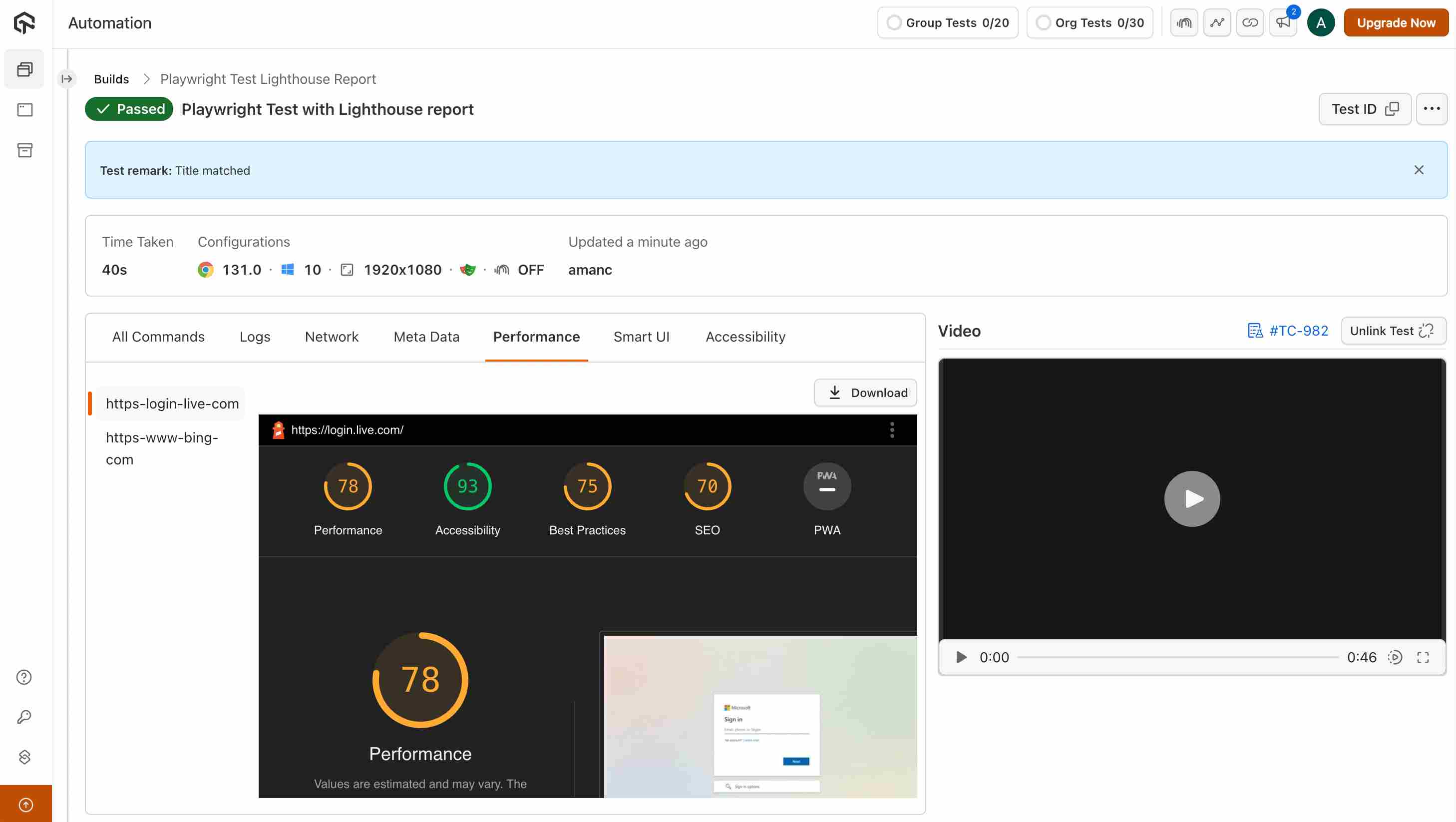
Learn more about Lighthuouse Playwright Reports
Version 3.1.6
Chrome for Testing Browser Support
HyperExecute now supports Chrome for Testing, enabling more reliable and version-controlled browser testing across automation workflows.
Why This Matters Traditional Chrome auto-updates can introduce test instability due to unexpected version changes. Chrome for Testing provides:
- Predictable browser versions
- Better alignment with corresponding ChromeDriver versions
- More stable and debuggable test runs in CI/CD pipelines
How It Helps You
- Run tests against specific Chrome versions without surprises
- Reduce flaky failures caused by browser mismatches
- Maintain consistency across local, staging, and CI executions
Version 3.1.5
Workflows for JMeter Projects
HyperExecute now supports Workflows for JMeter projects, enabling teams to orchestrate, automate, and manage performance test execution more efficiently within CI/CD pipelines.
Why This Matters Performance testing often needs more than a single test run. Workflows allow you to:
- Improve repeatability and reliability of load and performance testing
- Align JMeter tests with real-world CI/CD practices
How It Helps You
- Reduces manual intervention in performance testing
- Improves visibility and control over JMeter executions in HyperExecute
Learn more about Workflows from the documentation.
Version 3.1.4
Enhanced Support for Azure Repositories in HyperExecute Projects
We have introduced an enhancement to the HyperExecute Custom Project feature to support Azure Repos. This enables you with code repositories hosted in Azure DevOps to execute tests directly on HyperExecute, without relying on Jenkins or any external CI/CD tool.
With this update, you can now configure Azure Repos in the same intuitive manner as GitHub, or Bitbucket. Simply provide the repository details and Personal Access Token (PAT), and HyperExecute will fetch the code and trigger workflows seamlessly.
📘 Read More: Learn more about configuring Azure Repos, project setup, workflows, and job triggers in the HyperExecute documentation.
Version 3.1.2
Rerun Failed Tests on HyperExecute
Quickly validate fixes without rerunning your entire test suite. With the new Rerun Failed Tests feature, you can relaunch only the failed scenarios or the full suite directly from the dashboard, drastically reducing execution time and improving feedback cycles. Reruns use the same YAML configuration for consistent, reproducible results, with options to pick the same or latest commit and adjust concurrency.
Learn more: Refer to the detailed Rerun Failed Tests documentation.
Snooper Compatibility Update
Snooper is not compatible with Alpine-based Docker images because Alpine uses musl libc instead of glibc, which Snooper requires. To avoid runtime errors or unexpected failures, ensure your images are built on a non-Alpine base that includes glibc. This helps maintain consistent behavior when updating or troubleshooting Docker environments.
Learn more: Refer to the Snooper documentation.
View & Verify Code-Signed HyperExecute CLI Binaries
You can now easily verify the authenticity of downloaded HyperExecute CLI binaries using platform-specific code-signing checks. Each release is digitally signed to ensure integrity and trust, with clear instructions for Linux, macOS, and Windows users to validate the signature or certificate before use.
Learn more: Refer to the Code Signing Verification Guide
Version 3.1.0
HyperExecute now supports Katalon Reports generation, including all new report formats introduced in Katalon Studio 10 and above with the following support:
- Seamless Katalon Report Integration: You can now generate Katalon HTML reports directly within your HyperExecute workflow.
- Support for Latest Report Structure: HyperExecute is fully compatible with the new report schema and format updates introduced in Katalon Studio 10+.
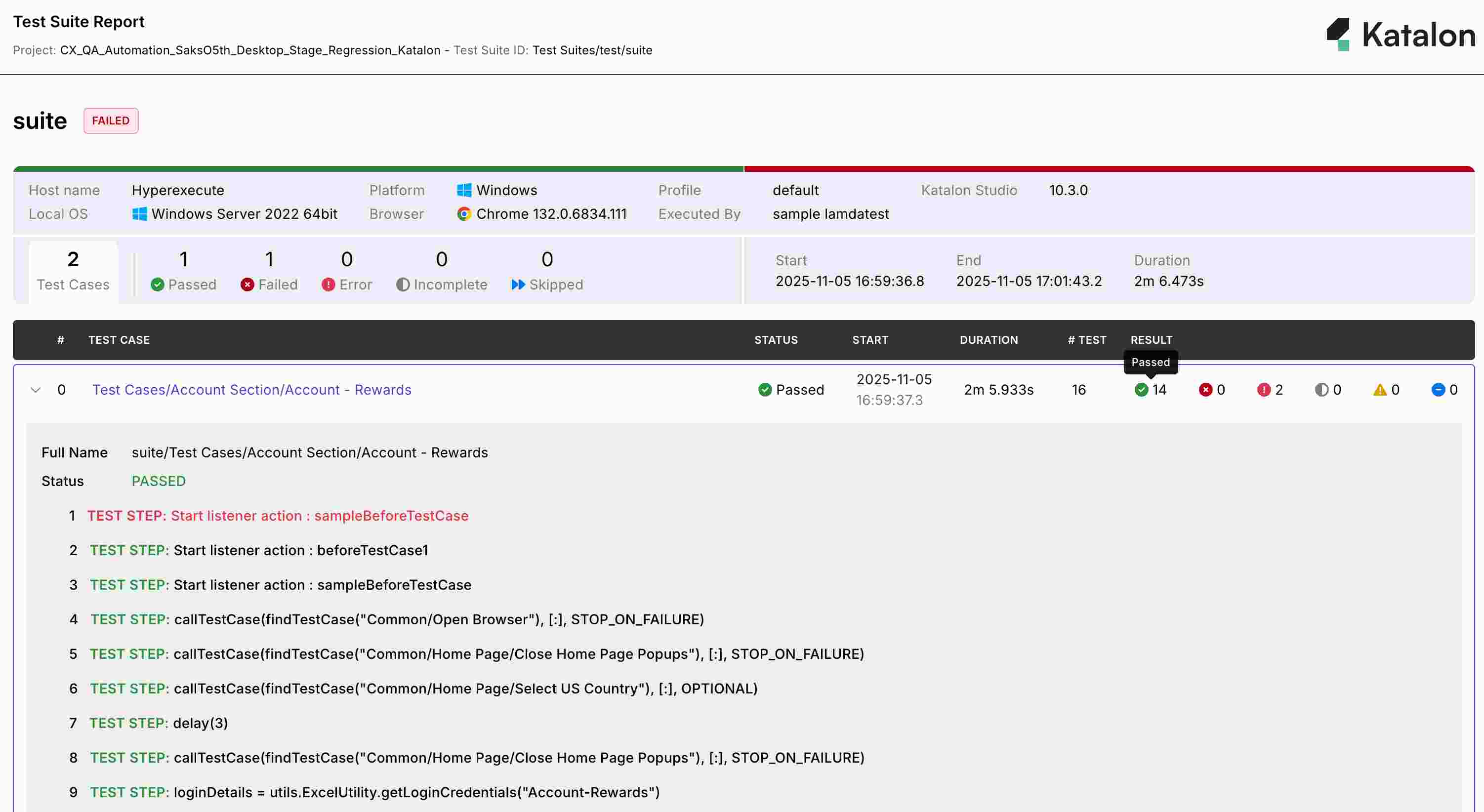
📘 Refer to our Katalon Report Generation Guide for a detailed setup walkthrough and examples.
Version 3.0.8
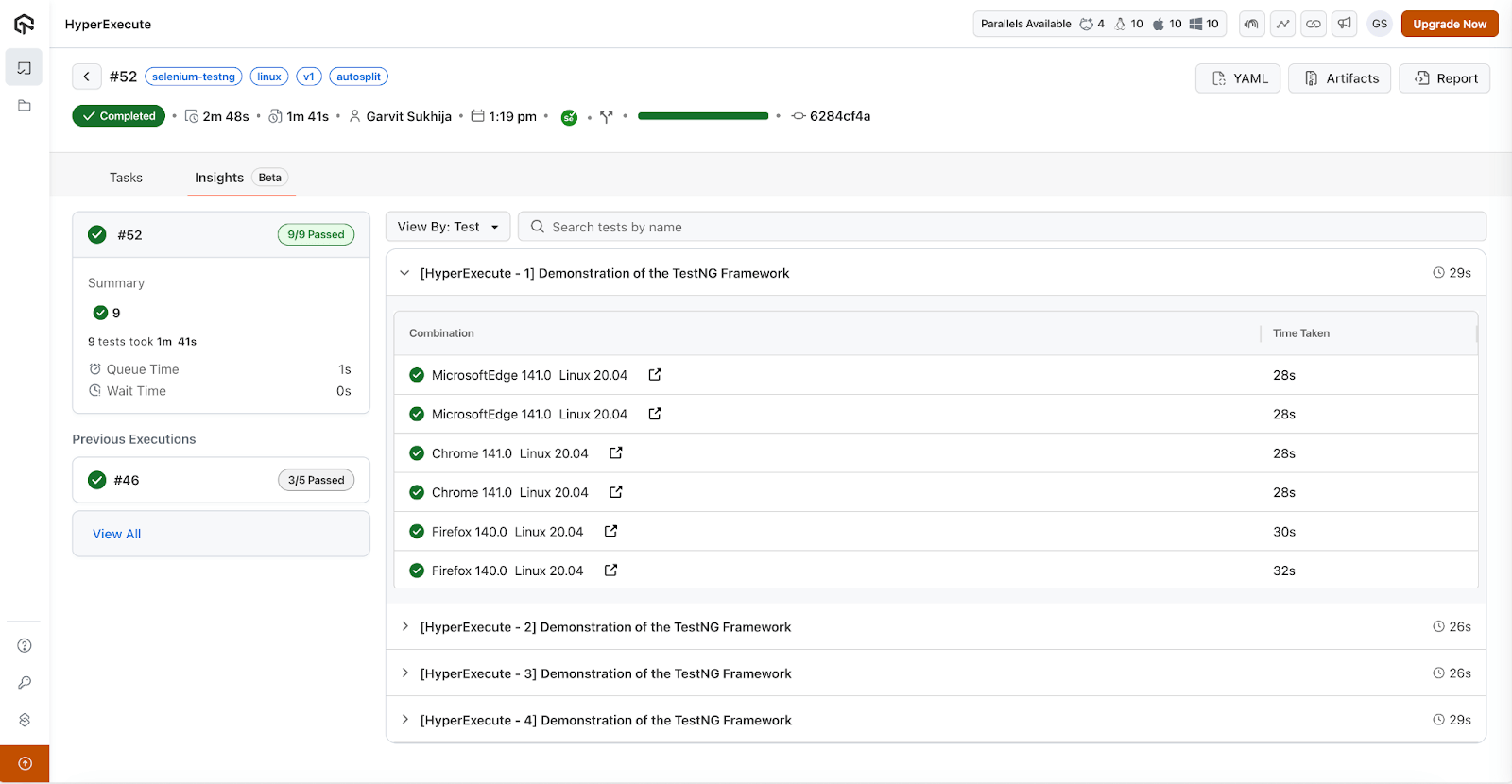
Job Insights View in HyperExecute
With the Job Insights View, you can now access a comprehensive overview of all your test results across different configurations, all in one unified interface, Even when tests are split across multiple environments or parallel jobs, HyperExecute intelligently aggregates the data, giving you a complete, consolidated view of your job performance.
This feature empowers you to:
- Compare results across configurations effortlessly.
- Review job summaries and outcomes in a single glance.
- Analyze historical job runs within the same project to identify patterns, regressions, or performance drifts quickly.
The Job Insights View is especially valuable for teams running the same tests across multiple combinations (such as different browsers, OS versions, or device types). It helps you pinpoint inconsistencies and regressions instantly, enabling faster decision-making and smoother test management.
Version 3.0.6
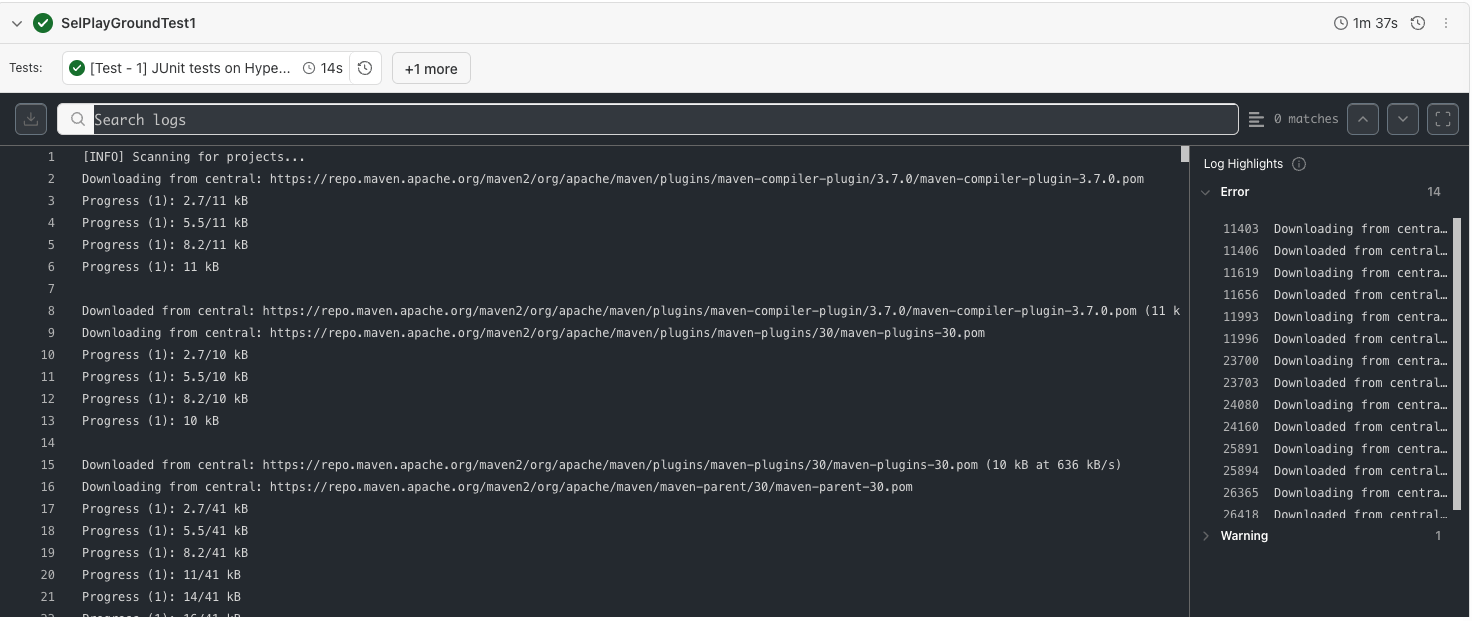
Feature: HyperExecute Logs Highlights
Debugging large test executions often generates extensive logs, making it difficult to identify key issues. The new Logs Highlights feature enhances log readability by automatically highlighting and grouping critical entries.
HyperExecute categorizes logs into Errors and Warnings using intelligent pattern detection based on regular expressions (regex). This will help you quickly locate and review the most relevant log lines during test analysis.
Version 3.0.5
Feature: syncStart
HyperExecute now supports the syncStart directive in the job YAML. When enabled, all VMs in autosplit or matrix mode start their tasks simultaneously after allocation, ideal for benchmarking or comparative test runs.
If some VMs are not ready within 15 minutes, the job starts with the available ones.
NOTE : For detailed usage and examples, refer to the detailed HyperExecute documentation.
Version 3.0.4
New Capability: bypassProxyDomains
You can now use the bypassProxyDomains capability to bypass Dedicated Proxy for specific domains. This ensures that local services (e.g., localhost, 127.0.0.1, or internal endpoints) remain accessible during test runs.
Note: dedicatedProxy: true must be enabled for this capability to take effect.
Visit the bypassProxyDomains documentation page to understand this capability in detail.
Live Command Logs
We've improved the way command logs are displayed in the HyperExecute dashboard. Earlier, logs appeared in chunks, which delayed visibility and created a less interactive experience. With the new Live Command Logs, you'll now see logs in real-time as they are generated, giving you instant feedback during test execution.
Version 3.0.3
MITM Support in Emulators
We've added Man-in-the-Middle (MITM) proxy support in HyperExecute Emulators.
- You can now capture network logs directly from emulator sessions using MITM.
- This feature is available for all emulators when configured with a flag that you can add in your
hyperexecute.yamlfile:
framework:
  name: raw
  args:
    mitmProxy: true
This enhancement enables deeper debugging of API calls, request/response payloads, and overall network traffic during test execution.
Enhancement: Retry Visibility in HyperExecute Reports
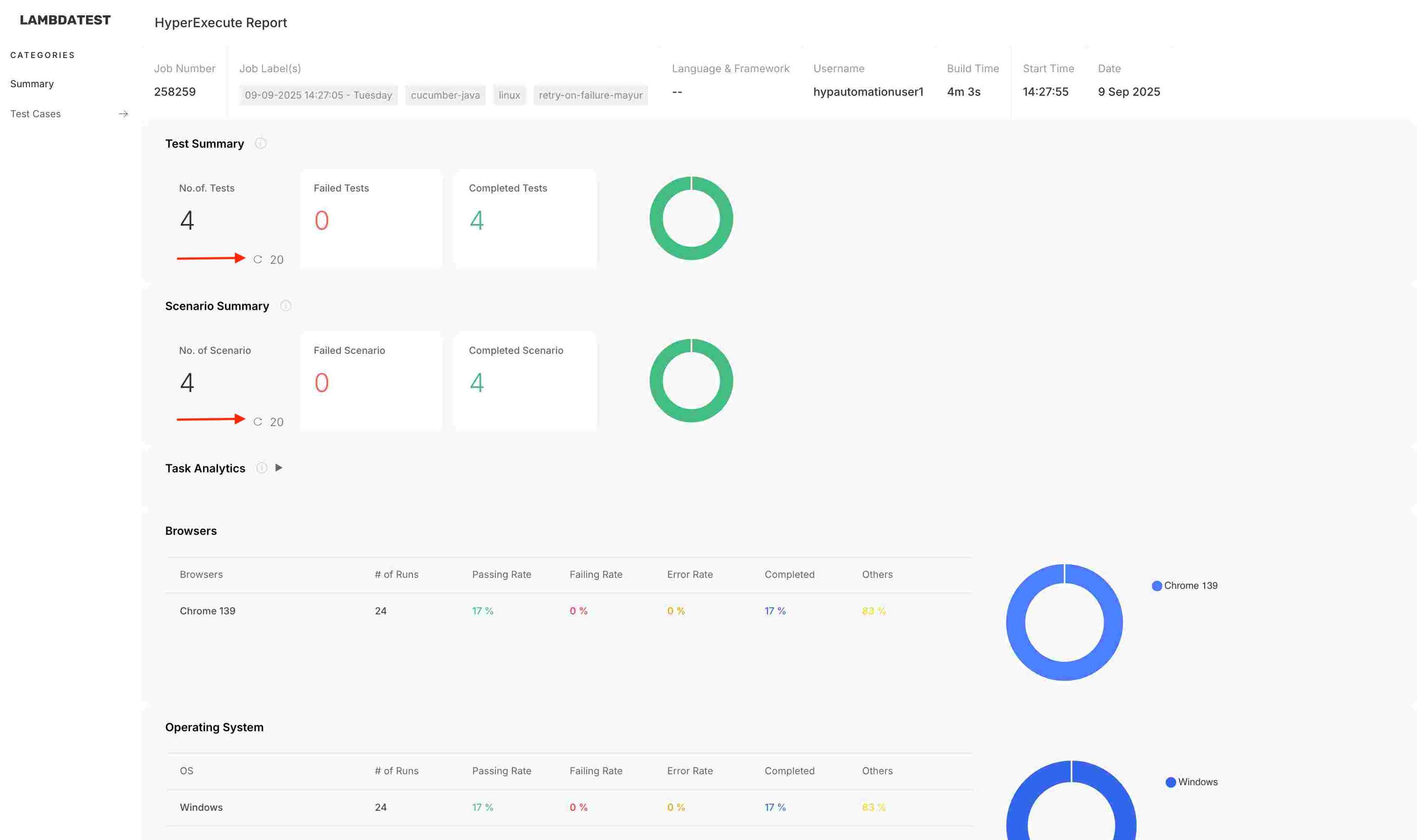
We've enhanced the HyperExecute Report to give better visibility into retries at both the summary and test level.
- Total Counts Refined : The "No. of Scenarios" and "No. of Tests" metrics will now display values excluding retries.
- Retry Indicators : A retry icon and the number of retried tests/scenarios are displayed alongside the counts, similar to the Task Summary section.
- Test Case Details : In the "Test Cases" view, retried tests are now clearly marked with a retry icon.
This update ensures accurate reporting and makes it easier to differentiate between unique executions and retries.
Muted Test Count & Bulk Unmute Option
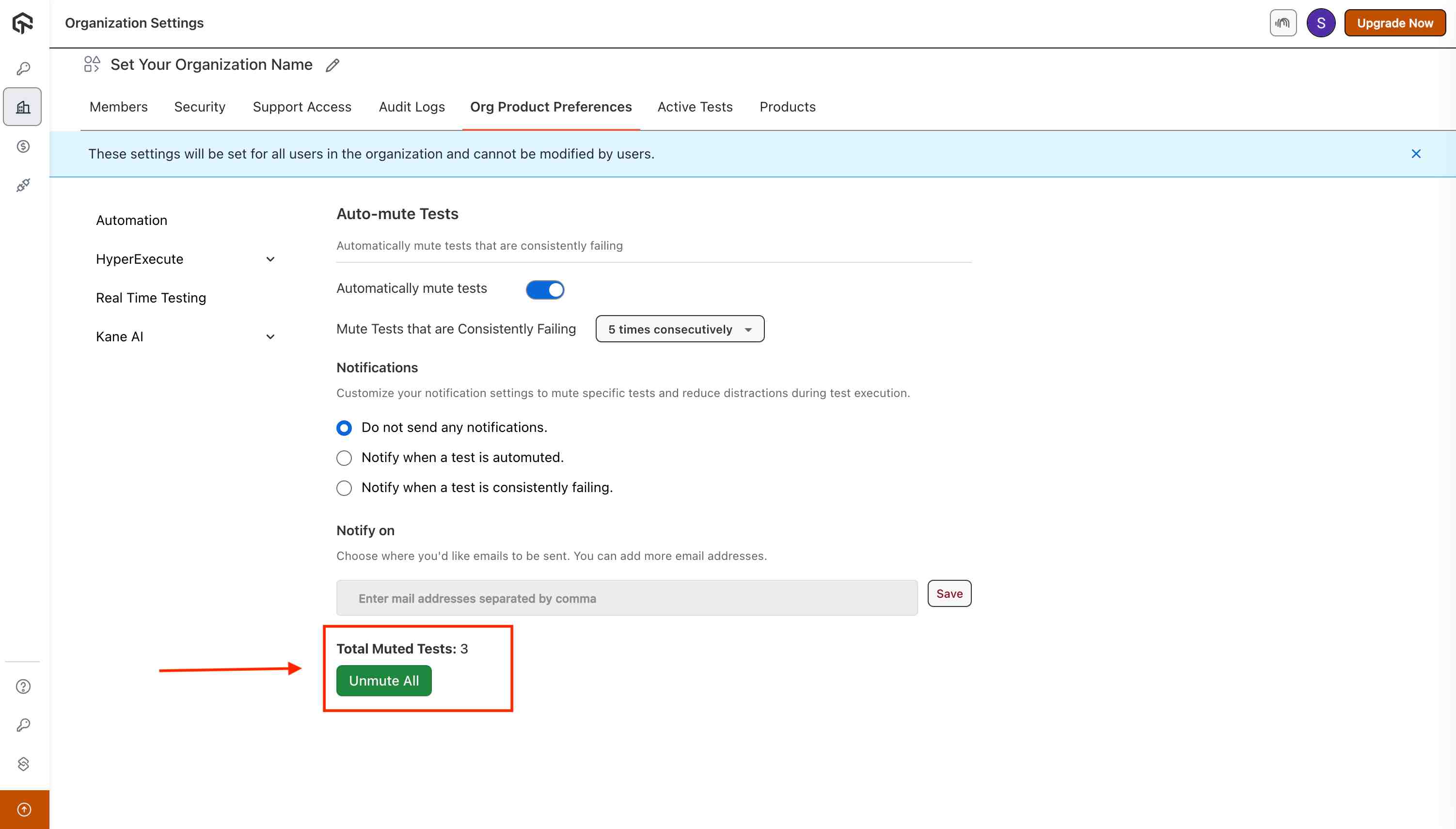
We've enhanced the Test Muting functionality in HyperExecute with improved visibility and control:
- Total Muted Test : The dashboard now shows the number of muted test cases in your suite.
- Unmute All : You can now unmute all tests at once instead of manually unmuting them one by one.
This update streamlines test management and makes it easier to re-enable muted tests when they are ready to be executed again.
Version 3.0.1
Workflow Variables on HyperExecute
With Workflow Variables, you can now customize your workflow execution. This makes it easier to reuse the same workflow across multiple scenarios without editing YAML or creating duplicate workflows.
- Workflow-level Variables : Define reusable variables (e.g., ENVIRONMENT, BROWSER) while creating or editing workflows.
- Default & Multiple Values : Assign defaults or provide multiple values per variable.
- Runtime Overrides : Update variable values at run time without changing saved defaults.
To learn more about Workflow Variables on HyperExecute, refer to our detailed documentation
Version 3.0.0
Language Support for Android Real Device Maestro Framework
We have introduced language support for Maestro tests on Android devices in HyperExecute. Now, you can configure the language parameter directly in your HyperExecute YAML under the framework flag.
This enhancement is particularly useful when your testing applications in non-English environments. For example, you can now run tests in Spanish by setting:
framework:
  name: raw
  args:
    language: es
    locale: ES
BiDi Testing Support with Selenium WebDriver
HyperExecute now supports BiDi (Bi-Directional) Testing with Selenium WebDriver. BiDi provides a two-way communication channel between the client and the browser, allowing you to go beyond traditional WebDriver commands. With BiDi enabled, you can interact with real-time browser events such as console logs, network traffic, JavaScript exceptions, and more, all directly from your test scripts.
To learn more about BiDi testing with Selenium WebDriver on HyperExecute, refer to our detailed documentation
Version 2.9.9
Emulator Support with Chrome for Browser Automation
We are excited to announce emulator support for Chrome browser automation on HyperExecute. This initial release introduces emulator functionality exclusively for Chrome, providing enhanced flexibility for testing mobile browser-based workflows.
Key Features Included
- Command Logs – Track and debug automation commands executed during test runs.
- Video Recording – Access full session recordings for detailed test analysis.
- Screenshots – Capture screenshots at various stages of execution for validation.
- Comprehensive Logs – Access Appium, Console, Network, and Device logs for improved troubleshooting.
Supported Environments
Currently available on Android 11 and Android 12 emulators. More versions and browsers will be supported in future releases.
👉 You can check detailed device support and capabilities at: TestMu AI Capabilities Generator
Version 2.9.8
SmartWait Support on HyperExecute
We are pleased to announce that the SmartWait functionality is now supported on HyperExecute.
SmartWait intelligently manages wait times by performing actionability checks before executing actions on webpage elements. This ensures that actions are only carried out when elements are ready, improving both accuracy and efficiency in Selenium automation.
With SmartWait on HyperExecute, you can:
- Reduce reliance on explicit and implicit waits.
- Optimize test scripts for readability and maintainability.
- Execute tests with improved reliability in parallel and distributed environments.
📌 Learn more about configuring SmartWait: SmartWait Documentation
Version 2.9.7
HyperExecute Security Update
We have implemented important security enhancements across HyperExecute to strengthen the overall protection of your test execution environment. This update includes:
- Application of the latest security patches to address identified vulnerabilities.
- Improved handling of session authentication and access controls.
- Strengthened security controls to ensure a safer execution environment.
These updates ensure that your test executions run in a more secure and reliable environment, with improved safeguards against potential risks.
Version 2.9.6
Regex Support in partialReports Parameter
You can now define dynamic or variable folder structures for report generation using wildcard (**) based regex patterns in the location parameter under partialReports. This allows HyperExecute to automatically discover and upload test reports from non-static, dynamically generated directories, eliminating the need to manually move reports to a fixed path.
Problem It Solves
Previously, HyperExecute required a static path to locate and upload test reports for frameworks like Cucumber. Customers generating test data in nested or date-based folders (e.g. reports/2025-07-29/cucumber/) encountered "path not found" errors, breaking the report generation process.
New Behavior
HyperExecute now supports regex-style directory matching (using **) to recursively search for report files in nested folders. This flexibility ensures that test reports are picked up correctly even if the folder structure changes between runs.
Supported Syntax Example
partialReports:
  location: reports/**/cucumber/
  frameworkName: cucumber
  type: json
This will successfully match paths like:
reports/2025-07-29/cucumber/
reports/staging/run_001/cucumber/
reports/builds/test_42/cucumber/
Your Testrunner.java file should have the complete path from where partial reports will be added. Example:
Testrunner.javaplugin = {
"json:target/abc/mno/pqr/xyz/cucumber-reports/CucumberTestReport.json",
"json:target/abc/its/pqr/abc/cucumber-reports/CucumberTestReport.json"
}You can configure your hyperexecute.yaml as:
hyperexecute.yamlpartialReports:
location: target/abc/**/pqr/**/cucumber-reports
frameworkName: cucumber
type: json
Version 2.9.5
Playwright Real Device iOS Support on HyperExecute
You can now run Playwright tests on real iOS devices using HyperExecute. This unlocks the power of native device testing with the speed and flexibility of Playwright on our real device cloud.
To enable this mode:
- Set
runson: iosin your YAML. - Use the following under
frameworkflag:
runson: ios

framework:
  name: appium
  args:
    playwrightRD: true
    mobileDC: true
Note: Currently supported on Safari for iOS real devices.
Version 2.9.4
YAML-Based Capability Overrides for Selenium Tests
You can now override Selenium capabilities directly from your hyperexecute.yaml file using the new ltOptions flag. This enhancement allows you to define key-value pairs, like browser type, version, logs, video, tunnel, and more without changing your test scripts.
Why it matters?
- Avoid code changes for environment-specific needs.
- Reuse the same script across different setups.
- Keep test code clean and capability-agnostic.
ltOptions:
  browserName: firefox
  build: 'testng_build_yaml_ltOptions'
  console: true
  name: 'testng_test_yaml_ltOptions'
  network: true
  selenium_version: 4.20.0
  tunnel: false
  version: latest
  video: false
📘 Refer to our detailed documentation for
ltOptionsflag.
Network Logs & Tunnel Support for Maestro Framework
HyperExecute now supports network logs and tunnel capabilities for Maestro tests running on both virtual devices and real devices using the Raw Framework configuration.
Feature Highlights
- Network Logs: Capture detailed request/response data during test execution for enhanced debugging and visibility.
- Tunnel Support: Access internal or staging environments securely using TestMu AI Tunnel.
- Supported across both virtual and real mobile devices.
📘 Refer to our detailed documentation for
Maestro.
Version 2.9.1
Support for customHeaders in HyperExecute
You can now inject custom HTTP headers into your test sessions using the customHeaders capability. This gives you more control over outbound requests made during test execution, especially when working around network security controls like firewalls or header-based access restrictions.
caps.setCapability("customHeaders", new HashMap<String, String>() {{
  put("x-px-access-token", "testuil");
}});
These headers are attached to your outbound HTTP requests and can help:
- Authenticate against secured endpoints
- Pass custom metadata
- Work around network/firewall restrictions
📘 Refer to our detailed documentation, Custom Headers for detailed explanation and examples.
Version 2.9.0
Git Token Support & Git Validation Improvements in HyperExecute Projects
We've enhanced Projects in HyperExecute to streamline Git integration. You can now also provide a git_token instead of PAT Token during project creation for GitHub authentication. If a token isn't provided at request time, HyperExecute will resolve it in the following order:
- Request-level token
- User-level secret
- Organization-level secret
You can now integrate Enterprise GitHub accounts seamlessly into Projects.
📘 Refer to our detailed documentation for
Projects.
Version 2.8.9
Windows 11 Infrastructure Optimizations
Enhanced speed and stability for tests running on Windows 11 environments.
Smart UI Improvements for Playwright
Optimized performance and accuracy of Smart UI validations in Playwright-based tests.
GPU Acceleration for Emulators
Introduced GPU-based acceleration to significantly boost emulator performance during test runs.
Version 2.8.8
Platform-Specific Error Codes
Introduced clear and consistent error codes to help you identify and resolve issues faster.
Chrome Driver Bug Fixes:
Addressed key issues to improve test reliability and compatibility with the latest Chrome versions.
Cypress Fixes for macOS 14
Resolved execution issues specific to Cypress tests running on macOS 14.
Scheduled Workflow Optimizations
Improved the reliability and performance of scheduled test executions.
Version 2.8.7
Folder Upload Support for JMeter Projects
You can now upload entire folders for JMeter performance tests, making it easier to manage complex test setups.
Mobile Test Execution Optimizations
Improved execution speed and stability for mobile tests running on HyperExecute.
Bug Fixes in Extent Native Reports
Resolved formatting and rendering issues to ensure more accurate and consistent reporting.
Version 2.8.6
Slack Integration Enhancements
Improved message formatting, richer test summaries, and better control for smoother collaboration.
Video Generation Optimizations
Faster and more reliable test case video generation with smaller file sizes and improved playback quality.
Version 2.8.5
🔧 Bug Fixes
- Resolved various stability and performance issues reported by users to ensure a smoother and more reliable experience across the platform.
- Addressed inconsistencies in data rendering and export functionality within the reporting modules.
- Fixed minor UI glitches and alignment issues to enhance usability.
🚀 Platform Enhancements
Improved Reporting Capabilities:
- Enhanced data visualization for better insights and clarity.
- Faster report generation and improved data accuracy.
- New filters and customization options for more flexible reporting workflows.
- Backend optimizations were made to boost performance and scalability, particularly under high-load conditions.
- Improved compatibility with third-party integrations to streamline data sharing and analysis.
We continue to listen to your feedback and are committed to delivering features and fixes that improve your experience. Stay tuned for more!
Version 2.8.4
🚀 New Feature: Enhanced Left-Side Test List View for Cypress
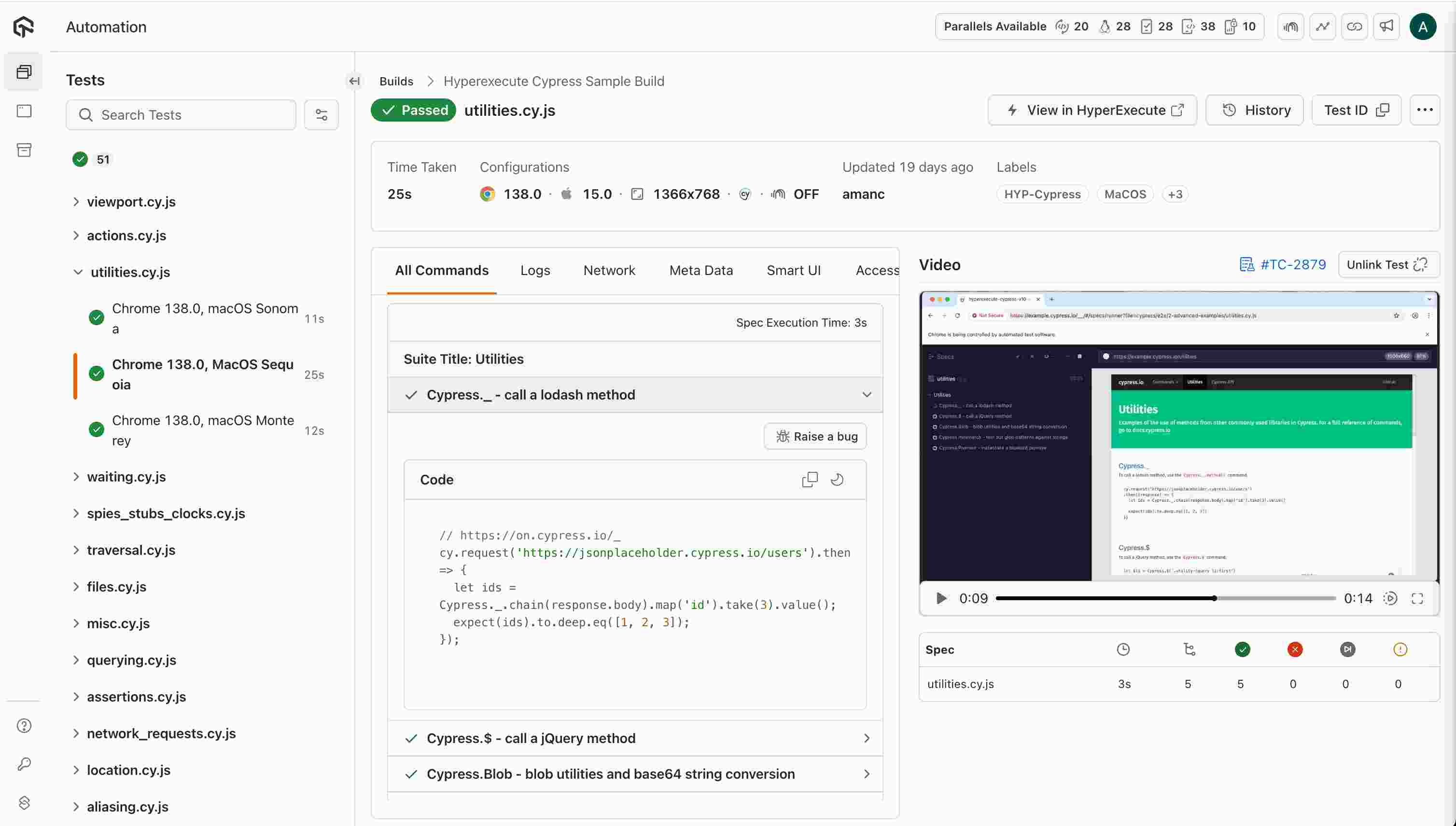
We're excited to announce the launch of a brand-new Left-Side Test List View in the HyperExecute Automation Dashboard, tailored specifically for Cypress test executions. This enhancement is designed to provide users with a more intuitive, informative, and actionable interface for navigating and debugging their Cypress automation builds.
🔍 Overview The new left-side panel now displays a vertical list of executed Cypress spec files within each build, making it easier than ever to:
- Understand the status of individual test files at a glance.
- Navigate between test files quickly.
- Debug failed or skipped tests efficiently.
- Monitor execution time per file. This feature significantly improves user experience by streamlining test result analysis and accelerating troubleshooting.
✅ Key Features Implemented 1. Test File Listing
- Each Cypress spec file (e.g., actions.spec.js, tunnel.spec.js) is displayed in a clean vertical list.
- Files are grouped under their corresponding build for better context.
- Sorted by execution start time to reflect chronological order.
2. Status Indicators
- Green checkmark (✔️): Test passed successfully.
- Red cross (✖️): Test failed.
- Yellow clock (⏳): Test is currently running (real-time updates).
- Grey icon (–): Test was skipped or not executed.
✅ Statuses are clearly visible and consistent across both the Build Summary page and individual Test Run pages.
3. Execution Time Display
- Execution duration shown next to each test file.
- Time format adapts based on length:
- 25s (seconds)
- 2m 59s (minutes and seconds)
✅ Times like 2m 59s, 35s, and 44s are accurately rendered in UI as expected.
4. Search and Filter
- A dedicated "Search Tests" bar is available at the top of the test list.
- Users can filter test files dynamically by filename for faster navigation.
🧪 Use Cases & Benefits
| Use Case | Benefits |
|---|---|
| Quickly identifying failed tests | Streamlined debugging process |
| Monitoring execution time per file | Better performance tracking |
| Searching through long test lists | Improved productivity and usability |
| Viewing real-time test statuses | Enables proactive monitoring during CI/CD |
📌 Accessing the Feature This feature is enabled by default for all Cypress-based test executions on HyperExecute. Simply navigate to your Automation Dashboard , select a Cypress build, and view the enhanced left-side test list in the Build Summary or individual Test Run views.
Version 2.8.2
Validate your HyperExecute YAML with ease !!
The --validate flag checks the syntax and structure of your YAML file without executing any tests, allowing you to quickly verify if the file is properly formatted.
How It Works
When you pass the --validate flag along with your YAML file, the CLI will:
- Validate the structure and syntax of the YAML file.
- Return a success or error message indicating whether the file is correct or if there are issues that need attention.
./hyperexecute --user undefined --key undefined --config RELATIVE_PATH_OF_YOUR_YAML_FILE --validate
Version 2.8.1
Enhanced failFast at the Scenario Level
We have made am enhancement to our test configuration: the ability to use failFast at the scenario level!
Previously, failFast could only be applied at the test level. Now, with this update, you can configure failFast to stop further scenario execution after a specified number of failed scenarios, providing more granular control over your testing process.
Key Features:
- Granular Control: Apply failFast to individual scenarios instead of the entire test suite.
- Easy Configuration: Simply set the level to scenario in the YAML configuration.
- Max Test Failures: Control the maximum number of allowed test failures at the scenario level.
Example YAML Configuration:
failFast:
  maxNumberOfTests: 2
  level: scenario
Note: You can use
failFasteither at the test level or scenario level, but not both simultaneously.
This enhancement brings more flexibility to your testing setup, helping you better manage the execution flow and quickly pinpoint issues.
Version 2.7.8
Default Reporter Configuration in CypressOps
You can now explicitly specify a custom reporter setup using the new reporterConfigFile option in cypressOps. If your Cypress project does not have a custom reporter configured, cypressOps will automatically enable command logs using the mochawesome reporter by default. This ensures that test results are always captured in a readable format, without requiring manual setup.
cypressOps:
  reporterConfigFile: "reporter_config.json"
Value of this JSON:
{
  "reporterEnabled": "mochawesome,mocha-junit-reporter",
  "mochawesomeReporterOptions": {
      "reportDir": "cypress/results",
      "overwrite": true,
      "html": false,
      "json": true
  },
  "mochaJunitReporterReporterOptions": {
        "mochaFile": "cypress/results/my-test-output.xml",
        "toConsole": true
  }
}
Setup Runtime Updates
HyperExecute expands its support for the dotnet by introducing the versions 4.7 and 4.8 in the runtime.
runtime:
  - language: dotnet
    version: "4.7"
Support for Project Capability in CypressOps
You can now define your Project name and autocreate your project via ProjectName capability defined in cypressOps.
cypressOps:
  ProjectName: "Cypress_Project"
Consolidated Native Robot Report Generation
The consolidated Native Robot report includes detailed information on all executed tests, i.e., which tests passed, failed, or were skipped, along with any error messages and stack traces for failed tests. It is widely supported across CI/CD tools, which makes it easy to integrate with existing workflows and with other tools or systems.
Add the following configurations in your YAML file:
testRunnerCommand: YOUR_RUNNER_COMMAND --outputdir Reports

report: true
partialReports:
  type: json
  location: Reports
  frameworkName: robot

Version 2.7.6
Parameterising appium flag
To support advanced mobile test scenarios, particularly for iOS simulation using desktop browsers, we've added support for parameterising the appium flag. You can now configure your test matrix to include macOS + Appium combinations for mobile browser testing. This supports more flexible testing strategies for iOS use cases using desktop browsers on mac environments.
version: 0.1

runson: ${matrix.os}

matrix:
  os: [mac, linux]
  appium: [true,false]

exclusionMatrix:
  - os: ["mac"]
    appium: [true]
  - os: ["linux"]
    appium: [false]

appium: ${matrix.appium}
Version 2.7.3
globalPre and globalPost flag in HyperExecute YAML
The globalPre and globalPost flags in the HyperExecute YAML configuration allow for global setup and teardown operations for test execution. These flags enable users to define commands that run before any tests begin (globalPre) and after all tests have completed (globalPost), providing greater control over test executions.
# globalPre
globalPre:
  mode: remote #local or remote
  commands:
    - "echo 'Setting up environment'"
    - "apt-get update && apt-get install -y curl"
    - "curl -X POST https://api.example.com/init"
  runson: linux

# globalPost
globalPost:
  mode: remote #local or remote
  commands:
    - "echo 'Cleaning up test environment'"
    - "rm -rf /tmp/test-results"
    - "curl -X POST https://api.example.com/cleanup"
  runson: linux
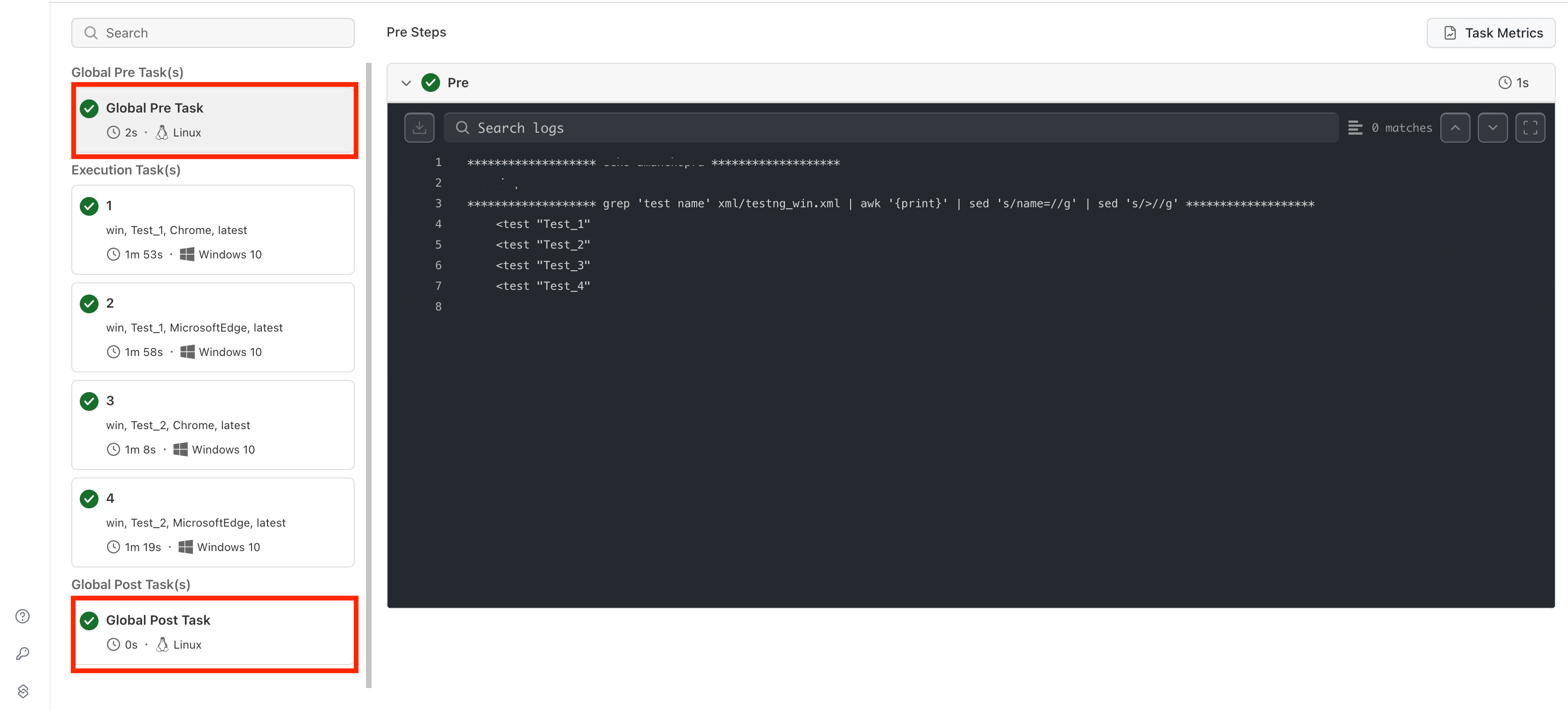
📘 Refer to our detailed documentation for
globalPreandglobalPostflags.
Version 2.7.1
Artifact Extraction on Job Abortion
- Artifacts will now be extracted even if a job is aborted in the middle of a test.
- This ensures that partial test results and logs are still available for review, improving debugging and post-test analysis.
afterEachScenario Flag for Test Cleanup
- Introduced the
afterEachScenarioflag to automate post-test scenario tasks. This flag is useful for cleanup activities such as clearing cookies, resetting databases, or capturing logs. - Commands or scripts listed under this flag will execute sequentially after each test scenario, ensuring test isolation and consistency.
afterEachScenario:
  - echo "Running a script"
  - pwsh run.test
📘 Refer to our detailed documentation for
afterEachScenarioflag
Role-Based Access Control (RBAC) for Projects
- Implemented RBAC to enhance project security and access management.
- Users can now be assigned specific roles with defined permissions.
This feature improves security by ensuring that only authorized users can access or modify project settings and resources.
UX Enhancements for Performance Testing Jobs
- Improved UI/UX for managing and analyzing performance testing jobs.
- Enhanced navigation and usability for a smoother experience.
- Group-Wise Error View
- Introduced an error grouping feature to help identify and troubleshoot issues efficiently.
- Errors are now categorized for better readability and quicker resolution.
- Toggle Metrics: ms ↔️ s
- Added the ability to toggle performance metrics between milliseconds (ms) and seconds (s).
- Provides flexibility for analyzing test execution times in preferred units.
Browser Version Updates
- Edge Beta : Released 133.3065.31 2.7.1 and 133.3065.39 2.7.2 for beta testing
Version 2.7.0
Browser Version Updates:
- Firefox : Added support for Firefox-133, and Firefox-134, enabling testing on the latest versions
- Edge : Updated to Edge-132 for compatibility and stability enhancements.
- Edge Beta : Released 133.0.3065.19 for beta testing
- Chrome : Upgraded to Chrome-132 to include the newest features and security updates.
These updates ensure broader coverage for cross-browser testing and improve test stability across the latest browser versions


 Chat with Us