 Test your AI Agents with the all-new Agent to Agent Testing Platform.Learn More
Scale Your Automation Testing with AI
 Run end-to-end parallel tests & reduce test execution time by 5x
- Generate tests scripts using natural language with KaneAI
- Accelerate your testing process with Autoheal, SmartWait & RCA



- Automation
- Home
- /
- Learning Hub
- /
- How to Use the Jest beforeEach() Function in Your Tests
How to Use the Jest beforeEach() Function in Your Tests
Learn how Jest beforeEach() boosts test reliability by handling repeated setup, ensuring clean states, and simplifying JavaScript test maintenance.
Last Modified on: November 18, 2025
- Share:
Jest beforeEach() helps streamline your workflow by eliminating the need to repeat the same setup logic across many test cases. When requirements change, you only need to update the setup in one place instead of modifying multiple tests individually, which makes maintenance faster and more reliable.
It also ensures consistency across your test suite by centralizing initialization, reducing the risk of subtle bugs caused by mismatched or outdated setup code. By keeping repeated setups out of individual tests, Jest beforeEach() maintains cleaner test files that are easier to navigate and understand.
Overview
What Does Jest beforeEach() Do?
The Jest beforeEach() runs prior to each test case, allowing developers to establish repeatable pre-test conditions. Its placement controls which tests receive that setup, ensuring cleaner and more maintainable test files.
What Are the Steps to Use Jest beforeEach()?
Using beforeEach() in Jest helps you prepare a consistent environment before each test runs by handling repeated setup tasks automatically. After configuring Jest in your project, you can use this hook within test files or describe blocks to initialize data or reset components before every test executes.
- Prepare Your Node.js Environment: Make sure your system has a working Node.js and npm setup, as these form the foundation for installing and running Jest.
- Install Node.js (Windows & macOS Options): Use system-specific commands, such as winget on Windows or Homebrew on macOS, to install Node.js if it’s not already available.
- Create and Initialize Your Project Directory: Set up a dedicated folder for your tests and turn it into a Node project using npm init -y, which generates the necessary configuration file.
- Add Jest to Your Project: Install Jest as a development dependency with npm install --save-dev jest, enabling your project to run automated test suites.
- Configure the Jest Test Script: Modify the package.json file to include a simple test script, allowing you to run Jest tests using just the npm test command.
- Implement beforeEach() in Your Test Files: Place Jest beforeEach() inside your test suite to execute repeated initialization logic, such as setting variables or resetting mocks, before every individual test runs.
What Are the Steps to Write Jest beforeEach() Tests?
Writing Jest beforeEach() tests involves preparing a module to test and using the hook to reset shared state before every test. By isolating setup logic, each test runs independently and avoids state carried over from previous executions.
- Create the Module You Want to Test: Build the functionality under test, ensuring it exposes methods that can be validated through predictable, isolated unit tests.
- Add a Dedicated Jest Test File: Create a test.js file so Jest automatically detects, reads, and executes your test cases during runs.
- Import the Module Inside the Test Suite: Require the target module within your test file so its functions and behaviors are available for validation.
- Initialize Shared Variables Within the Test Suite: Declare variables in the suite scope to hold objects reused across test cases without reassigning each time manually.
- Use beforeEach() to Reset Setup Before Every Test: Place initialization logic in beforeEach() to ensure each test operates on a fresh, unchanged instance every run.
- Write Individual Test Cases for Specific Behaviors: Create focused tests checking expected outputs for operations, ensuring calculations and interactions behave correctly.
- Validate the Module’s Initial Default State: Include a test confirming the module begins with a clean, known state before any operations occur.
- Run the test command using npm: Execute npm test to let Jest discover test files, execute hooks, and display results in the terminal.
- Review Performance Considerations for Heavy Setups: Large setups inside beforeEach() may slow execution, especially when many test cases require repetitive initialization.
What Is Jest beforeEach()?
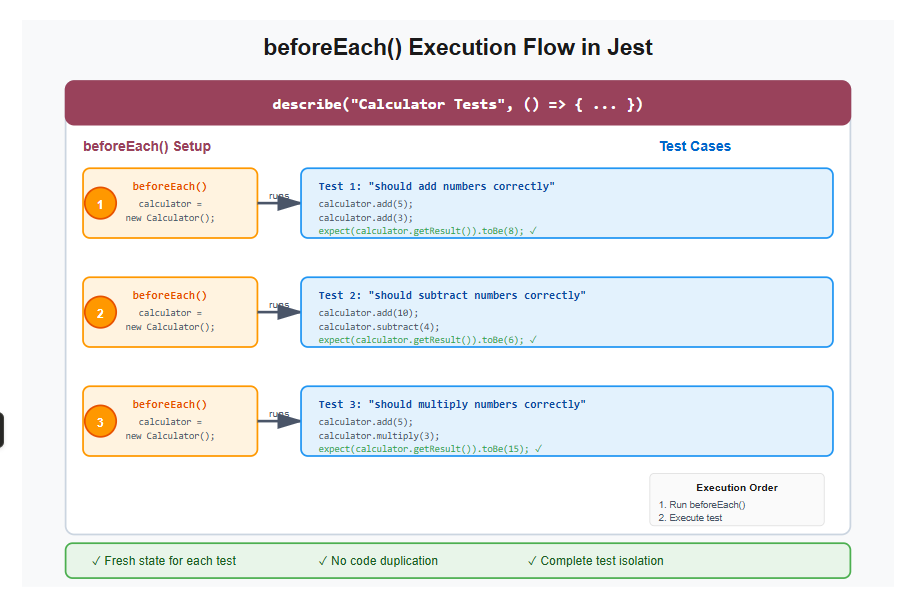
The beforeEach() function is a Jest lifecycle hook that executes setup code before each individual test case runs. It ensures every test starts with a clean, predictable state by initializing variables, creating mock objects, or setting up test fixtures.
Jest provides several lifecycle hooks for setup and teardown, and beforeEach() specifically handles pre-test initialization, running once before every test() or it() block within its scope. This eliminates redundant setup code and maintains test isolation.

Note: Run JavaScript tests at scale across 3000+ browsers and OS combinations.. Try LambdaTest Today!
How to Set Up Jest beforeEach()?
Using Jest beforeEach() involves placing your setup logic inside a callback that runs automatically before every test in the same scope. This helps ensure each test begins with a clean, consistent state. Simply define beforeEach() inside a test file or describe block, and Jest handles the rest.
Setting and Initializing Node.js in Your Project
Before you begin working with Jest or any Node-based tools, you need to ensure your system is properly set up with Node.js and npm. This setup provides the foundation for managing packages, running scripts, and creating a well-structured project. Once your environment is ready, you can create and initialize your project folder.
- Node.js Installation: Confirm Node.js v16 or later is installed before setting up your project environment. To verify installation run the command given below.
node -vnpm -v - Install Node.js on Windows: Run winget install OpenJS.NodeJS.LTS in PowerShell or the Command Prompt to install the latest LTS version.
- Install Node.js on macOS Using Homebrew: If Homebrew is installed, run brew install node to install Node.js quickly and reliably.
- Install Homebrew First (If Missing): Use the Homebrew installation script to set up Homebrew before installing Node.js on macOS.
/bin/bash -c "$(curl -fsSL https://raw.githubusercontent.com/Homebrew/install/HEAD/install.sh)"With your project folder created, initialize it as a Node.js project to properly manage project dependencies.
Installing and Configuring Jest in Your Project
After initializing your project, the next step is to install and configure Jest as your testing framework. This ensures your project can run automated tests smoothly and consistently.
- Run the Installation Command: Execute npm install --save-dev jest inside the project folder to add Jest as a development dependency.
- Update Your package.json File: Open your project’s package.json file in your preferred editor to configure a test script for Jest.
With Jest installed, you need to configure it so you can easily run your tests with a simple command.
{
  "name": "jest-beforeeach-demo",
  "version": "1.0.0",
  "type": "commonjs",
  "scripts": {
    "test": "jest"
  },
  "devDependencies": {
    "jest": "^29.7.0",
    "selenium-webdriver": "^4.38.0"
  }
}
How to Write Jest beforeEach() Tests?
Now that your project is fully set up with Jest, the next step is to create the module you want to test. Once the module is ready, you’ll write your first tests using Jest beforeEach() to handle initialization and shared setup for your tests.
Create the Calculator Module
Before writing Jest beforeEach() tests, you need to create a module to test. To do so, create a simple Calculator class that will serve as your test subject.
Create a new file named calculator.js inside your project folder and add the following code:
class Calculator {
  constructor() {
    this.result = 0;
  }
  add(num) {
    this.result += num;
    return this.result;
  }
  subtract(num) {
    this.result -= num;
    return this.result;
  }
  multiply(num) {
    this.result *= num;
    return this.result;
  }
  reset() {
    this.result = 0;
  }
  getResult() {
    return this.result;
  }
}
module.exports = Calculator;

This simple Calculator class provides basic arithmetic operations that we'll test using Jest and beforeEach().
To write tests for your Calculator module, you need to create a dedicated test file.
Create the Test File
Before writing tests that use the Jest beforeEach() hook, you first need to create a test file that Jest can detect and run. Jest automatically looks for files ending in .test.js, so creating one ensures your tests are properly recognized.
To do this, create a new file named calculator.test.js inside your project folder and add the following code:
const Calculator = require("./calculator");
describe("Calculator Tests", () => {
  let calculator;
  beforeEach(() => {
    calculator = new Calculator();
  });
  test("should add numbers correctly", () => {
    calculator.add(5);
    calculator.add(3);
    expect(calculator.getResult()).toBe(8);
  });
  test("should subtract numbers correctly", () => {
    calculator.add(10);
    calculator.subtract(4);
    expect(calculator.getResult()).toBe(6);
  });
  test("should multiply numbers correctly", () => {
    calculator.add(5);
    calculator.multiply(3);
    expect(calculator.getResult()).toBe(15);
  });
  test("should start with zero result", () => {
    expect(calculator.getResult()).toBe(0);
  });
});
Code Walkthrough:
- Import the Calculator Module: The test file begins by requiring the Calculator class so its methods can be tested.
- Group Tests Using describe(): A test suite named “Calculator Tests” organizes all related test cases in one structured block.
- Declare a Shared Variable: A variable named calculator is created to hold the Calculator instance used within the tests.
- Initialize Before Each Test: The beforeEach() hook creates a fresh Calculator object before every test to avoid shared state.
- Test Addition Functionality: The first test checks whether adding 5 and 3 results in an expected total of 8.
- Test Subtraction Logic: The second test adds 10, subtracts 4, and ensures the final value correctly evaluates to 6.
- Test Multiplication Behavior: The third test adds 5, multiplies by 3, and verifies that the result becomes 15.
- Verify Initial State: The last test confirms that a new Calculator instance always starts with a result of zero.
The Jest beforeEach() creates a fresh Calculator instance before each test runs, ensuring every test starts with a clean state. Without the Jest beforeEach(), you would need to manually instantiate the Calculator in every test, which leads to unnecessary code duplication.
Each test begins with a clean calculator object where the result is reset to zero, making every outcome predictable and easier to validate. The hook runs once before each of the four test cases in this suite, ensuring consistent initialization across all tests.
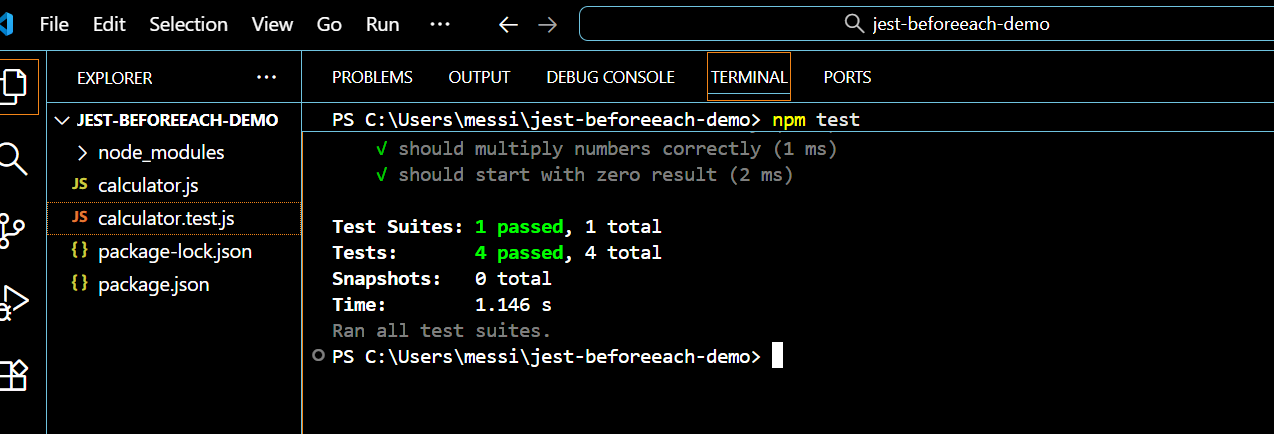
Run the Tests:
Run the following command:
npm testOnce the tests run, Jest will discover the test file, execute the beforeEach() hook in Jest before each test, and display the results in your terminal.
Running beforeEach() before every test can slow down large test suites that involve a complex setup. Local environments may also lack sufficient memory or CPU to efficiently handle heavy initialization for many tests.
Additionally, differences in local machine configurations can sometimes lead to unexpected failures. When multiple beforeEach() hooks or nested describe blocks are used, tracing issues can become more challenging and time-consuming.
Using cloud environments can help overcome these issues. They allow tests to run in parallel, provide standardized environments across machines, and allocate extra CPU, memory, and storage for heavier suites. Test results are consolidated, making monitoring and debugging easier. One such cloud environment is LambdaTest.
How to Run Jest Tests At Scale?
LambdaTest is a cloud testing platform that allows you to perform manual and automated Jest testing at scale across 3,000+ browser and OS combinations.
To get started with the LambdaTest platform and implement beforeEach() in Jest, we will use the LambdaTest eCommerce Playground website for demonstration purposes.
- Install Selenium WebDriver: Begin by adding Selenium WebDriver so Jest can control browsers remotely when executing cloud-based test automation.
- Set Up Dependencies: Use Selenium WebDriver with Jest to run tests on LambdaTest eCommerce Playground. Install it by running:
npm install --save-dev selenium-webdriverconst capabilities = {
browserName: "Chrome",
browserVersion: "latest",
"LT:Options": {
username: process.env.LT_USERNAME,
accessKey: process.env.LT_ACCESS_KEY,
platformName: "Windows 10",
project: "Jest beforeEach Demo",
build: "eCommerce Tests",
name: "Product Search Test",
w3c: true,
plugin: "node_js-jest",
},
};You can generate the necessary capabilities using the LambdaTest Automation Capabilities Generator.
const gridURL = "https://" + process.env.LT_USERNAME + ":" + process.env.LT_ACCESS_KEY + "@hub.lambdatest.com/wd/hub";Run the Tests:
Run the following command:
npm testOnce the tests start, the beforeEach() hook creates a new browser session for each test, runs the test logic, and the afterEach() hook closes the session. You'll see the test results displayed in your terminal.
Output:
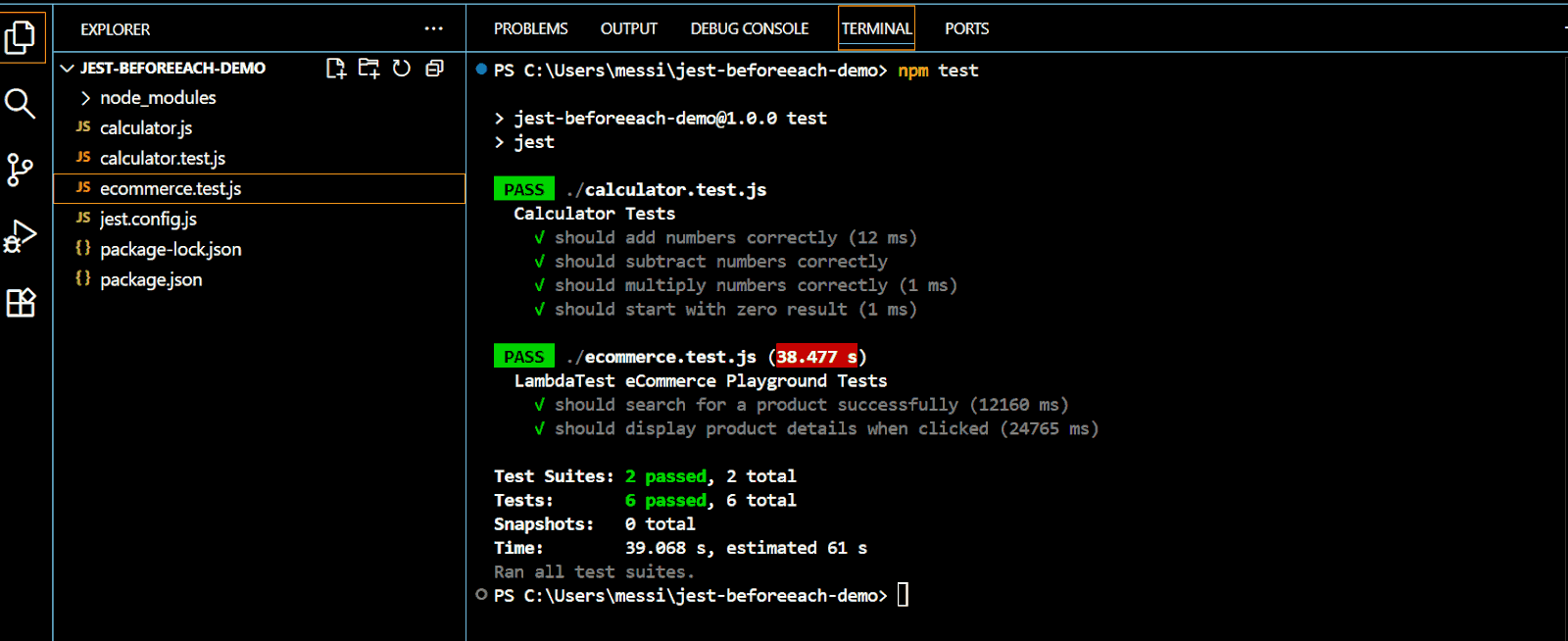
Result:
After your tests are complete, you can review the results on LambdaTest Dashboard > Web Automation.
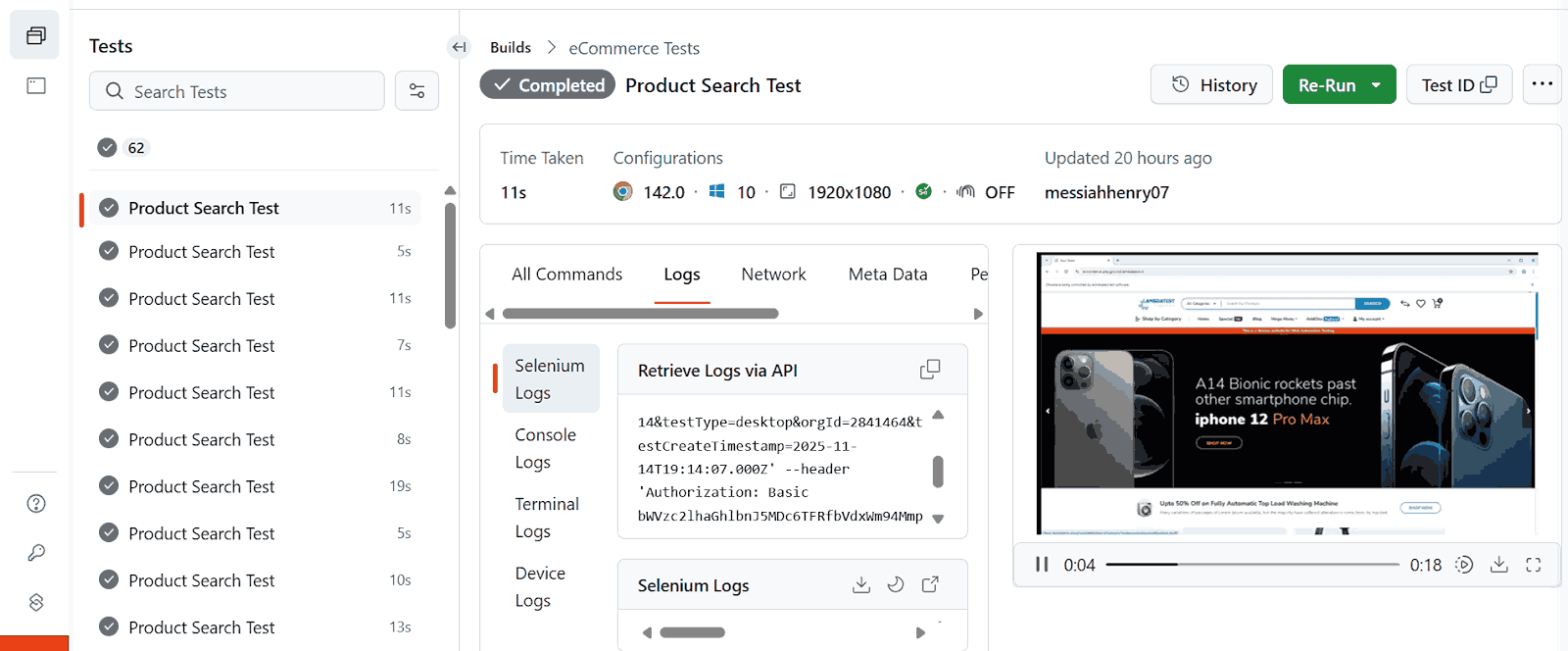
On the LambdaTest result, you can view detailed test session views that provide logs, video playback, and session metadata.
To get started, follow this support documentation on Jest with Selenium to configure and run your JavaScript automation testing scripts.

What Are the Benefits of Using Jest beforeEach()?
Jest beforeEach() helps keep your tests clean, consistent, and predictable by resetting state before every test. It prevents test interference, reduces duplication, and improves maintainability in larger test suites.
- Ensures a Fresh Test Environment: Prevents shared state issues by resetting variables, mocks, or instances before each test run.
- Reduces Repetitive Setup Code: Moves common initialization into one place, eliminating duplication across multiple related test cases.
- Improves Test Reliability: Ensures each test behaves independently, avoiding hidden dependencies and unpredictable failures.
- Supports Scalable Test Structure: Works seamlessly with nested describe blocks for layered setups in complex or modular systems.
- Simplifies Mock and Spy Management: Resets mocks, spies, and timers automatically, keeping test results accurate and consistent.
The Jest beforeEach() hook is a fundamental part of writing clean and maintainable test suites, especially as your project grows. Understanding how it initializes state before every test will make your testing workflow far more reliable and structured.
To explore this concept in-depth and continue building strong Jest testing skills, check out the Jest tutorial.
What Are the Advanced Use Cases of Using Jest beforeEach()?
In more complex test suites, JavaScript automation testing with Jest often requires a shared setup for all tests as well as group-specific configurations.
Jest allows you to nest describe() blocks and use multiple beforeEach() hooks to achieve this hierarchy, ensuring a clean and maintainable structure.
Using Jest beforeEach() With Nested describe() Blocks
Jest beforeEach() works well for simple tests to keep setup organized. However, for more complex test suites, you can use nested describe() blocks with multiple Jest beforeEach() hooks to structure your tests more effectively.
Before writing nested tests, it’s important to understand how Jest executes multiple levels of describe() blocks and Jest beforeEach() hooks.
When several tests share a common setup but also require group-specific initialization, nested describe() blocks with multiple Jest beforeEach() hooks are the ideal solution:
- The outer beforeEach() runs first and handles shared setup for all tests.
- The inner beforeEach() runs after the outer one and adds specific preparation for that particular group of tests.
This structure ensures each test starts with a consistent base state while allowing flexible, group-specific configuration.
To demonstrate nested Jest beforeEach() behavior, you'll need a new test file.
Let's create a test file that demonstrates how Jest beforeEach() works with nested describe() blocks. Create a new file named nested-beforeeach.test.js inside your project folder and paste the following code:
const Calculator = require("./calculator");
describe("Calculator", () => {
  let calculator;
  beforeEach(() => {
    console.log("Outer beforeEach: Creating calculator");
    calculator = new Calculator();
  });
  test("should initialize with zero", () => {
    expect(calculator.getResult()).toBe(0);
  });
  describe("Addition Operations", () => {
    beforeEach(() => {
      console.log("Inner beforeEach: Setting up for addition");
      calculator.add(10);
    });
    test("should add positive numbers", () => {
      calculator.add(5);
      expect(calculator.getResult()).toBe(15);
    });
    test("should add negative numbers", () => {
      calculator.add(-3);
      expect(calculator.getResult()).toBe(7);
    });
  });
  describe("Multiplication Operations", () => {
    beforeEach(() => {
      console.log("Inner beforeEach: Setting up for multiplication");
      calculator.add(5);
    });
    test("should multiply by positive number", () => {
      calculator.multiply(3);
      expect(calculator.getResult()).toBe(15);
    });
    test("should multiply by zero", () => {
      calculator.multiply(0);
      expect(calculator.getResult()).toBe(0);
    });
  });
});
Code Walkthrough:
- Import the Calculator Module: The test file begins by importing the Calculator class so that its methods can be tested.
- Outer beforeEach() Creates a Fresh Calculator: Before every test in the file, the outer beforeEach() runs. It creates a new Calculator instance, ensuring each test starts with a clean calculator state.
- Initialization Test: The first test checks that a newly created calculator initializes with a result of zero for predictable starting behavior.
- Inner beforeEach() for Addition Operations: A nested beforeEach() adds 10 to the calculator before every addition test, ensuring each case starts with the same initial value.
- Addition Tests: After both outer and inner beforeEach() hooks run, these tests verify addition with positive and negative numbers starting from 10.
- Inner beforeEach() for Multiplication Operations: A nested beforeEach() adds 5 to the calculator before each multiplication test to ensure consistent starting state.
- Multiplication Tests: Executed after both beforeEach() hooks, validating multiplication with positive numbers and zero, starting from 5.
Run the Tests:
Run the following command:
npm test nested-beforeeach.test.jsThis command runs only the nested tests file. You'll see console output showing the execution order of the Jest beforeEach() hooks, demonstrating how the outer hook runs before each inner hook.
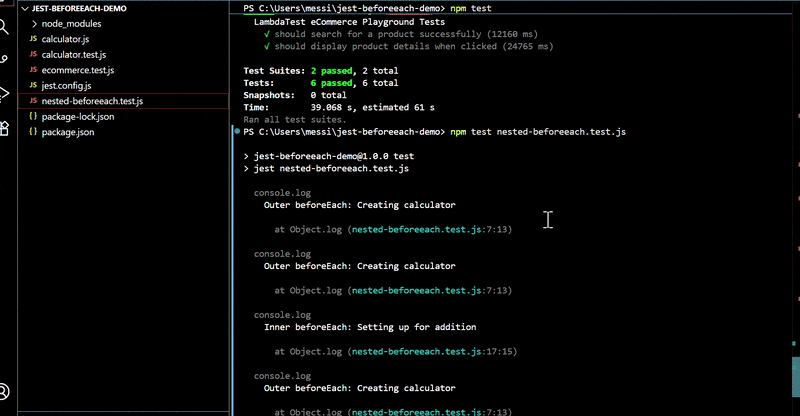
Benefits of Nested Jest beforeEach()
After seeing nested Jest beforeEach() in action, let's understand why this pattern is valuable.
This pattern provides several advantages:
- Independent Nested beforeEach(): Each nested describe block can have its own beforeEach(), remaining independent without affecting sibling blocks’ setup or execution.
- Addition and Multiplication Setup: Addition Operations tests start with ten added, Multiplication Operations tests start with five added, despite shared outer initialization.
- Hierarchical Test Structure: Nested beforeEach() hierarchy organizes tests clearly, grouping related tests, and defining shared and group-specific setup at the correct levels.
Use outer beforeEach() for setup shared across all tests, and use inner beforeEach() in nested describe blocks for setup specific to each test group. This creates clean and maintainable test suites that are easy to understand and extend.
Using Jest beforeEach() With Mocks
The beforeEach() hook is particularly useful for managing mocks, spies, and global state that needs resetting between tests. This ensures each test runs with clean mock data and prevents test pollution.
The use of Jest beforeEach() here is to manage complex test scenarios involving mocked APIs, spied functions, and global state that needs to be reset between tests.
To demonstrate mock management, you'll need a test file that simulates API calls. To do that, create a new file named api-service.test.js inside your project folder and paste the code below:
// Mock axios without importing it
const axios = {
  get: jest.fn(),
  post: jest.fn(),
  put: jest.fn(),
  delete: jest.fn(),
};
describe("API Service Tests", () => {
  let mockData;
  beforeEach(() => {
    mockData = {
      users: [
        { id: 1, name: "John Doe", email: "john@example.com" },
        { id: 2, name: "Jane Smith", email: "jane@example.com" },
      ],
    };
    jest.clearAllMocks();
  });
  test("should fetch users successfully", async () => {
    axios.get.mockResolvedValue({ data: mockData.users });
    const response = await axios.get("/api/users");
    expect(axios.get).toHaveBeenCalledWith("/api/users");
    expect(response.data).toEqual(mockData.users);
    expect(response.data.length).toBe(2);
  });
  test("should handle API errors", async () => {
    const errorMessage = "Network Error";
    axios.get.mockRejectedValue(new Error(errorMessage));
    await expect(axios.get("/api/users")).rejects.toThrow(errorMessage);
    expect(axios.get).toHaveBeenCalledWith("/api/users");
  });
});
Code Walkthrough:
- Importance of Resetting Mocks: Before moving to spies, resetting mocks in beforeEach() ensures that one test’s mock behavior does not affect subsequent tests.
- Use of beforeEach() for Mocks: The beforeEach() hook resets mock data and clears all mock implementations using jest.clearAllMocks(). This keeps tests independent.
- Mock Data Initialization: A mockData object is recreated in beforeEach() for each test case, ensuring fresh test data and preventing accidental state sharing.
- jest.clearAllMocks(): This function clears all information stored in mocks, including call counts, return values, and recorded arguments, for a clean state.
- jest.restoreAllMocks(): Restores the original (non-mocked) implementation, but only for mocks created with jest.spyOn() or explicitly mockable functions.
Using jest.clearAllMocks() and jest.restoreAllMocks() in beforeEach() guarantees predictable, isolated test behavior across multiple tests.
Using Jest beforeEach() With Spy
The Jest beforeEach() hook helps manage Mockito spy effectively by allowing you to set up spies, which monitor function calls without altering their behavior.
To demonstrate spy management, you'll need a test file that monitors console output. Create a new file named logger-service.test.js inside your project folder and paste the following code:
describe("Logger Service Tests", () => {
  let consoleLogSpy;
  let consoleErrorSpy;
  beforeEach(() => {
    consoleLogSpy = jest.spyOn(console, "log").mockImplementation();
    consoleErrorSpy = jest.spyOn(console, "error").mockImplementation();
  });
  afterEach(() => {
    consoleLogSpy.mockRestore();
    consoleErrorSpy.mockRestore();
  });

  test("should log info messages", () => {
    const logger = { info: (msg) => console.log(`INFO: ${msg}`) };
    logger.info("Test message");
    expect(consoleLogSpy).toHaveBeenCalledWith("INFO: Test message");
    expect(consoleLogSpy).toHaveBeenCalledTimes(1);
  });
  test("should log error messages", () => {
    const logger = { error: (msg) => console.error(`ERROR: ${msg}`) };
    logger.error("Test error");
    expect(consoleErrorSpy).toHaveBeenCalledWith("ERROR: Test error");
    expect(consoleErrorSpy).toHaveBeenCalledTimes(1);
  });
});
Code Walkthrough:
- Using beforeEach() to Create Spies: The beforeEach() hook creates fresh spies on methods like console.log and console.error before every test.
- Setting Up Spies with jest.spyOn(): jest.spyOn() monitors the targeted methods, while mockImplementation() prevents actual console output, keeping test results clean.
- Using afterEach() to Restore Original Implementations: The afterEach() hook calls mockRestore() to restore the original function, ensuring spies do not affect later tests.
- Independent Test Verification: Each test verifies console behavior or function calls independently, without interference from previous executions.
This pattern is essential for testing code that logs to the console, writes to files, or calls monitored functions without changing behavior.
Best Practices for Using Jest beforeEach()
You've now learned all the core techniques for using beforeEach() in various scenarios. Let's consolidate this knowledge with best practices that will help you write cleaner, more maintainable test suites.
Following established patterns when using beforeEach() creates maintainable and reliable test suites. These practices help avoid common pitfalls and improve test clarity.
- Keep Setup Code Focused and Minimal: The beforeEach() hook should only contain logic necessary for test initialization. Avoid complex business logic or operations unrelated to the test setup. This makes tests easier to understand and debug when failures occur.
- Use beforeEach() for Shared Setup Across Multiple Tests: If only one or two tests need specific initialization, place that setup directly in those tests rather than in beforeEach(). This prevents unnecessary setup operations for tests that don't need them.
- Combine beforeEach() with afterEach() for Proper Cleanup: When beforeEach() initializes resources like mocks, test fixtures, or in-memory data, use afterEach() to clean up. This prevents resource leaks and ensures tests don't interfere with each other.
- Use Synchronous Setup in beforeEach() When Your Initialization is Naturally Synchronous: It's simpler and faster. However, async beforeEach() is perfectly valid and fully supported by Jest when your setup requires async operations like database connections, API calls, or loading fixtures. Jest handles async hooks seamlessly. When async operations are needed, use async/await syntax for clarity and properly handle errors that might occur during setup.
- Use Async beforeEach() Only When Needed: Position hooks in outer describe blocks for setup shared across all tests, and in nested describe blocks for setup specific to that group. This creates a clear hierarchy and prevents redundant setup code.
- Place beforeEach() at the Appropriate Scope Level: Use outer describes for global setup and nested describes for group-specific setup to maintain structure and readability.
- Document Complex Setup Logic: When beforeEach() performs non-obvious initialization, add brief comments explaining the purpose. This helps other developers understand the test context quickly.
- Reset Mocks for isolation: Reset mocks and spies in beforeEach() to ensure test isolation. Choose the right reset method for your needs:
- jest.clearAllMocks(): Clears call history and instance data but preserves mock implementations.
- jest.resetAllMocks(): Full reset: clears both usage data AND implementations, returning mocks to unconfigured state.
Important: Jest tests should avoid real file I/O, database connections, or network calls in beforeEach(), use mocks or test doubles instead to keep tests fast and isolated.
beforeEach(() => {
  jest.clearAllMocks();  // Most common: reset tracking, keep behavior
});
Using the appropriate reset method prevents mock behavior from leaking between tests, making each test independent and reducing unexpected failures.
- Slow approach: 10,000 database records × 20 tests = 200,000 unnecessary loads
- Fast approach: 2 objects × 20 tests = minimal overhead
- Lazy approach: Load only when specific tests need it
Conclusion
The Jest beforeEach() function provides a powerful mechanism for test initialization, reducing code duplication and ensuring consistent test setup. This article covered the fundamental concepts of Jest beforeEach(), from basic usage to advanced scenarios involving nested describe blocks and mock management.
You learned how to implement Jest beforeEach() in local test environments and scale testing across browsers using cloud Selenium grids. The function's scope-based behavior allows flexible setup inheritance, while its integration with mocks and spies enables clean test isolation.
By following the best practices outlined, you can create maintainable test suites that run reliably across different environments. The Jest beforeEach() funtion is an extremely useful method for writing clean, organized Jest tests that execute predictably and fail clearly when issues arise.
Citations
- Jest Official Documentation: https://jestjs.io/docs/api#beforeeachfn-timeout
- Mock Functions · Jest : https://jestjs.io/docs/mock-function-api
- Selenium WebDriver Documentation: https://www.selenium.dev/documentation/webdriver/
Frequently Asked Questions (FAQs)


Did you find this page helpful?


More Related Hubs


Start your journey with LambdaTest
Get 100 minutes of automation test minutes FREE!!